

No-Code Automation in 2026:
Build, Connect, Scale —
Without Touching a Line of Code
The complete guide to workflow automation for builders, operators, and teams who are done wasting hours on tasks a machine should handle. Market data, tool comparisons, real case studies, and a roadmap for getting started today.
What Exactly Is No-Code Automation — and Why Does It Matter?
Let’s skip the marketing fluff. No-code automation is the practice of building workflows, integrations, and applications using visual drag-and-drop interfaces instead of traditional programming. You connect triggers to actions, add logic rules, and watch repetitive tasks run themselves.
The concept has been around for a while — IFTTT launched in 2010, Zapier in 2011 — but something shifted around 2023 and accelerated sharply through 2025. The tools got genuinely good. AI got embedded into them. And developer shortages became so severe that enterprises stopped treating automation platforms as shortcuts and started treating them as strategy.
A useful mental model: think of no-code automation as the plumbing of your digital operations. Your apps — CRM, email, Slack, spreadsheets, databases — are the rooms. The automations are the pipes connecting them, moving data and triggering actions without anyone having to carry buckets manually between rooms all day.
No-code vs. low-code vs. traditional development
The terms get conflated constantly, so a quick distinction is worth making here. No-code platforms require zero programming knowledge — anyone on your team can use them. Low-code platforms are primarily visual but allow developers to write code when they need more flexibility. Traditional development is where you write everything from scratch.
| Approach | Who builds | Time to deploy | Flexibility | Cost |
|---|---|---|---|---|
| No-code automation | Anyone | Minutes–hours | Moderate | Low–medium |
| Low-code development | Business users + devs | Days–weeks | High | Medium |
| Traditional development | Developers only | Weeks–months | Complete | Very high |
None of these is inherently better. The point is matching the tool to the job. Automating a Slack notification when a new lead hits your CRM? No-code, done in 10 minutes. Building a complex customer-facing application with custom business logic? You’ll probably want something more. The table above is a rough orientation, not a verdict.
The Market in 2026: Numbers That Tell a Real Story
The growth trajectory here is hard to overstate. We’re not talking about a niche tool category slowly gaining traction. This is one of the fastest-expanding segments in enterprise software.
Those numbers represent something concrete: the assumption that you need a developer for most automation tasks is simply outdated. Gartner forecasts the low-code development technologies market to exceed $30 billion in 2026 with continued strong growth, making it one of technology’s fastest-expanding segments. And that’s just low-code — when you include the broader no-code AI platform market, the global no-code AI platform market is projected to grow from USD 8.6 billion in 2026 to USD 75.14 billion by 2034, at a CAGR of 31.13%.
Perhaps the most telling signal is who’s actually building things now. Developers outside formal IT departments are expected to account for 80% of the low-code user base by 2026, up from 60% in 2021. Marketing teams, operations managers, HR professionals — they’re the ones deploying automations, not the engineering department. That’s a fundamental shift in the organizational power dynamics of software.
Why Now? The Converging Forces That Made This Inevitable
The rise of no-code automation wasn’t accidental. Several forces hit at roughly the same time, and their combination created something unstoppable.
1. A developer shortage that isn’t going away
The US is facing a 1.2 million developer shortage by 2026. Companies of all sizes have backlogs of automation requests they can’t fulfill because they don’t have enough engineers — or the engineers they do have are already consumed by core product work. 72% of IT leaders report being blocked from strategic work due to project backlogs. No-code platforms are, in large part, a direct response to this structural problem.
2. AI that actually helps
The 2025–2026 generation of automation platforms isn’t just visual drag-and-drop anymore. According to the Salesforce report, 78% of organizations currently use or plan to use AI as part of their workflow automation initiatives. Platforms like Zapier now let you describe a workflow in plain English and the AI builds it for you. n8n launched 2.0 with 70+ AI nodes and native LangChain integration. Make shipped its Maia AI assistant. The gap between “what I want to automate” and “how I build the automation” has narrowed dramatically.
3. Technical debt reaching a breaking point
Industry research indicates that technical debt consumes 20 to 40 percent of technology estate value in many organizations. No-code platforms help address this partly by standardizing development patterns and maintaining automatic updates. Organizations report 40 to 50 percent faster remediation of technical debt issues through no-code adoption. That’s a real operational benefit, not just a headline metric.
4. Digital transformation as a survival imperative
66% of companies say that digital transformation is the main reason for adopting low-code platforms, showing how these tools are tied to long-term business goals. The pandemic permanently accelerated timelines here — companies that had vaguely planned to digitize over 5–7 years compressed that into 18 months, and many of them reached for no-code tools to do it.
“Low-code has moved beyond being just another development tool and into being a key strategic asset, according to 81% of companies.” — Hostinger Low-Code Trends Report, January 2026
The Main Platforms: An Honest Comparison
There are dozens of platforms in this space, but a handful dominate the conversation. Here’s a clear-eyed look at the main players — their actual strengths, real limitations, and who they’re actually best for.
The founding name in no-code automation, launched in 2011. Now connects 8,000+ apps through “Zaps” and added Zapier Agents in 2025 for autonomous AI task execution. Arguably the most accessible platform ever built for workflow automation. The trade-off: task-based pricing gets expensive fast at scale, and complex conditional logic can feel clunky.
Best for: Non-technical teams, solo founders, marketing & ops teams who need fast, reliable automation with minimal learning curve.
Formerly Integromat, now owned by Celonis. Its canvas-based interface lets you build sophisticated multi-branch workflows that Zapier’s linear approach handles less elegantly. In 2026, Make introduced its Maia AI assistant, which builds automation scenarios from natural language descriptions, and launched Make AI Agents for autonomous task execution. More generous free tier than Zapier. Steeper learning curve though — it can look like circuit diagrams at first glance.
Best for: Operations specialists, automation agencies, power users who need complex logic and cost-efficient pricing at scale.
The most technically ambitious of the three. Open-source, self-hostable, and with n8n 2.0 (launched January 2026) introducing the AI Agent Tool Node for multi-agent orchestration, native LangChain integration with 70+ AI nodes, persistent agent memory across executions, vector database support for RAG workflows, and sandboxed code execution. Cost-effective for high-volume use. Requires technical confidence.
Best for: Engineering-led teams, data-sensitive companies (healthcare, finance), startups building AI-powered workflows.
Head-to-head comparison
| Factor | Zapier | Make | n8n |
|---|---|---|---|
| Ease of use | ⭐⭐⭐⭐⭐ Excellent | ⭐⭐⭐⭐ Good | ⭐⭐⭐ Moderate (developer-friendly) |
| Integration catalog | 8,000+ apps | 2,000+ apps | 1,000+ (unlimited via API) |
| Pricing model | Per task (can escalate) | Per operation (more generous) | Per execution (most scalable) |
| Self-hosting | No | No | Yes (free, full platform) |
| AI capabilities | Zapier Agents, Copilot | Maia AI, AI Agents (beta) | LangChain, 70+ AI nodes, RAG |
| Data privacy / GDPR | US-hosted AWS | EU-based option | Full data sovereignty |
| Workflow complexity | Simple–moderate | Moderate–complex | Complex–enterprise |
| Free tier | 2-step Zaps only | 1,000 ops/month | Unlimited (self-hosted) |
Beyond the big three
Worth knowing about: Pabbly Connect for small businesses that run high volumes and hate per-task pricing. Workato for enterprise iPaaS with serious governance requirements. Microsoft Power Automate if your organization is already deeply embedded in the Microsoft ecosystem. Activepieces as a rising open-source alternative. And Bardeen for browser-based automation that APIs simply can’t reach.
The no-code space is genuinely competitive right now, which is good news for buyers. Platforms are shipping meaningful updates quarterly. The race to embed AI features meaningfully — not just as marketing — is making all of them better faster than they’ve ever been.
Real-World Use Cases by Department
Abstract discussions of automation don’t help much. Here’s what teams are actually building and running today, department by department.
Sales & Revenue Operations
- New lead from website form → automatically enriched with company data → added to CRM → assigned to rep → Slack notification sent
- Deal stage changes in CRM → triggers follow-up email sequence → updates forecast spreadsheet → logs in project management tool
- Meeting booked in Calendly → creates deal in CRM → sends pre-meeting prep email → schedules post-meeting follow-up
- Contract signed in DocuSign → triggers onboarding sequence → creates customer record → notifies customer success team
Marketing
- New blog post published → auto-posted to all social channels → added to email newsletter queue → Slack notification to team
- Webinar registration → confirmation email sent → added to CRM → reminder sequence triggered → follow-up sequence post-event
- Ad campaign performance drops below threshold → Slack alert to performance team → creates task in project tool
- New customer review posted → sentiment analyzed → positive reviews shared to Slack → negative reviews create support ticket
Operations & Finance
- Invoice received via email → data extracted → entered into accounting system → approval request sent → payment scheduled
- New employee hired → onboarding tasks created across HR, IT, and manager → equipment ordered → accounts provisioned
- Expense submitted → approval routing based on amount and category → notification to finance → sync to accounting software
- SLA breach detected → support ticket escalated → manager notified → customer email sent → case logged for review
Customer Support
- Support ticket created → automatically tagged and routed based on content → relevant knowledge base articles attached
- High-priority ticket created → immediate Slack alert → assigned to senior agent → escalation timeline started
- Customer churns → triggers save campaign in marketing → creates task for success manager → logs reason for churn analysis
- NPS survey completed → score below threshold → creates follow-up task → routes to customer success rep with full context
Enterprise Case Studies: Real Numbers, Named Organizations
We’ve heard the theoretical ROI claims. Here’s what verified deployments actually produced — with specific companies, specific use cases, and specific outcomes.
JPMorgan’s COiN AI agent parses 12,000 commercial credit agreements every year, extracting 150 critical data attributes per document in seconds. The same process previously consumed 360,000 lawyer-hours annually. Error rates dropped 80% post-deployment.
360,000 lawyer-hours reclaimed annuallyVodafone saved approximately £2.2M in operational costs through n8n workflow automation deployments. The deployment focused on reducing manual operational overhead across backend business processes.
£2.2M operational cost savingsDelivery Hero saved 200+ hours monthly through n8n automation deployments. The scale of time savings at a company this size translates directly into reduced operational cost and headcount reallocation to strategic work.
200+ hours saved monthlyDole reported an 85% reduction in manual reconciliation effort and costs, cutting cycle time by two days and improving month-end operations after deploying AI to streamline invoice-to-statement matching and exception detection.
85% reduction in manual effortRicoh achieved a 253% ROI with low-code adoption, resulting in full payback in under 7 months. The deployment targeted application development processes that had previously required dedicated IT resources.
253% ROI · 7-month paybackJPMorgan’s wealth management AI agents helped advisors respond to client inquiries during market volatility with personalized, portfolio-specific messages, producing a 20% increase in gross sales. A rare revenue-side metric rather than a pure cost reduction.
20% gross sales increaseWhat the aggregate data says
Bar widths represent: ROI within 12 months (60% of orgs), avg productivity increase (25–27%), error reduction vs manual (40–75% range, median 57%), dev time reduction vs traditional (up to 90%), employee satisfaction improvement (15–35% range). Sources: Kissflow, Gartner, McKinsey.
The AI Layer: When Automation Gets a Brain
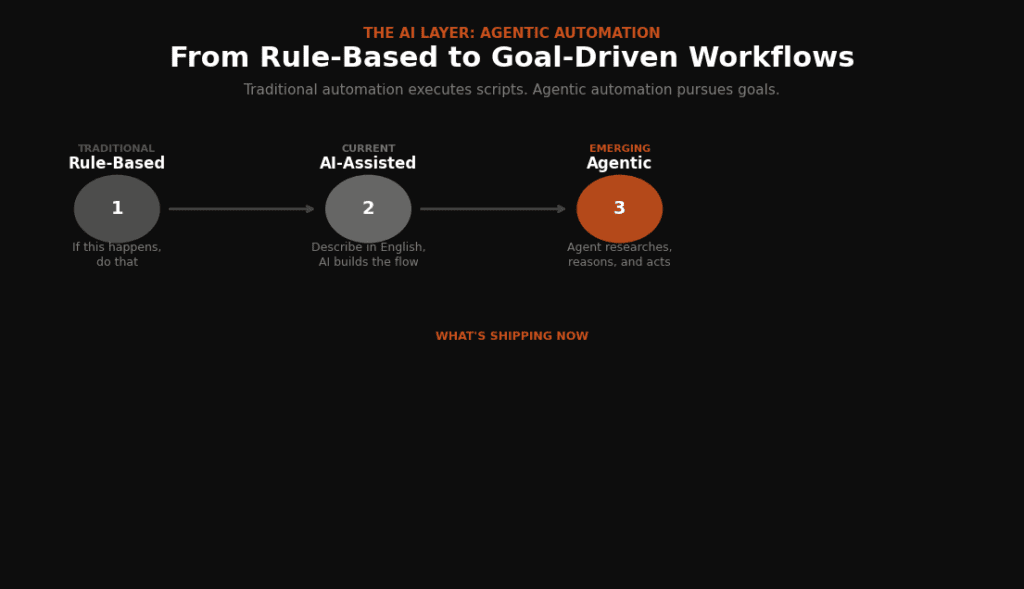
Traditional no-code automation is rule-based. “If this happens, do that.” Powerful, reliable, but brittle — the workflow only handles exactly what you programmed it to handle. The AI layer changes this fundamentally.
What’s happening in 2026 isn’t just “AI features added to automation tools.” It’s a genuine architectural shift toward systems that can understand context, make decisions, and take multi-step actions without pre-defined paths. This is what the industry calls agentic automation.
Agentic automation in plain language
A traditional Zapier workflow: “When a new form submission arrives, add the contact to the CRM and send a welcome email.” Predictable, deterministic, useful.
An agentic workflow: “When a new lead arrives, research the company, assess their fit based on our ICP, draft a personalized outreach message, decide whether to send it now or wait based on time zone, then log your reasoning.” The AI agent reads context, reasons, and acts — rather than just executing a pre-written script.
By the end of 2026, 40% of enterprise applications will be integrated with AI agents, up from less than 5% in 2025 (Gartner). That’s not gradual adoption — that’s a step function.
What’s shipping in the major platforms right now
n8n 2.0 introduced the AI Agent Tool Node for multi-agent orchestration, native LangChain integration with 70+ AI nodes, persistent agent memory across executions, vector database support for RAG workflows, and sandboxed code execution. For teams comfortable with technical tools, n8n is currently the most powerful environment for building AI-driven automations.
Zapier launched Zapier Agents — autonomous AI systems that execute tasks across 8,000+ apps without human intervention — and an AI Copilot that builds Zaps from natural language descriptions. The accessibility Zapier is known for now extends to AI workflows, which matters a lot for non-technical teams.
The honest assessment: most teams in 2026 are still in the early stages of agentic automation. The tools are genuinely capable, but most organizational processes aren’t yet well-defined enough to reliably automate at the agentic level. The teams winning here tend to start with a narrowly scoped, high-frequency process, get the agent working well on that, and then expand. Broad deployment from day one rarely goes smoothly.
Common Mistakes — and How to Avoid Them
The failure modes in no-code automation are pretty consistent. Most of them have nothing to do with the technology.
1. Automating broken processes
This is far and away the most common mistake. A manual process that’s fundamentally dysfunctional doesn’t become functional when you automate it — it just fails faster and more reliably. Before you build anything, draw the process out. Identify where the friction actually lives. Often the right answer isn’t to automate the existing steps; it’s to eliminate half of them first, then automate what’s left.
2. Building without governance
One person builds a workflow connecting their email to the company CRM, and it works great. Six months later, there are 200 automations built by 40 different people, nobody knows which ones are still running, two of them are duplicating data, and one of them broke six weeks ago and nobody noticed. Automation sprawl is real. Naming conventions, an automation inventory, and designated ownership matter more than they seem at first.
3. Underestimating the change management piece
People have feelings about their workflows. An ops manager who’s been manually compiling the weekly report every Friday for three years might feel oddly threatened when that task gets automated. The ROI of your automation could be invisible to them — all they see is someone changing how they work. Involve people early. Explain what’s changing and why. Let them have input on the design where possible.
4. Over-engineering the first version
The temptation, especially for detail-oriented people, is to build the perfect workflow on day one. Handling every edge case, every exception, every unusual scenario. The problem is you don’t know what the edge cases are until you run it against real data. Build the simple version, run it for two weeks, learn what breaks, then iterate. You’ll ship something useful in days instead of months.
5. Neglecting error handling
What happens when an API returns an error? When a required field is empty? When the app you’re integrating has an outage? Most first-time automation builders don’t think about this. The workflow runs fine in testing, ships, and then silently fails in production for three days before anyone notices. Build error notifications into every critical workflow from the start. A simple Slack alert when something breaks is worth its weight in gold.
How to Actually Get Started: A Practical Roadmap
Enough analysis. Here’s how to go from zero to your first production automation, and then how to scale from there.
Identify your best first candidate
Look for a process that: runs frequently (daily or multiple times per week), involves moving data between two apps, is well-defined and consistent, and takes 15+ minutes per occurrence. The ROI math is easiest when the frequency is high. Common wins: form → CRM, new customer → onboarding email, daily report compiled from multiple sources.
Map the process clearly before touching any tool
Write down every step. Every input, every output, every decision point. Note the apps involved. If you can’t write it down clearly, you can’t automate it reliably. This takes an hour and saves weeks of frustration later.
Choose your tool based on who’s building
Non-technical user, simple automation: Zapier. Operations team, complex logic needed: Make. Developer or data-sensitive requirements: n8n. All three have free tiers sufficient to test your first workflows before spending anything.
Build the simple version and test with real data
Don’t build the perfect version. Build the version that handles the 80% case, test it with 20–30 real data samples, and fix what breaks. This is genuinely the most important step — real data exposes things that test data never will.
Add error handling and notifications
Before you turn it on for production, add an alert for when it fails. This can be as simple as a Slack message or an email. Know when it breaks before your users do.
Document it and assign an owner
Write one paragraph describing what the automation does, what it connects, when it runs, and who to contact if it breaks. Name an owner. This is the discipline that separates teams with 10 well-maintained automations from teams with 200 mystery workflows no one understands.
Measure, iterate, and scale
Track time saved, errors caught, or whatever metric the automation was meant to improve. After 4–6 weeks of stable operation, you’ll have the confidence and credibility to tackle the next process — and the next. This compounds.
What Comes Next: Honest Forecasts for 2026–2028
Predictions in tech are often wrong. Here’s an attempt at grounded optimism — patterns that seem genuinely likely versus things that are getting overhyped.
What seems clearly likely
AI builds the automation for you. The trajectory from “drag-and-drop builder” to “describe it in English and the AI builds it” is already well underway. Make’s Maia AI assistant and Zapier’s AI Copilot both build automation scenarios from natural language descriptions. Within two to three years, writing the automation yourself will probably feel like writing your own HTML instead of using a website builder — technically possible, but rarely the right choice for most people.
Agentic automation becomes the default for knowledge work. Seven out of ten companies say agents are their primary automation lever, and two out of three already see productivity gains. The shift from reactive automation (triggered by events) to proactive automation (agents that pursue goals) will accelerate as the underlying AI models get more reliable.
Industry-specific platforms emerge as dominant. As low-code technology matures, it’s evolving into industry-specific solutions with pre-built templates and compliance features. Generic platforms will still exist, but the companies with specific regulatory requirements — healthcare, finance, legal — will increasingly migrate toward vertical platforms built for their exact compliance context.
What’s probably getting overhyped
The idea that AI agents will autonomously run entire departments end-to-end within the next two years deserves skepticism. The technology for the automation exists. The organizational processes, governance frameworks, and institutional trust required for truly autonomous departmental operation don’t exist yet — and won’t for some time. The gap between “this agent can do this task” and “we trust this agent to run this function without oversight” is wider than vendor demos suggest.
That’s not pessimism — it’s just an accurate read of where human-AI collaboration actually is in 2026. The teams winning with automation aren’t the ones replacing humans wholesale. They’re the ones deploying automation to absorb the low-value work, freeing their people for the judgment-intensive work that machines genuinely can’t handle yet.
External Sources & Further Reading
Market Data & Industry Forecasts
The Only Guide to AI Productivity Tools You Need in 2026
- Gartner Market Guide for Low-Code Development — The primary source for the $30B+ 2026 market projection and the forecast that 80% of low-code users will come from outside IT departments by 2026.
- Searchlab: No-Code & Low-Code Statistics 2026 — A compiled data hub with 50+ verified statistics from Gartner, Forrester, McKinsey, and IDC. Useful for fact-checking aggregate claims like the 26.1% CAGR and the 16.2 million citizen developer figure.
- ByteIota: Low-Code Hits $44.5B — Breakdown of Gartner’s 2026 forecast with context on why enterprise adoption is accelerating (developer shortage, AI coding confidence gaps).
Platform Comparisons (Independent)
AI Tools Hub — Full Directory
- Intuz: Make vs n8n vs Zapier — Detailed Guide [2026] — Independent technical comparison with pricing breakdowns, decision trees, and specific 2026 feature updates (Maia AI, n8n 2.0, Zapier Agents). Includes the critical cost-at-scale analysis that the original post only touches on.
- UI Bakery: n8n vs Zapier (2026 Comparison) — Developer-focused comparison emphasizing the architectural difference: “Zapier is optimized for simplicity and speed, while n8n is optimized for control and scalability.” Good counterweight to the original post’s more neutral stance.
- Zapier Blog: n8n vs. Make [2026] — Written by Zapier’s own team, but surprisingly balanced. Key insight: “Make is plug-and-play; n8n is build-and-maintain” and the security trade-offs (SOC 2 Type II baked in vs. DIY).
- Digital Applied: Marketing Automation AI Agents — Make vs Zapier vs n8n — Focused specifically on AI agent capabilities in 2026, with practical cost benchmarks (Make under $100/month at 100K operations, n8n self-hosted at $0 execution cost).
Broader Context
Personal AI Agents: Your Digital Self, Finally Unleashed
Landbase: Fastest-Growing Low-Code Platforms — Market projection to $376.92B by 2034 (29.10% CAGR) with geographic and vertical breakdowns. Useful for readers who want the ultra-long-term view.
AI for Marketers & Creators The 2026 Reality Check
CDP.com: Low-Code/No-Code Platforms — Benefits, Limits & Use Cases — Balanced assessment of the hype cycle, including the question of whether these tools truly give marketers autonomy from IT or are overpromising.
Contact Us
AI for Developers & Indie Hackers: The 2026 Reality Check
AI Industry Applications: The Definitive 2026 Field Guide