

Quick answer: n8n is the cheapest and most technically powerful option if you can self-host or manage a VPS. Zapier gets you to a working automation fastest but charges per action step, so cost scales with workflow complexity, not just volume. Make sits between the two — same per-step billing mechanic as Zapier, but priced lower per unit — and is the best fit for teams with some technical comfort but no engineering headcount to spare on self-hosting.
Key Takeaways
- All three platforms now bill AI steps differently from ordinary automation steps. Zapier changed its AI pricing model on June 15, 2026, partway through this comparison’s relevance window — confirmed directly against Zapier’s help documentation.
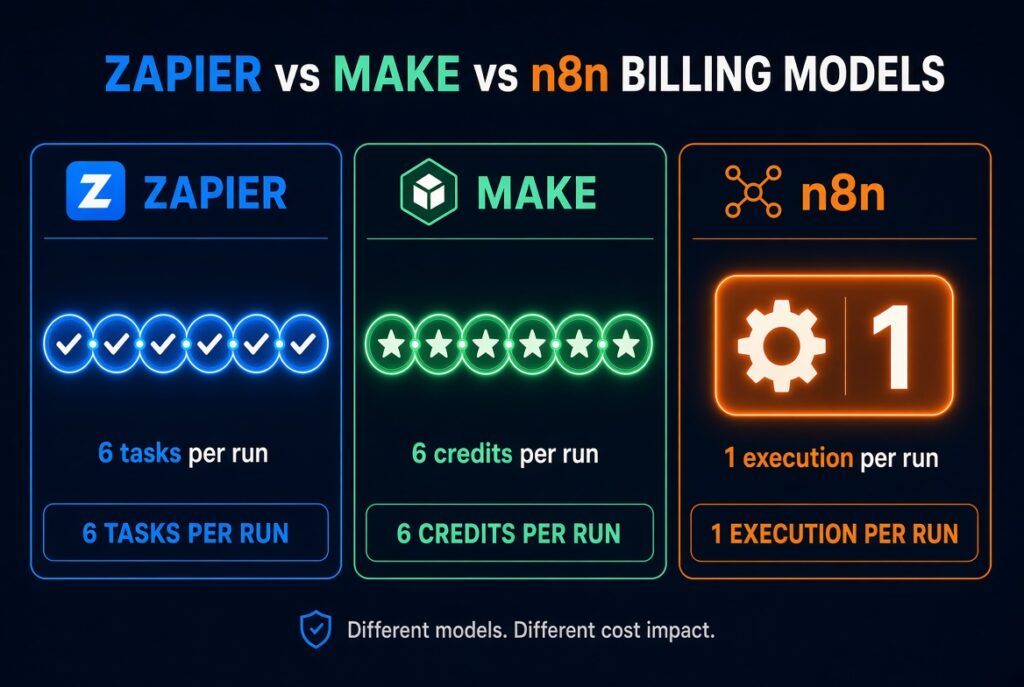
- The decisive cost variable isn’t how many apps a platform connects to. It’s whether it charges per action step (Zapier, Make) or per full workflow run (n8n) — a six-step workflow can generate six times more billable units on the first model than the second, at identical run volume.
- n8n’s Business tier is self-hosted only as of its current pricing page, not a managed cloud tier — a detail several widely shared third-party guides still get wrong. Verified against n8n’s published 2026 pricing breakdown.
- Make renamed its billing unit from “operations” to “credits” on August 27, 2025; the mechanic (one module run ≈ one credit) didn’t change, only the label did — per Make’s own announcement.
- No platform is the universal right answer. The correct choice depends on who’s building the workflow and how it’s shaped — step count per run matters more than which tool has the longer integration list.
A February 2026 post on r/aiagents, later cited by automation-billing analysts at eesel AI, put a concrete number on a problem a lot of Zapier users only feel: an eight-step lead-capture workflow, run roughly 100 times a day, generated <cite index=”6-1″>a monthly bill of $847 for around 15,000 tasks</cite>. The poster described removing working steps from an automation purely to stay under a pricing threshold — not because the workflow needed fewer steps, but because the pricing model punished having them.
That single anecdote is this whole comparison in miniature. Zapier, Make, and n8n all connect similar categories of apps, all now bolt AI steps into visual builders, and all will automate a lead-capture form without much trouble. What actually separates them is the unit each one bills you on — and that unit decides whether your cost scales with workflow complexity, run frequency, or barely at all.
What Each Platform Actually Charges You For
This is the part most comparison articles skip on the way to the feature grid. It’s the part that decides your invoice.
| Platform | Billing unit | What triggers a charge |
|---|---|---|
| Zapier | Task | Every successful action step in a Zap. An 8-step workflow run 100 times a day is roughly 24,000 tasks/month, regardless of how simple each step is. |
| Make | Credit (renamed from “operation” in Aug. 2025) | Every module call — same per-step mechanic as Zapier’s tasks, priced lower per unit. Filters and routers still count as operations, unlike some competitors. |
| n8n | Execution | One full run of the entire workflow, however many nodes it contains. This is n8n’s core pitch against step-based competitors, stated directly on its own pricing materials. |
The Worked Example
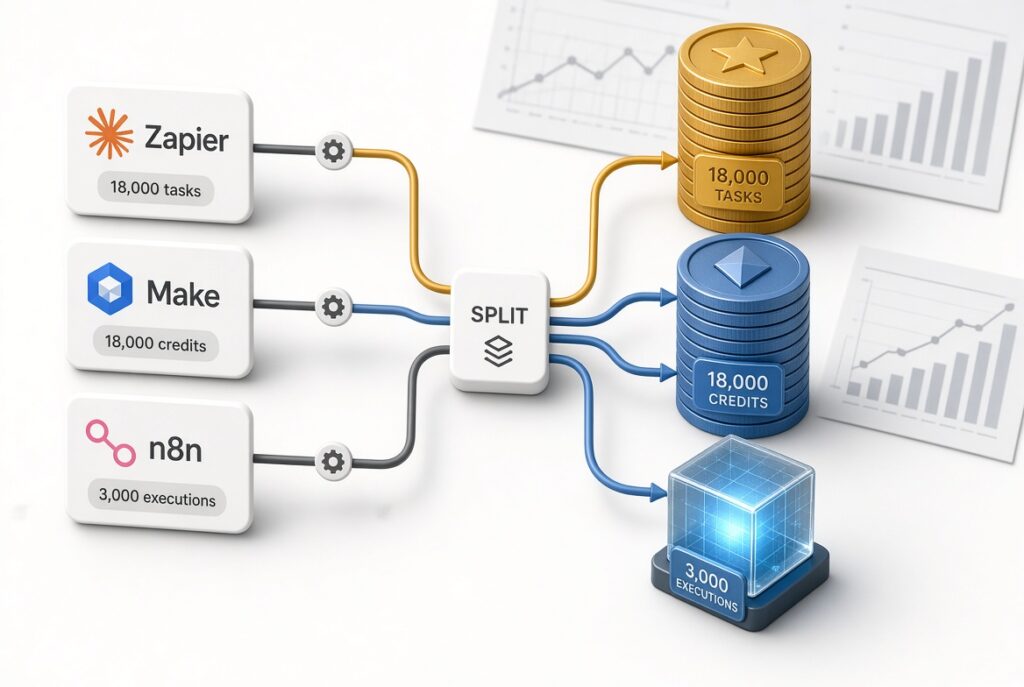
Take a realistic mid-size use case: a six-step lead-enrichment workflow (new form submission → CRM lookup → AI-generated summary → Slack notification → CRM field update → email confirmation), run 100 times a day, 30 days a month — 3,000 workflow runs total.
| Platform | Billing math | Monthly units |
|---|---|---|
| Zapier | 6 tasks × 3,000 runs | 18,000 tasks |
| Make | 6 credits × 3,000 runs | 18,000 credits |
| n8n | 1 execution × 3,000 runs | 3,000 executions |
Zapier and Make face the identical multiplication problem — 18,000 billing units either way — because both meter at the step level. n8n’s unit count for the same workflow is six times smaller, because it doesn’t matter how many nodes live inside one run. On n8n’s published cloud tiers, 3,000 executions fits inside the €50/month Pro plan (10,000 executions/month); self-hosted, it costs whatever a small VPS costs — commonly $5–$12/month, per multiple independent hosting breakdowns — with no execution ceiling at all.
What this doesn’t mean: it doesn’t mean n8n is unconditionally cheaper. A workflow with very few steps but extremely high run frequency — a one-step webhook relay firing 50,000 times a month — costs n8n 50,000 execution units, and could cost Zapier a similar 50,000 tasks, since a one-step Zap only ever produces one task per run. The gap widens in n8n’s favor specifically as step count per run increases. Model your own workflow shape before choosing on cost alone.
Pricing Snapshot (Verified Against Live Vendor Pages, September 2026)
| Platform | Free tier | Entry paid plan | Billing unit | Mid tier |
|---|---|---|---|---|
| Zapier | 100 tasks/mo, 2-step Zaps only | Professional, from $19.99/mo (750 tasks) — source | Task (per action step) | Team, from $69/mo, 25 users, 2,000 tasks |
| Make | 1,000 credits/mo, 2 active scenarios | Core, ~$9/mo annual (10,000 credits) — source | Credit (per module call) | Pro, ~$16/mo (10,000 credits, priority execution) |
| n8n | None on Cloud; self-hosted Community Edition is free with unlimited executions | Starter, €20/mo billed annually, 2,500 executions | Execution (per full workflow run) | Pro, €50/mo, 10,000 executions |
One correction worth flagging directly: several widely shared third-party pricing guides describe n8n’s Business tier as a cloud plan. It isn’t. n8n’s own current pricing states Business (€667/month billed annually, 40,000 executions) is self-hosted only — cloud hosting at that tier is waitlist-only as of this writing. If you need n8n’s collaboration and SSO features on n8n’s own infrastructure rather than your own servers, Enterprise (custom pricing, hosted or self-hosted) is currently the only route. #mermaid-rg6-r1 { font-family: system-ui, “Segoe UI”, Roboto, Helvetica, Arial, “PingFang SC”, “PingFang TC”, “Hiragino Sans”, “Apple SD Gothic Neo”, “Kohinoor Devanagari”, “Kohinoor Bangla”, “Kohinoor Telugu”, “Tamil Sangam MN”, “Kohinoor Gujarati”, “Malayalam Sangam MN”, “Nirmala UI”, “Noto Sans Devanagari UI”, “Noto Sans Devanagari”, “Noto Sans Bengali UI”, “Noto Sans Bengali”, “Noto Sans Telugu UI”, “Noto Sans Telugu”, “Noto Sans Tamil UI”, “Noto Sans Tamil”, “Noto Sans Gujarati UI”, “Noto Sans Gujarati”, “Noto Sans Kannada UI”, “Noto Sans Kannada”, “Noto Sans Malayalam UI”, “Noto Sans Malayalam”, Thonburi, “Leelawadee UI”, “Noto Sans Thai UI”, “Noto Sans Thai”, Kefa, Ebrima, “Noto Sans Ethiopic”, “Abyssinica SIL”, sans-serif, ui-sans-serif, system-ui, -apple-system, “Segoe UI”, Roboto, “PingFang SC”, “PingFang TC”, “Hiragino Sans”, “Apple SD Gothic Neo”, sans-serif; font-size: 16px; fill: rgb(25, 25, 25); } #mermaid-rg6-r1 .edge-animation-slow { stroke-dashoffset: 900; animation: 50s linear 0s infinite normal none running dash; stroke-linecap: round; stroke-dasharray: 9, 5 !important; } #mermaid-rg6-r1 .edge-animation-fast { stroke-dashoffset: 900; animation: 20s linear 0s infinite normal none running dash; stroke-linecap: round; stroke-dasharray: 9, 5 !important; } #mermaid-rg6-r1 .error-icon { fill: rgb(204, 120, 92); } #mermaid-rg6-r1 .error-text { fill: rgb(51, 135, 163); stroke: rgb(51, 135, 163); } #mermaid-rg6-r1 .edge-thickness-normal { stroke-width: 1px; } #mermaid-rg6-r1 .edge-thickness-thick { stroke-width: 3.5px; } #mermaid-rg6-r1 .edge-pattern-solid { stroke-dasharray: 0; } #mermaid-rg6-r1 .edge-thickness-invisible { stroke-width: 0; fill: none; } #mermaid-rg6-r1 .edge-pattern-dashed { stroke-dasharray: 3; } #mermaid-rg6-r1 .edge-pattern-dotted { stroke-dasharray: 2; } #mermaid-rg6-r1 .marker { fill: rgb(145, 145, 141); stroke: rgb(145, 145, 141); } #mermaid-rg6-r1 .marker.cross { stroke: rgb(145, 145, 141); } #mermaid-rg6-r1 svg { font-family: system-ui, “Segoe UI”, Roboto, Helvetica, Arial, “PingFang SC”, “PingFang TC”, “Hiragino Sans”, “Apple SD Gothic Neo”, “Kohinoor Devanagari”, “Kohinoor Bangla”, “Kohinoor Telugu”, “Tamil Sangam MN”, “Kohinoor Gujarati”, “Malayalam Sangam MN”, “Nirmala UI”, “Noto Sans Devanagari UI”, “Noto Sans Devanagari”, “Noto Sans Bengali UI”, “Noto Sans Bengali”, “Noto Sans Telugu UI”, “Noto Sans Telugu”, “Noto Sans Tamil UI”, “Noto Sans Tamil”, “Noto Sans Gujarati UI”, “Noto Sans Gujarati”, “Noto Sans Kannada UI”, “Noto Sans Kannada”, “Noto Sans Malayalam UI”, “Noto Sans Malayalam”, Thonburi, “Leelawadee UI”, “Noto Sans Thai UI”, “Noto Sans Thai”, Kefa, Ebrima, “Noto Sans Ethiopic”, “Abyssinica SIL”, sans-serif, ui-sans-serif, system-ui, -apple-system, “Segoe UI”, Roboto, “PingFang SC”, “PingFang TC”, “Hiragino Sans”, “Apple SD Gothic Neo”, sans-serif; font-size: 16px; } #mermaid-rg6-r1 p { margin: 0px; } #mermaid-rg6-r1 .label { font-family: system-ui, “Segoe UI”, Roboto, Helvetica, Arial, “PingFang SC”, “PingFang TC”, “Hiragino Sans”, “Apple SD Gothic Neo”, “Kohinoor Devanagari”, “Kohinoor Bangla”, “Kohinoor Telugu”, “Tamil Sangam MN”, “Kohinoor Gujarati”, “Malayalam Sangam MN”, “Nirmala UI”, “Noto Sans Devanagari UI”, “Noto Sans Devanagari”, “Noto Sans Bengali UI”, “Noto Sans Bengali”, “Noto Sans Telugu UI”, “Noto Sans Telugu”, “Noto Sans Tamil UI”, “Noto Sans Tamil”, “Noto Sans Gujarati UI”, “Noto Sans Gujarati”, “Noto Sans Kannada UI”, “Noto Sans Kannada”, “Noto Sans Malayalam UI”, “Noto Sans Malayalam”, Thonburi, “Leelawadee UI”, “Noto Sans Thai UI”, “Noto Sans Thai”, Kefa, Ebrima, “Noto Sans Ethiopic”, “Abyssinica SIL”, sans-serif, ui-sans-serif, system-ui, -apple-system, “Segoe UI”, Roboto, “PingFang SC”, “PingFang TC”, “Hiragino Sans”, “Apple SD Gothic Neo”, sans-serif; color: rgb(25, 25, 25); } #mermaid-rg6-r1 .cluster-label text { fill: rgb(51, 135, 163); } #mermaid-rg6-r1 .cluster-label span { color: rgb(51, 135, 163); } #mermaid-rg6-r1 .cluster-label span p { background-color: transparent; } #mermaid-rg6-r1 .label text, #mermaid-rg6-r1 span { fill: rgb(25, 25, 25); color: rgb(25, 25, 25); } #mermaid-rg6-r1 .node rect, #mermaid-rg6-r1 .node circle, #mermaid-rg6-r1 .node ellipse, #mermaid-rg6-r1 .node polygon, #mermaid-rg6-r1 .node path { fill: rgb(240, 240, 235); stroke: rgb(217, 216, 213); stroke-width: 1px; } #mermaid-rg6-r1 .rough-node .label text, #mermaid-rg6-r1 .node .label text, #mermaid-rg6-r1 .image-shape .label, #mermaid-rg6-r1 .icon-shape .label { text-anchor: middle; } #mermaid-rg6-r1 .node .katex path { fill: rgb(0, 0, 0); stroke: rgb(0, 0, 0); stroke-width: 1px; } #mermaid-rg6-r1 .rough-node .label, #mermaid-rg6-r1 .node .label, #mermaid-rg6-r1 .image-shape .label, #mermaid-rg6-r1 .icon-shape .label { text-align: center; } #mermaid-rg6-r1 .node.clickable { cursor: pointer; } #mermaid-rg6-r1 .root .anchor path { stroke-width: 0; stroke: rgb(145, 145, 141); fill: rgb(145, 145, 141) !important; } #mermaid-rg6-r1 .arrowheadPath { fill: rgb(11, 11, 11); } #mermaid-rg6-r1 .edgePath .path { stroke: rgb(145, 145, 141); stroke-width: 1px; } #mermaid-rg6-r1 .flowchart-link { stroke: rgb(145, 145, 141); fill: none; } #mermaid-rg6-r1 .edgeLabel { background-color: rgb(245, 230, 216); text-align: center; } #mermaid-rg6-r1 .edgeLabel p { background-color: rgb(245, 230, 216); } #mermaid-rg6-r1 .edgeLabel rect { opacity: 0.5; background-color: rgb(245, 230, 216); fill: rgb(245, 230, 216); } #mermaid-rg6-r1 .labelBkg { background-color: rgba(245, 230, 216, 0.5); } #mermaid-rg6-r1 .cluster rect { fill: rgb(204, 120, 92); stroke: rgb(138, 115, 107); stroke-width: 1px; } #mermaid-rg6-r1 .cluster text { fill: rgb(51, 135, 163); } #mermaid-rg6-r1 .cluster span { color: rgb(51, 135, 163); } #mermaid-rg6-r1 div.mermaidTooltip { position: absolute; text-align: center; max-width: 200px; padding: 2px; font-family: system-ui, “Segoe UI”, Roboto, Helvetica, Arial, “PingFang SC”, “PingFang TC”, “Hiragino Sans”, “Apple SD Gothic Neo”, “Kohinoor Devanagari”, “Kohinoor Bangla”, “Kohinoor Telugu”, “Tamil Sangam MN”, “Kohinoor Gujarati”, “Malayalam Sangam MN”, “Nirmala UI”, “Noto Sans Devanagari UI”, “Noto Sans Devanagari”, “Noto Sans Bengali UI”, “Noto Sans Bengali”, “Noto Sans Telugu UI”, “Noto Sans Telugu”, “Noto Sans Tamil UI”, “Noto Sans Tamil”, “Noto Sans Gujarati UI”, “Noto Sans Gujarati”, “Noto Sans Kannada UI”, “Noto Sans Kannada”, “Noto Sans Malayalam UI”, “Noto Sans Malayalam”, Thonburi, “Leelawadee UI”, “Noto Sans Thai UI”, “Noto Sans Thai”, Kefa, Ebrima, “Noto Sans Ethiopic”, “Abyssinica SIL”, sans-serif, ui-sans-serif, system-ui, -apple-system, “Segoe UI”, Roboto, “PingFang SC”, “PingFang TC”, “Hiragino Sans”, “Apple SD Gothic Neo”, sans-serif; font-size: 12px; background: rgb(204, 120, 92); border: 1px solid rgb(138, 115, 107); border-radius: 2px; pointer-events: none; z-index: 100; } #mermaid-rg6-r1 .flowchartTitleText { text-anchor: middle; font-size: 18px; fill: rgb(25, 25, 25); } #mermaid-rg6-r1 rect.text { fill: none; stroke-width: 0; } #mermaid-rg6-r1 .icon-shape, #mermaid-rg6-r1 .image-shape { background-color: rgb(245, 230, 216); text-align: center; } #mermaid-rg6-r1 .icon-shape p, #mermaid-rg6-r1 .image-shape p { background-color: rgb(245, 230, 216); padding: 2px; } #mermaid-rg6-r1 .icon-shape .label rect, #mermaid-rg6-r1 .image-shape .label rect { opacity: 0.5; background-color: rgb(245, 230, 216); fill: rgb(245, 230, 216); } #mermaid-rg6-r1 .label-icon { display: inline-block; height: 1em; overflow: visible; vertical-align: -0.125em; } #mermaid-rg6-r1 .node .label-icon path { fill: currentcolor; stroke: revert; stroke-width: revert; } #mermaid-rg6-r1 .node .neo-node { stroke: rgb(217, 216, 213); } #mermaid-rg6-r1 [data-look=”neo”].node rect, #mermaid-rg6-r1 [data-look=”neo”].cluster rect, #mermaid-rg6-r1 [data-look=”neo”].node polygon { stroke: url(“#mermaid-rg6-r1-gradient”); filter: drop-shadow(rgb(185, 185, 185) 1px 2px 2px); } #mermaid-rg6-r1 [data-look=”neo”].swimlane.cluster rect { filter: none; } #mermaid-rg6-r1 [data-look=”neo”].node path { stroke: url(“#mermaid-rg6-r1-gradient”); stroke-width: 1px; } #mermaid-rg6-r1 [data-look=”neo”].node .outer-path { filter: drop-shadow(rgb(185, 185, 185) 1px 2px 2px); } #mermaid-rg6-r1 [data-look=”neo”].node .neo-line path { stroke: rgb(217, 216, 213); filter: none; } #mermaid-rg6-r1 [data-look=”neo”].node circle { stroke: url(“#mermaid-rg6-r1-gradient”); filter: drop-shadow(rgb(185, 185, 185) 1px 2px 2px); } #mermaid-rg6-r1 [data-look=”neo”].node circle .state-start { fill: rgb(0, 0, 0); } #mermaid-rg6-r1 [data-look=”neo”].icon-shape .icon { fill: url(“#mermaid-rg6-r1-gradient”); filter: drop-shadow(rgb(185, 185, 185) 1px 2px 2px); } #mermaid-rg6-r1 [data-look=”neo”].icon-shape .icon-neo path { stroke: url(“#mermaid-rg6-r1-gradient”); filter: drop-shadow(rgb(185, 185, 185) 1px 2px 2px); } #mermaid-rg6-r1 :root { –mermaid-font-family: system-ui,”Segoe UI”,Roboto,Helvetica,Arial,”PingFang SC”,”PingFang TC”,”Hiragino Sans”,”Apple SD Gothic Neo”,”Kohinoor Devanagari”,”Kohinoor Bangla”,”Kohinoor Telugu”,”Tamil Sangam MN”,”Kohinoor Gujarati”,”Malayalam Sangam MN”,”Nirmala UI”,”Noto Sans Devanagari UI”,”Noto Sans Devanagari”,”Noto Sans Bengali UI”,”Noto Sans Bengali”,”Noto Sans Telugu UI”,”Noto Sans Telugu”,”Noto Sans Tamil UI”,”Noto Sans Tamil”,”Noto Sans Gujarati UI”,”Noto Sans Gujarati”,”Noto Sans Kannada UI”,”Noto Sans Kannada”,”Noto Sans Malayalam UI”,”Noto Sans Malayalam”,Thonburi,”Leelawadee UI”,”Noto Sans Thai UI”,”Noto Sans Thai”,Kefa,Ebrima,”Noto Sans Ethiopic”,”Abyssinica SIL”,sans-serif,ui-sans-serif,system-ui,-apple-system,”Segoe UI”,Roboto,”PingFang SC”,”PingFang TC”,”Hiragino Sans”,”Apple SD Gothic Neo”,sans-serif; }n8n — 1 billable executionTrigger → Action → Action→ Action → Action →Action, all inside one runMAKE — 6 billable creditsTriggerCredit 1Credit 2Credit 3Credit 4Credit 5ZAPIER — 6 billable tasksTriggerTask 1Task 2Task 3Task 4Task 5
Same six-step workflow, three billing outcomes. Zapier and Make meter every step; n8n meters the run. At scale, this single mechanic moves your bill more than which apps you connect.
AI Capability, Mechanism by Mechanism
All three vendors now market themselves as “AI orchestration” platforms, and the homepage language has converged. The underlying billing mechanics haven’t.
Zapier: AI Folded Into the Same Task Economy
Since a model-tier pricing change that took effect June 15, 2026, an AI by Zapier step is priced as a task multiplier rather than a flat action. New steps default to the Advanced tier (3x the base task rate, and the tier required to use tool calls); Standard runs at 1x, Premium at 5x. A per-step safety cap pauses a Zap for manual approval if a single AI step would consume 75 tasks in one run. Zapier also ships Copilot (a natural-language Zap builder, free of task cost) and Zapier MCP, which connects external AI clients to Zapier’s app library at two tasks per tool call, on any plan. Net effect: AI steps inherit the same step-based billing exposure as the rest of the platform, just at a steeper multiplier.
Make: AI as One More Module Type
Make treats AI models (OpenAI, Anthropic, and others) as modules that plug into a scenario like any connector, consuming credits per call the same way a spreadsheet write does. Make added dedicated AI Agent modules and a visual agent builder through 2025–2026. The billing mechanic doesn’t change for AI specifically — a model call is still a credit — which makes Make’s AI cost easier to estimate than Zapier’s tiered multiplier, but doesn’t remove the underlying per-step exposure.
n8n: LangChain-Based Agents, Priced Separately From Executions
n8n’s AI Agent node wraps LangChain’s JavaScript primitives into a visual block that accepts a chat model, a memory backend, an optional vector-store retriever, and a tool list, then runs a ReAct-style reasoning loop inside the regular canvas. Because the node lives inside a workflow like any other node, using it doesn’t change the execution-based billing mechanic — one workflow run is still one execution, regardless of how many LLM calls happen inside it. Self-hosted, using your own API key, an agent that calls a model 40 times in one run still costs one execution.
n8n Cloud does gate a separate, smaller AI Assistant credit allowance (a build-time help feature) — Starter plans include a limited monthly pool that several 2026 buyer guides note runs out quickly on AI-heavy builds. That’s a distinct product from the AI Agent node’s runtime, and it’s easy to conflate the two in older third-party writeups — worth checking your own plan’s current allowance before assuming “unlimited AI” applies everywhere in n8n.
The distinction that matters: Zapier and Make charge extra, step by step, for AI reasoning inside a workflow. n8n charges for the workflow run, not for how many times a model gets called inside it. That difference compounds fast for AI-heavy workflows — exactly the workload category all three platforms are now competing to own.
Reliability: What to Actually Check Before You Commit
Vendor uptime claims are marketing copy. Independent, continuously updated status-tracking services are a better source — but reliability data ages fast and shifts by region, so treat any specific incident count as a snapshot, not a permanent verdict.
| Platform | What to look for | Where to check |
|---|---|---|
| Zapier | UI/dashboard incidents are typically more frequent than execution-affecting ones; Zap runs have generally continued even during dashboard degradation | Zapier status page |
| Make | Has a documented history of both minor UI issues and occasional multi-hour regional incidents affecting live scenario execution, not just the interface | Make status page |
| n8n (self-hosted) | Not centrally trackable — uptime is entirely your own infrastructure’s responsibility, which is the trade-off for the free self-hosted tier | Your own monitoring; n8n Cloud has a separate status page for hosted users |
The practical takeaway: if you’re choosing between Zapier and Make on price alone, weigh Make’s lower cost against a real, if intermittent, history of execution-affecting regional incidents — worth checking the live status page and its incident history directly before committing a revenue-critical workflow (payment processing, lead routing) to either hosted platform. n8n sidesteps the vendor-reliability question entirely for self-hosted users, at the cost of making uptime your own problem.
Who Should Skip Each Platform
Skip Zapier if:
- Your workflows average more than 4–5 action steps and run more than a few hundred times a month
- You’re price-sensitive and don’t need Zapier’s largest-in-class catalog (9,000+ integrations, per Zapier’s own count)
- You want AI reasoning steps without a per-call cost multiplier
Skip Make if:
- Your team has zero appetite for a steeper visual-builder learning curve than Zapier’s
- You need contractual, guaranteed uptime for execution-critical scenarios and can’t absorb an occasional multi-hour regional incident
- You need the deep self-hosting control that comes with a dedicated engineering team
Skip n8n if:
- Nobody on the team can maintain a Docker container, patch a VPS, or debug a self-hosted instance
- You need the single largest app catalog — n8n’s official integration count (400–500+) trails Zapier’s by an order of magnitude
- You want a fully managed Business-tier experience today — as of this writing it’s self-hosted only, with hosted Business still waitlisted
The Straight Answer
The “best platform” question is really a question about who’s building the workflow and how often it runs — and the honest answer splits cleanly along those lines rather than landing on one universal winner.
Non-technical teams building a handful of simple automations — light volume, no in-house engineering support — get to a working result fastest on Zapier, and task-based cost stays manageable specifically because the workflows stay simple. The moment those workflows grow past a handful of steps, or scale past a few thousand runs a month, the same mechanic that made Zapier easy starts working against the budget.
Teams with some technical comfort, mid-range budgets, and workflows heavier than Zapier’s sweet spot are usually better served by Make — cheaper per unit, same step-based billing mechanic, a genuinely capable visual builder — at the cost of a real reliability gap worth pricing into execution-critical decisions.
Teams with engineering capacity, AI-heavy workflows, or a hard requirement to keep data on their own infrastructure get the best economics and the most architectural control from n8n, self-hosted — at the direct cost of taking on their own uptime, patching, and scaling.
A Decision Framework You Can Actually Use
| If your situation is… | Start with | Why |
|---|---|---|
| Solo founder, <500 runs/mo, no dev help | Zapier Free / Professional | Fastest setup, largest template library, task cost stays low at low volume |
| Agency running many multi-step client workflows | Make Core/Pro | Lower per-unit cost than Zapier on the same step-based mechanic; strong visual debugging |
| AI-heavy internal tooling, engineering team available | n8n self-hosted Community Edition | Unlimited executions, full LangChain-based AI Agent node, no per-call AI surcharge |
| Regulated industry, data residency requirements | n8n self-hosted (Enterprise license for SSO/audit) | Data stays on your infrastructure; n8n’s hosted Cloud data is stored in Frankfurt, Germany, per its own documentation |
| Enterprise needing SAML SSO, admin governance, largest app catalog | Zapier Enterprise or n8n Enterprise | Zapier wins on integration breadth; n8n wins on execution economics at genuine scale |
Frequently Asked Questions
Does Zapier’s per-task pricing really punish complex workflows? Yes, directly. Every successful action step in a Zap counts as one task by default, so a workflow with more steps consumes proportionally more of your monthly task allowance at the same run volume — there’s no built-in discount for step count, though AI-step tiers now add a further multiplier on top of that.
Is n8n actually free? The Community Edition is free, open-source, and unlimited on executions if you self-host it — but “free” means you’re paying for and managing your own server (commonly $5–$12/month for a small VPS) rather than paying n8n directly. n8n Cloud, the fully managed option, is not free and has no permanent free tier beyond a trial.
Which one is best for AI agents specifically? n8n’s AI Agent node offers the deepest technical control — memory backends, vector-store retrievers, multiple model providers — because it exposes LangChain primitives directly, and running it doesn’t add per-call cost on top of the execution price. Zapier and Make both now support AI steps and dedicated agent-building tools, but each AI call adds to the same step-based cost that governs the rest of the platform.
Can I switch platforms later without starting over? Not directly. None of the three offers a native one-click import from a competitor’s workflow format, so migrating means manually rebuilding logic on the new platform. Factor that lock-in cost into your initial choice rather than treating a future switch as low-friction.
Methodology & Sources
Zapier and n8n pricing and AI-tier figures were checked directly against each vendor’s current help documentation and pricing pages in September 2026: Zapier’s AI pricing announcement, Zapier’s task-definition article, and n8n’s 2026 pricing breakdown. Make’s credit-rename date and mechanic are confirmed against Make’s own product announcement; specific Make plan prices are drawn from multiple independent 2026 pricing trackers that showed minor variance by currency and billing cycle, presented here as approximate figures rather than a single precise quote. The Reddit invoice example is cited via eesel AI’s 2026 Zapier subscription analysis, which reproduces the original post. Reliability claims are deliberately kept general rather than citing specific incident counts, since status-tracker data changes month to month — check each platform’s live status page linked above before making an execution-critical decision.
This comparison will go stale. Automation pricing changes often enough that a six-month-old comparison article is a liability, not an asset — confirm current rates on each vendor’s live pricing page before budgeting, and treat this as a framework for thinking about the decision, not a locked-in quote.