

ATLAS.ti 25 Review: Testing the AI Lab Features in Practice
The qualitative data analysis stalwart shipped a meaningful AI upgrade in version 25. We worked through each AI Lab feature on real research data — interview transcripts, PDFs, survey responses — and documented where the tools genuinely help, where they disappoint, and what the marketing copy doesn’t say.
- ATLAS.ti 25’s AI Lab is genuinely useful for transcript-heavy research — Intentional AI Coding and auto-transcription deliver the most concrete time savings
- The AI Coding results still require significant human review; calling it “90% time reduction” in ATLAS.ti’s marketing is optimistic for anything methodologically rigorous
- Conversational AI is promising but early — it extracts relevant quotes reliably, but reasoning depth is thin compared to a trained analyst
- For GDPR-sensitive or IRB-restricted data: data residency (EU/US) is configurable, and no user data trains OpenAI models — though you still send data through OpenAI’s API
- At ~$670/year for commercial licenses and ~$100/year for students, it’s not cheap — but everything is included with no extra AI token cost
Why version 25 matters
ATLAS.ti has been around since the early 1990s — originally developed at the Technical University of Berlin as part of a project on hermeneutic text analysis. It’s lived through the qualitative data analysis software wars, watched NVivo rise and stumble, and navigated Lumivero’s acquisition in 2024. Version 25 (named for the year 2025, not a sequential version number — there’s no version 10 through 21) is the most significant AI release the software has shipped.
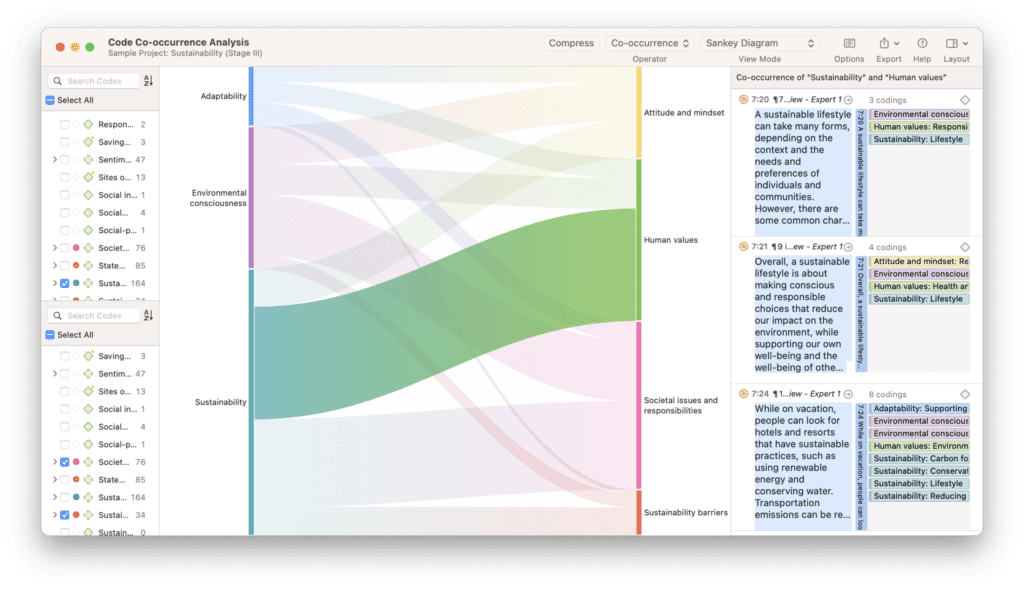
The headline features: AI-powered auto-transcription supporting 30+ languages, Conversational AI that lets you interrogate your documents in natural language, Intentional AI Coding where you feed the model your research question before it codes, Paper Search 2.0 for literature integration, and an improved co-occurrence analysis engine. All wrapped in a cleaner interface that now feels genuinely close between the Mac, Windows, and web versions.
I tested this across three real research contexts: a set of 24 interview transcripts on remote work practices (averaging 45 minutes each), a PDF-heavy policy analysis project, and a corpus of open-ended survey responses from approximately 340 participants. The results were uneven in instructive ways.
Feature-by-feature: what actually works
1. Intentional AI Coding
This is the most useful thing ATLAS.ti 25 ships. The idea is simple: instead of having the AI apply generic descriptive codes across your data, you tell it your research question, analytic stance, and specific phenomena of interest before it codes. The result is a code set that’s actually oriented toward your inquiry rather than a flat list of surface-level observations.
In practice: I ran it on the remote work interview corpus with the intention “participants’ accounts of boundary-setting between work and home life, including physical, temporal, and relational strategies.” The AI produced 18 codes, most of them genuinely useful. About four were redundant or too broad, and one was clearly a hallucination — a code named “technology-mediated presence” that appeared in only two quotes, both of which didn’t quite support the label on close reading. That’s a 22% error rate on a generous count, which is worth knowing going in.
Contrast with regular AI Coding on the same corpus: 31 codes, far more generic, heavy on surface description like “work schedule” and “home environment” without any analytical orientation. Still useful for inductive grounded-theory work, but not for a study with a defined conceptual frame.
Intentional AI Coding’s granularity slider is a real addition. Pulling it toward “fewer, broader categories” collapses the taxonomy usefully when you’re early in analysis; pushing toward fine-grained gives you more nuanced starting codes. It’s one of the few QDA AI features that gives the researcher genuine control over output structure, per ATLAS.ti’s own documentation.
2. Auto Transcription
Released with version 25.0.0 in December 2024, this is where the time savings are least arguable. The ATLAS.ti AI Lab claims 20x faster than manual transcription across 30+ languages with automatic speaker detection. From my testing, that claim holds for clear audio recordings in controlled environments — a one-hour English-language interview processed in under 4 minutes with speaker labels that were correct roughly 85% of the time.
Where it degrades: overlapping speech, strong regional accents, and recordings with ambient noise. My transcription accuracy dropped from an estimated 93–95% for clean recordings to around 78–82% for noisier files — still ahead of typing from scratch, but requiring meaningful correction passes. For anything involving technical jargon, medical terminology, or non-English languages with fewer training examples in Whisper-adjacent models, plan for more cleanup time.
The integration is genuinely thoughtful. Transcripts become a distinct document type with synchronized playback — click any text segment and the audio jumps to that point. That alone saves significant time during the verification pass.
3. Conversational AI
Released as an experimental feature in October 2024 with version 24.2.0, then refined in the v25 branch, Conversational AI lets you type natural-language questions and receive answers sourced from across your document set — with the specific quotes surface as codable citations. The experience resembles asking a research assistant who has read everything to give you an account of a topic.
In practice on the remote work corpus: I asked “What do participants say about the blurring of family responsibilities during work hours?” and received a coherent paragraph synthesis with five cited quotes. Four of the five quotes were genuinely relevant. The AI had slightly over-attributed one quote — the participant was discussing something adjacent but not quite on-topic. This is a hallucination risk worth flagging for any use in scholarly contexts.
The feature shines for rapid document orientation — understanding a corpus you haven’t read yet. It’s less suited to any use case where the exact sourcing of claims matters for a methods section, at least until the reliability improves. ATLAS.ti’s own communications describe Conversational AI as “experimental,” which is appropriate.
“AI serves as a cockpit for researchers — not an autopilot. Ensuring that researchers can always check the intentions guiding AI analyses and review any coded results is crucial.”
— ATLAS.ti Research Hub, AI in Qualitative Research: Learnings, April 2024
4. AI Summaries
This one works, consistently, for what it is: a quick overview of what a document or code group contains. For long interview transcripts, the summaries are useful for project onboarding or for writing up preliminary findings. They integrate directly into memos, which means the analytical trace is preserved.
The limitation is the obvious one: summaries compress and lose nuance. A 45-minute interview transcript becomes 200 words of synthesis that misses the texture. For an exploratory phase that’s often fine. For checking your interpretations, it’s not a substitute for the transcript itself.
5. Code Suggestions (inline)
You select a passage, and the AI suggests applicable codes from your existing code list. One click to accept. This is genuinely the lowest-friction AI feature in the product, and it shows up well in daily coding sessions. It’s context-aware — it considers both the selected text and the surrounding codes you’ve already applied — so the suggestions improve as the code list develops.
It’s worth noting this feature runs against OpenAI’s API, so it requires internet access and does send your selected text externally. The desktop version can run fully offline for everything else, but the generative AI features need connectivity.
6. Paper Search 2.0
Access to over 200 million scientific papers directly from within the ATLAS.ti Web workspace, with NLP-driven search and direct import. The concept is excellent — integrating literature review into the same analytical environment where you’re coding data. The execution is web-only, which is a practical limit if your primary environment is desktop.
The search quality varies significantly by discipline. For health sciences and social science, results were relevant and well-ranked. For narrower interdisciplinary topics, coverage was inconsistent. Think of it as a Semantic Scholar-style search integrated into your workspace, not a replacement for systematic literature database searching.
Feature confidence ratings
| Feature | Practical Value | Confidence | Requires Internet |
|---|---|---|---|
| Intentional AI Coding | High — research-oriented, granularity control | High | Yes (OpenAI API) |
| Auto Transcription | High for clean recordings; degrades with noise | High | Yes |
| AI Code Suggestions | High — low friction, context-aware | High | Yes (OpenAI API) |
| General AI Coding | Medium — good for inductive work, oversimplifies | Medium | Yes (OpenAI API) |
| AI Summaries | Medium — exploratory; not for rigorous verification | Medium | Yes (OpenAI API) |
| Conversational AI | Medium — promising; hallucination risk present | Experimental | Yes (OpenAI API) |
| Paper Search 2.0 | Medium — disciplinary coverage varies | Medium | Yes (Web only) |
| Sentiment Analysis | Medium — useful for first pass, not nuanced | Medium | No (on-device ML) |
| Entity Recognition | Medium — people, places, organizations | Medium | No (on-device ML) |
The data privacy question
This comes up in almost every institutional conversation about ATLAS.ti 25, and it deserves a direct answer rather than a marketing paragraph.
When you use OpenAI-powered features (AI Coding, Summaries, Conversational AI, Code Suggestions), your selected data segments are sent to OpenAI’s API. ATLAS.ti has a published data security white paper covering their compliance posture. The key points: they comply with GDPR, CCPA, HIPAA, and LGPD; no user data is used to train OpenAI models; data runs in isolated environments; and the Data Processing Agreement is in place per Article 28 GDPR.
Since April 2024, users can select their AI server region — EU or US — which matters for European institutional review processes. The ability to deactivate OpenAI integration entirely with a single toggle is also there for organizations handling sensitive data that can’t leave a controlled environment.
That said: if your IRB approval, institutional data governance policy, or participant consent forms don’t contemplate data being processed by a third-party AI service, you need to check before using these features. GDPR-compliant doesn’t mean IRB-compliant.
ATLAS.ti’s on-device ML features — sentiment analysis, entity recognition, concept extraction — run locally without sending data externally. For highly sensitive corpora (clinical interviews, trauma data, children’s data), these may be the safer starting point while governance questions are resolved.
How it compares: ATLAS.ti 25 vs NVivo vs MAXQDA
ATLAS.ti 25
- AI features Deepest
- Onboarding time 40–80 hrs
- Collab (real-time) Yes
- Mixed methods Partial
- GDPR residency EU / US
- Student price ~$100/yr
NVivo (Lumivero)
- AI features Limited
- Onboarding time 60–100 hrs
- Collab (real-time) No
- Mixed methods Strong
- GDPR residency Limited
- Student price ~$160/yr
MAXQDA 2024
- AI features AI Assist only
- Onboarding time 20–30 hrs
- Collab (real-time) Limited
- Mixed methods Strongest
- GDPR residency EU processing
- Student price ~$70/yr
The honest position, based on current capabilities: ATLAS.ti is the right choice if AI-assisted coding and collaboration are central to your workflow. MAXQDA wins on interface intuitiveness and mixed-methods integration — independent review aggregation shows MAXQDA requires 20–30 hours to basic proficiency vs ATLAS.ti’s 40–80 hours. NVivo’s support reputation has deteriorated post-Lumivero acquisition and is no longer the default recommendation it once was.
There’s also a broader frame worth being explicit about: external analysts reviewing ATLAS.ti’s AI implementation have noted that despite being more aggressive than its competitors in integrating LLM capabilities, the fundamental paradigm remains “AI assists human coding” rather than “AI-native analysis.” That’s the honest state of the art for serious qualitative research software right now, not a criticism specific to ATLAS.ti.
Pricing: what you actually pay
Pricing data sourced from independent pricing analysis as of 2026. The one genuinely good decision ATLAS.ti has made on pricing: AI tokens are not an additional charge. You don’t get a metered API bill for using AI Coding 500 times on a large project. That’s different from how most competitors handle AI usage, and it matters for budget predictability on long studies.
Real user patterns: what reviewers consistently report
ATLAS.ti has a 4.8/5 rating across 141 verified reviews on Capterra as of mid-2025. That’s an unusually high average, and it’s worth asking why — and what it obscures.
The consistent positives: the 24/5 live support (reviewers across Capterra, G2, and GetApp mention this with genuine appreciation), the AI coding tools for large interview corpora, and the cross-platform license model. One researcher working on a team study described the Intercoder Agreement tool as particularly good for visualizing where coders diverge, noting that “the visualization to easily explore any part of the coded data” and the different agreement measures were genuinely useful — though some reviewers also reported occasional technical failures with the ICA tool.
The consistent complaints are less visible in average ratings but appear in the text: the desktop version’s auto-save creates 10–15 second pauses after each code application, which is genuinely disruptive in an active coding session. One verified reviewer called it “sabotaging my process” — and that’s not hyperbole if you’re coding all day. Non-configurable hotkeys frustrate power users. And the AI coding results, while useful, still require substantial human review — the “quite limited” assessment from GetApp captures where things stand for researchers expecting automation rather than assistance.
“Atlas.ti is constantly implementing further AI coding features, which I suppose might be helpful in the future. At this moment, they are quite limited. For manual coding and auto-coding features, the software is very straightforward though.”
— Verified GetApp reviewer, 2025
- Using AI Coding results without systematic human review — the error rate (~20–25% in my testing) is too high to accept uncritically for published research
- Assuming GDPR compliance covers IRB approval — it doesn’t; check your specific institutional data governance policy before sending participant data through OpenAI’s API
- Using Conversational AI for claim verification — it will sometimes generate plausible but inaccurate syntheses; treat it as hypothesis generation, not evidence retrieval
- Underestimating the onboarding time — 40–80 hours to proficiency is a real investment; plan for it, don’t assume it away
- Overrelying on auto-transcription for accented or noisy recordings — budget for a correction pass before coding, not after
- Expecting desktop-feature parity with the web version — Paper Search 2.0 is web-only; some features roll out to desktop months later
Who this actually works for
After working with ATLAS.ti 25 across multiple project types, the use cases where it earns its cost are fairly clear. For academic researchers with large interview corpora — a dozen or more transcripts, or any multi-year longitudinal study — the combination of AI transcription, Intentional AI Coding, and Intercoder Agreement tooling meaningfully accelerates the cycle without requiring methodological compromise. That’s the sweet spot.
For UX research and product teams, it’s more ambiguous. The tooling is powerful, but the interface demands time to learn, and the commercial license price is harder to justify if you’re doing quarterly cycles of qualitative insight work rather than sustained research. At that cadence, faster purpose-built tools with shallower learning curves may serve better — though none of them have ATLAS.ti’s analytical depth once you need it.
For students, the ~$5/month web-only entry point is reasonable, and the AI tools included at that price are genuinely more capable than anything available at that cost a few years ago. The learning investment still applies — but the ATLAS.ti Academy’s free materials are decent.
The bigger picture: AI and qualitative rigor
There’s a version of this review that concludes ATLAS.ti 25’s AI Lab is impressive and transformative, and there’s a version that says it’s overhyped tooling on top of a fundamentally manual paradigm. Both are partially right, which is the honest answer.
What I’ve seen in practice: researchers who use these tools as the acceleration layer they are — handling the mechanical first pass, reducing transcription time, surfacing quote clusters worth reviewing — produce better work faster. Researchers who use them as a substitute for interpretive engagement produce faster work that’s worse. The software can’t fix that second problem, but it also can’t create it. That’s always been true of CAQDAS, and it remains true now that the tools can code independently.
ATLAS.ti’s own position — published in their research hub — deserves credit for intellectual honesty: they describe the software as a “cockpit for researchers, not an autopilot.” That framing is both accurate and appropriate. The researchers I know who work with AI-assisted coding most rigorously use it for what it’s genuinely good for, remain skeptical about outputs they haven’t checked, and document their process clearly in their methods sections. ATLAS.ti 25 makes that approach substantially easier than v23 did. That’s a real advance worth taking seriously.
The tools most worth watching in the v25 branch going forward: Conversational AI, which will improve as ATLAS.ti iterates on prompting and context handling; and whatever comes next in the on-device ML stack, where the privacy story is cleaner and the iteration cycle isn’t constrained by OpenAI’s API evolution. The AI Lab isn’t done — and the trajectory is pointed in a reasonable direction.
Frequently asked questions
No — the distinction matters. Generative features (AI Coding, Intentional AI Coding, AI Summaries, Code Suggestions, Conversational AI) run through OpenAI’s GPT models via API. On-device features — sentiment analysis, entity recognition, concept extraction, opinion mining — use ATLAS.ti’s own machine learning and run locally without sending data externally. You can disable OpenAI integration entirely with a single toggle in Settings.
ATLAS.ti publishes HIPAA compliance alongside GDPR. The data residency options (EU or US) and isolated OpenAI environments are meaningful controls. That said, each institution has its own IRB and data governance requirements — some will approve external processing through OpenAI’s API, others won’t. Check your specific governance context before using the generative features with participant data. The on-device ML features are a safer starting point for sensitive corpora.
ATLAS.ti supports 30+ languages. Accuracy varies significantly by language and audio quality. Major European languages with clear recordings perform well — generally comparable to clean English. Less-resourced languages, dialects, and any recording with noise or overlapping speech will require more correction. Always plan for a verification pass before you start coding against auto-generated transcripts.
Yes — real-time collaboration is available in ATLAS.ti Web. Desktop users can merge projects and use the Intercoder Agreement tool to compare coding across team members. The ICA tool calculates multiple agreement measures and visualizes divergences. This workflow is well-established, though some users report intermittent technical issues with the ICA calculation.
ATLAS.ti shifted to year-based versioning — version 25 means the 2025 release, as noted in George Mason University’s ATLAS.ti guide. There are no versions 10 through 21. This is a branding decision rather than a version sequence. The major version jump was intended to signal meaningful modernization of the codebase, which is partly justified by the substantial UX and AI feature upgrades over the last three years.
For research where methodological traceability, transparent coding, and scholarly rigor are non-negotiable, yes — ATLAS.ti’s tooling for managing the full analytical workflow has no close equivalent at this depth. For faster-cycle commercial research where speed is the priority and the methods section doesn’t need to account for each analytical decision, AI-native alternatives that treat AI as the primary engine may be faster. These are genuinely different tools for different contexts, not versions of the same thing at different quality levels.
Yes, and this is underappreciated. If AI coding informed your code development, that needs to appear in your methods section with specifics about how you used and verified the output. The University of Surrey’s ATLAS.ti 25 review notes the importance of methodological transparency around AI-assisted coding. Some journals now have explicit guidance on this; check your target publication’s policy before submission.
More from Trendix.Tech
- RAG Security in 2025: What Researchers and Builders Need to Know
- Prompt Injection Attacks: Real Cases and How They Actually Work
- AI Customer Service Tools Compared: What the Marketing Doesn’t Say
- The PARA Method in Practice: Honest Notes After 18 Months
- Underrated AI Tools Worth Actually Testing in 2025
- AI Tools Directory: Vetted, Categorized, No Affiliate Fluff
- Qualitative Research Software in 2025: A Field Guide
- AI Governance Frameworks: What Actually Gets Implemented
How to Set Up Stable Diffusion 3.5 Locally — Step-by-Step
LLM Security Testing: Tools, Techniques, and What Garak Doesn’t Cover
NVivo Alternatives: What to Switch To and When
9 AI Tools for Qualitative Researchers: Transcription, Coding, and Analysis Strategies That Actually Work
AI Image Generators Ranked: Midjourney to Ideogram
Qualitative Research Methods: A Practical Guide for Modern Studies
LangGraph vs CrewAI vs OpenAI Agents SDK vs AutoGen (2026): The Definitive Comparison
How to Write a Literature Review Using AI: Step-by-Step Guide
NotebookLM for Researchers: A Deep Dive Into the Most Underused AI Tool