

PARA Method Deep Dive

PARA Method Deep Dive:
Organise Your Whole Digital Life
Most of us don’t have an organisation problem. We have a retrieval problem. PARA is the simplest system that actually solves it — but only if you understand where it breaks.
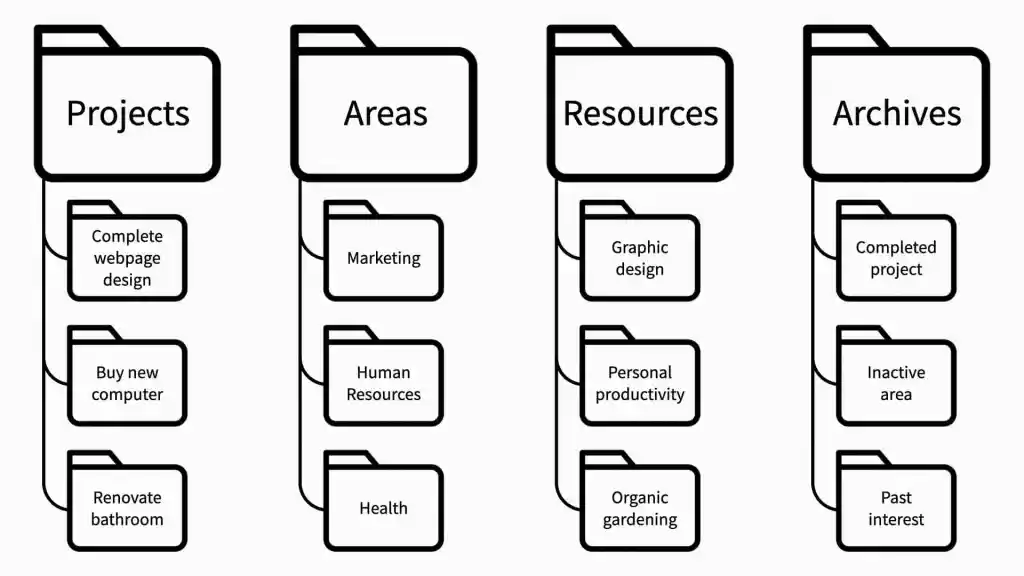
- PARA sorts everything into four buckets — Projects, Areas, Resources, Archives — organised by how actionable they are, not by topic.
- The single biggest mistake people make is treating Areas and Projects as interchangeable. They are not. Projects have finish lines; Areas don’t.
- PARA works across any tool — Notion, Obsidian, Google Drive, Apple Notes — because the structure is a concept, not a feature.
- The system has real limits: it can struggle with cross-domain notes and requires honest periodic maintenance, not just passive filing.
Why Most People’s Digital Lives Are a Mess
There’s a stat I find genuinely depressing: knowledge workers spend up to 2.5 hours per day searching for information across multiple platforms, according to research cited by LumApps. That’s over 600 hours a year hunting for things you’ve already seen, read, or written. The global economic cost of this kind of information overload? Roughly $1 trillion annually, per Rensselaer Polytechnic Institute (2024).
The failure isn’t laziness. It’s architecture. Most people organise their files the same way they sort physical mail — by what something is, not by what they’re going to do with it. You create a folder called “Finance,” then a subfolder called “2024,” then “Q3,” and before long you’re six levels deep into a structure nobody can navigate at 9 AM on a Tuesday. Established
The PARA Method, developed by productivity researcher Tiago Forte at Forte Labs and formalised in his 2023 book The PARA Method, flips this logic. Instead of organising by category, it organises by actionability. The question isn’t “what is this?” — it’s “what am I going to do with this, and when?”
That shift sounds small. It isn’t.
The Four Buckets, Actually Explained
PARA stands for Projects, Areas, Resources, Archives. Here’s what they actually mean in practice — not just the textbook definitions.
Short-term efforts with a clear finish line. “Launch the Q3 newsletter” is a project. “Running our newsletter” is not — that’s an Area.
Ongoing responsibilities with no end date. Health, finance, a client relationship, parenting. You maintain these — you don’t complete them.
Topics you find interesting or might reference later, but aren’t tied to any current commitment. A reading list, a swipe file, a recipe folder.
Inactive items from the other three. Completed projects, past job roles, old resources you’ve stopped caring about. Cold storage, not a bin.
The sequence matters. It runs from most actionable (Projects, where you’re actively working) down to least actionable (Archives, where things go to rest without being deleted). This ordering shapes where your attention flows when you open any given app.
The Critical Distinction Nobody Talks About
The Projects vs Areas split is where 80% of PARA users get confused. Forte’s test is brutal in its simplicity: does this have a deadline or a natural endpoint? If yes, it’s a Project. If no, it’s an Area. “My health” is an Area. “Lose 8kg before my sister’s wedding in October” is a Project. They might share files, but they live in different buckets — and that distinction changes how you allocate your attention every single week.
Forte himself recommends keeping between 10 to 15 active Projects at any one time. Enough that you have somewhere to turn if one stalls. Not so many that the system collapses under its own weight. In my experience working with teams setting up PKM systems, the people who list 30 active Projects haven’t really understood the system — they’ve just renamed their to-do list. Probable
PARA in Practice: Implementation Across Real Tools
One of the things that makes PARA genuinely useful is that it doesn’t care what app you use. You can implement it in Notion Obsidian Apple Notes Google Drive — or across all of them simultaneously, because the folder names stay the same everywhere.
That cross-platform consistency is the underrated superpower here. A lot of people maintain separate systems in their note-taking app, their file storage, and their task manager. PARA forces you to use the same four categories everywhere, which means your mental overhead drops dramatically. When a file needs to move, you know exactly where it goes. Established
Notion
Notion is the most popular implementation surface, and for good reason — its database system lets you relate Projects to Areas and Resources in ways no simple folder can. Thomas Frank’s free PARA template is a solid starting point. The power move in Notion is creating a Projects database with an Area relation field, so each active Project is linked to the ongoing Area it serves. When a project completes, archive it; the Area persists.
The common mistake in Notion: people create a PARA structure and then bury it under twenty linked databases. Start with four pages. That’s literally it.
Obsidian
Obsidian has emerged as the preferred PARA tool among people who want AI-native workflows in 2025–2026. Because Obsidian stores everything as plain Markdown files on your local disk, AI tools like Claude Code can read and write your vault directly — no API, no middleware. This kind of workflow lets you run things like weekly review summaries in 30 seconds by simply pointing an AI assistant at your folder. For anyone building serious knowledge systems in 2026, that local-file architecture matters.
In Obsidian, implement PARA with four top-level folders. Resist the urge to use tags instead of folders — tags don’t transfer well to other platforms, which defeats the point of a universal system. Probable
Google Drive / File System
For teams, Google Drive is often where PARA breaks down or gets skipped. Shared drives resist personal folder structures. The practical workaround: use PARA only at the root of your personal drive, and put team-shared folders inside the relevant Projects or Areas subfolder as shortcuts. Don’t try to reorganise your entire organisation’s drive around PARA — that’s an overreach that will fail politically before it succeeds technically.
Just-in-Time Organisation: The Part Everyone Skips
Forte’s concept of “just-in-time organisation” is one of the more counterintuitive parts of PARA. The idea is that you don’t schedule dedicated filing sessions. You organise as you work — when you open a document, decide where it lives; when you finish a project, move the whole folder to Archives.
This feels wrong at first. Most productivity systems reward regular, scheduled maintenance. PARA explicitly doesn’t — or at least, it doesn’t require it. The claim is that by the time you need information, you’ll know what project or area it belongs to, so the filing is almost automatic.
In my experience, this works well for Projects and Archives. It works less well for Resources, which tend to accumulate into a hoard if you’re not periodically curating them. A quarterly Resource audit — removing things you’re genuinely never going to revisit — keeps the system usable. Probable
“Your notes are things to use, not just things to collect.” — Tiago Forte, The PARA Method (2023)
How PARA Compares to Other Systems
PARA isn’t the only personal knowledge management system. Here’s an honest look at where it sits relative to the alternatives most knowledge workers actually use.
| System | Core Logic | Best For | Biggest Weakness |
|---|---|---|---|
| PARA | Organise by actionability | Multi-tool knowledge workers; freelancers managing several domains | Area/Resource boundary gets fuzzy; weak on cross-domain linking |
| GTD (Allen) | Organise by context and next action | Task-heavy professionals; anyone drowning in commitments | Complex to set up; high maintenance; doesn’t address note/file organisation |
| Zettelkasten | Atomic notes linked by concept | Writers, researchers; anyone building long-form ideas over years | Steep learning curve; poor for short-term project management |
| Johnny.Decimal | Strict numeric taxonomy | File system organisation; teams needing shared structure | Rigid; resists change; doesn’t handle digital notes well |
PARA and Zettelkasten are the most commonly combined. PARA handles your operational life (projects, commitments, reference material). Zettelkasten handles your intellectual life (developing ideas over years). Many serious knowledge workers run both simultaneously. Probable
How to Actually Set Up PARA (Without Spending a Weekend on It)
Most implementation guides suggest a marathon migration session. I’d push back on that. Start with what’s already on your plate, not with your entire digital archive.
List your current Projects. Not everything you care about — only things with a clear end point and that you’re working on this month. Aim for 10, push no higher than 15. This list is your system’s backbone.
Define your Areas. These are ongoing responsibilities you can’t drop: a role at work, a client relationship, your health, your finances. Don’t create more than 8–10. If you have 20 Areas, you have too many commitments, not too many folders.
Create four folders in one tool first. Start with whichever app holds your most important work — Notion, Obsidian, or your file system.
01 Projects / 02 Areas / 03 Resources / 04 Archives. The number prefix keeps them in order.Move only what you need. Don’t migrate everything on day one. Move the five most urgent Project folders in. Everything else can sit in an
Inboxfolder until you need it — then file it when you touch it.Replicate the structure across other tools. Once it feels stable (usually 2–3 weeks), create the same four top-level folders in your other apps. The point is that the system behaves identically everywhere you work.
Archive completed Projects immediately. The moment a project concludes, move the folder to Archives. Don’t let finished work linger in Projects — it creates a kind of false cognitive weight, like unread messages you’ve already handled.
A 2023 survey among Notion users found over 40% had implemented some form of PARA in their personal or professional workflows. That’s a remarkable adoption rate for a system that’s fundamentally just four folders — which tells you something about how hungry people are for something that actually works across tools.
PARA in 2026: The AI Layer
This is where things have genuinely shifted in the last 18 months. PARA was designed before AI assistants were capable of reading and acting on your notes at scale. Now that they can, the system becomes considerably more powerful — but also reveals some of its seams.
The most effective current pattern I’ve seen: use Obsidian as your PARA vault (plain Markdown files), and connect it to an AI assistant that can read the vault directly. Your Projects folder becomes a live context the AI can reference when you ask things like “What’s my next action on the Nielsen account?” or “Summarise everything I’ve captured about machine learning this quarter.” Probable
Where AI struggles with PARA: it can’t make the Projects-vs-Areas judgement for you, and it’ll happily over-populate your Resources folder with anything you’ve asked it to save. The curation discipline is still on you. Established
AI-assisted capture tools can flood your Resources folder at alarming speed. Without a periodic cull, Resources becomes the system’s junk drawer — which defeats everything PARA is trying to do. Cap your Resources subfolders; when a topic goes cold, archive it.
What Could Be Wrong With PARA
I think PARA is genuinely useful, but there are some real criticisms worth taking seriously before you commit to a full migration.
The Area/Resource boundary is fuzzier than it looks. As several practitioners have noted, the line between an Area (a responsibility you maintain) and a Resource (a topic you find interesting) gets murky fast. “Personal finance” — is that an Area you manage, or a Resource topic you read about? The answer is probably both, and PARA doesn’t handle that overlap elegantly. Probable
It’s not designed for collaborative filing. PARA is a personal system. Teams can approximate it, but the moment multiple people are deciding which folder something goes into, you need governance rules that go well beyond “four buckets.” Shared drives resist this. One reviewer put it plainly: “you don’t need to worry about digital organisation methods when you have a good search function.” There’s a grain of truth here — for teams with strong metadata and search infrastructure, PARA may be solving a problem those teams don’t have.
The review habit is undersold. Forte’s original writing downplays the importance of regular review, noting it’s fine not to review for seven months if life gets busy. Critics of the book — including GTD practitioners — argue this is a significant omission. Without periodic review, Projects stagnate, Areas drift, and Resources compound into noise. The system doesn’t fail dramatically; it just slowly stops reflecting reality. Established
It doesn’t address capture. PARA tells you where to put things, not how to decide what’s worth capturing in the first place. That’s a separate problem — and arguably the more important one — which Forte addresses in his broader Second Brain methodology but leaves out of PARA itself.
The Solopreneur Who Built PARA Into Paralysis
Situation: A content strategist running a boutique consultancy adopted PARA in Notion in early 2024. Enthusiastic about the system, she spent three weekends building an elaborate implementation: 12 Areas, 22 Projects (including aspirational ones like “learn watercolour”), linked databases for every bucket, custom properties, colour-coded views.
Mechanism of failure: Because the system was so elaborate, every new document required a decision tree before it could be filed. The friction didn’t feel like friction — it felt like rigour. But by month three, she was spending an estimated 45 minutes per day maintaining the system instead of using it. New project materials started piling up in an ad-hoc “inbox” folder because correct filing felt like too much work.
Cost: Approximately 90 hours of maintenance time over the first quarter, plus a two-week mental block where she avoided opening Notion at all because it felt oppressive rather than clarifying.
Fix: Stripped back to four folders, no linked databases, no custom properties. 12 Projects maximum, hard rule. Total rebuild time: under two hours. The lesson isn’t that PARA failed — it’s that complexity is the enemy of any organisational system, PARA included. Forte’s own advice is to keep it “loose and informal.” She’d done the opposite.
The Six Most Common PARA Mistakes
| Mistake | What it looks like | Fix |
|---|---|---|
| Project creep | 30+ active Projects, half with no recent activity | Apply the “deadline or endpoint” test. Anything without one moves to an Area or archive. |
| Over-nested subfolders | Projects → Work → Clients → Active → Nielsen → 2024 → Q3 → Drafts | Maximum 2 subfolder levels. If you need deeper, your Project is too broad. |
| Resources hoarding | Resources folder with 400 notes, 95% unread | Quarterly cull. Archive anything untouched for 6+ months. |
| Tool-specific PARA | PARA in Notion, different structure in Google Drive | Mirror the same four folders in every tool you use regularly. |
| Treating Archive as trash | Deleting instead of archiving completed work | Archive is cold storage, not a bin. Completed project files may be valuable in 18 months. |
| Skipping the review | Projects folder still showing a project completed 4 months ago | Monthly 15-minute sweep: archive finished projects, reassess active ones. |
The Honest Bottom Line
PARA isn’t a magic bullet. It’s a durable, flexible framework that works across any tool, any context, and any profession — as long as you keep it simple and actually maintain it. The people who abandon it usually built something too elaborate, or expected the system to do the thinking for them.
What it genuinely solves: the “I know I have this somewhere” problem. The “why does this feel so overwhelming” problem. The “I have twelve apps and none of them talk to each other” problem. If those are your problems, PARA is worth the two hours it takes to set up properly.
What it doesn’t solve: knowing what to capture in the first place, or how to develop ideas into output. For that you’ll need Forte’s broader Second Brain methodology, or something like Zettelkasten layered on top. PARA is the house; the other systems are how you actually live in it.
The practical advice I’d give anyone starting out: set up four folders, put your five most active projects in, and ignore the rest for two weeks. After two weeks, you’ll understand the system better than any book or guide can teach you — because you’ll have felt where it helps and where it chafes. Then adjust accordingly.
Tiago Forte, “The PARA Method” (Forte Labs, 2023, updated 2026) · Forte Labs: How to Implement PARA Across Apps · LumApps: Information Overload in the Workplace (2025) · ScienceDirect: Information Overload — Causes, Consequences & Strategies (2024) · Matt Giaro: PARA Method Alternatives (2025)
0 responses to “PARA Method Deep Dive: Organise Your Whole Digital Life”