

Notion + AI in 2026:
From Smart Notes to Autonomous Agents
Everything that actually matters — Custom Agents, the new Developer Platform, real ROI figures, honest pricing, and how to decide if it’s worth your team’s money right now.
Two years ago, “Notion with AI” meant a writing assistant that could rewrite your paragraphs. Today it means an autonomous system that reads your Slack, checks your calendar, queries your CRM, and works independently for up to 20 minutes without you touching a keyboard.
That shift is not incremental. It’s the kind of change that actually alters how teams are structured — which tasks get delegated to people, which get handed to software, and where the real bottlenecks live. The question isn’t really “should we try Notion AI?” anymore. It’s “are we using it at the right depth, and is the cost justified for our specific team?”
This guide tries to answer that honestly. I’ve tracked every major Notion release since version 2.5, read through the official changelogs, dug into third-party ROI studies, and pulled the real pricing numbers. No sponsored puffery here — just what the thing actually does, what it costs, and where it still falls short.
Sources: SQ Magazine, CNBC Sept 2025, Notion 3.3 release notes
Why 2025–2026 changed everything
Most productivity tools have had “AI features” for a couple of years now. What made Notion’s trajectory different was the September 2025 release of Notion 3.0 — the shift from assistive AI (help me write this) to agentic AI (go do this for me). The company framed it as moving from “AI that suggests” to “AI that executes,” which is actually a pretty fair description.
The other turning point was the May 2025 pricing restructure. Notion eliminated the standalone AI add-on ($8/user/month) and folded meaningful AI access into the Business and Enterprise tiers. That annoyed plenty of smaller teams — and it’s worth being clear-eyed about that — but it also forced the product to justify itself at a higher level of capability. You don’t charge $20/user/month for a grammar checker. You charge that because the agents are actually replacing parts of your workflow.
Knowledge workers spend roughly 30% of their working day on tasks that could be automated or streamlined by AI, according to productivity research cited by multiple independent analysts. For someone earning £50,000/year, that’s £15,000 of time annually sitting in scheduling, status updates, data entry, and repetitive reporting. Notion’s bet is that agents can reclaim a meaningful chunk of that.
Then in May 2026 — just this week, as of this writing — Notion took another major step: the Notion Developer Platform. This turns Notion from an AI-enhanced productivity app into something closer to infrastructure — an orchestration layer for AI agents across your entire software stack. That’s a big swing, and it’s worth understanding what it actually means in practice.
Notion AI: a version-by-version timeline
Context matters here. The current Notion AI is several generations removed from what launched in late 2022. Here’s the honest version of how we got here:
What Notion AI actually is today
People sometimes use “Notion AI” as a catch-all, but it’s actually a cluster of distinct features that work quite differently. Understanding which is which will save you a lot of confusion when you’re trying to figure out what your plan includes.
The personal Notion Agent
This is the on-demand AI you interact with directly. You give it a task, it goes and does it. The word “it goes and does it” is doing real work in that sentence — we’re not talking about autocomplete or suggestions. The Agent can:
- Build an entire project launch plan from a brief description — creating the database structure, populating tasks, assigning owners, drafting kickoff docs
- Search across your entire workspace, connected tools (Slack, Google Drive, GitHub, email), and the web simultaneously
- Update or create hundreds of database rows at once based on a single instruction
- Read comment threads and suggest edits (“implement Holly’s feedback”)
- Upload a CSV and turn it into a structured Notion database on the spot
- Answer questions like “when did I last meet with Steven and what were the action items?” by cross-referencing your calendar and meeting notes
Available to all Business and Enterprise users. The personal agent is included in the plan price — no extra credits required.
Custom Agents — the team-level layer
Custom Agents are the genuinely new thing. Where the personal Agent waits for you to ask it something, Custom Agents run autonomously — on a schedule, or triggered by an event — without any human prompting. You build them once, and they keep working while you sleep.
The most useful way to think about them: imagine you hired a very capable but narrow-purpose assistant for each recurring workflow your team does. One person’s job is to triage every incoming Slack message in your #bugs channel and create a Notion ticket. Another’s job is to write the weekly sprint recap every Friday at 4pm. A third reads every new customer feedback email and categorizes it in your CRM database. Custom Agents are those assistants — except they cost a fraction of what a person would, and they’re perfectly consistent.
Remote’s IT Ops Manager James Lawley replaced an unwieldy IT ticketing system with Custom Agents that now triage requests with over 95% accuracy and resolve more than 25% of tickets autonomously, saving the team 20 hours per week. Braintrust’s VP of Marketing saves 20 minutes per day from agents posting daily competitive intelligence updates and weekly customer reference summaries.
Custom Agents connect to: Slack, Notion Mail, Google/Notion Calendar, and a growing list of MCP integrations including Linear, Figma, HubSpot, Ramp, Stripe, GitHub, Intercom, Amplitude, Attio, Sentry — plus any custom MCP server you configure yourself.
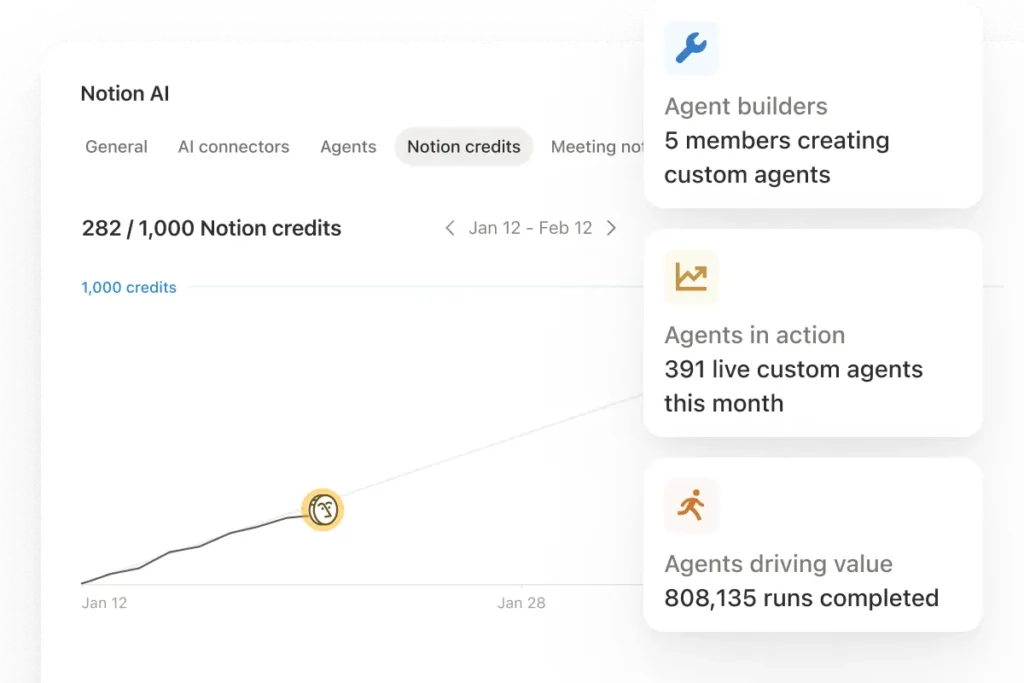
Pricing note: Custom Agents moved to a credit-based model starting May 4, 2026 (after a free beta period). Credits cost $10 per 1,000, shared across your workspace, and reset monthly. Simple tasks use fewer credits; complex multi-step workflows use more. Enterprise teams can negotiate volume pricing.
The Notion Developer Platform (brand new)
This one is fresh out of the oven — announced May 13, 2026. It’s arguably the biggest strategic shift since the original Notion Agent launch.
The Developer Platform does three things that weren’t previously possible:
- External AI agent embedding: Third-party AI agents can now read from and write back to Notion. So a Cursor agent could update your sprint board, or a Claude-powered coding agent could log bugs directly to your Notion database.
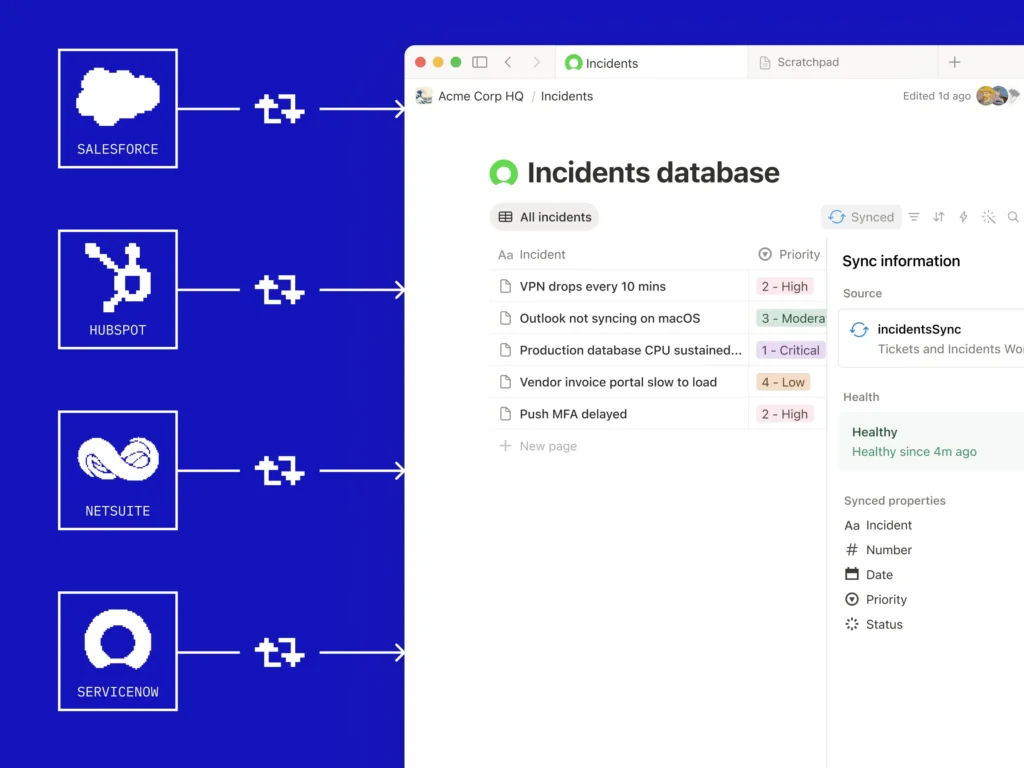
- Live data sync: You can connect any external database with an API — Salesforce, Zendesk, Postgres, etc. — and have Notion stay current with it automatically. No manual exports or third-party sync tools required.
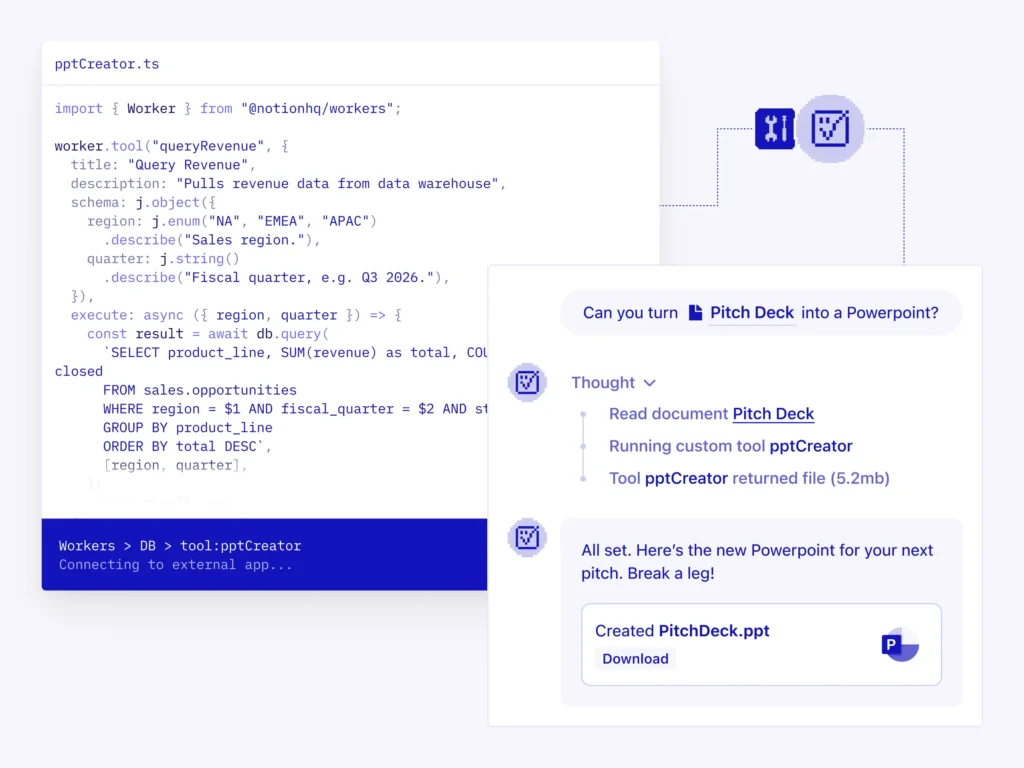
- Notion Workers (custom code execution): Deploy custom code that runs inside Notion’s infrastructure. No external server required. Workers can be triggered by webhooks, automations, or other agents. Free through August 2026 while developers experiment.
Notion’s CEO Ivan Zhao put the vision plainly: “Any data, any tool, any agent — that’s the big picture.” Whether the developer ecosystem actually materializes at scale is an open question. But the architecture is there.
AI Meeting Notes
Honestly one of the more immediately useful features, and often underutilized. AI Meeting Notes transcribes your meetings in real-time, summarizes key decisions and action items, and — since Notion 3.1 — links each takeaway directly to the exact moment in the transcript. On mobile (since v3.2), transcription continues even when you switch apps or lock your screen, which makes it practical for phone calls and walking meetings.
The new Meetings tab in the sidebar organizes notes from every meeting you’ve run or joined, synced with your calendar, so prep and follow-up live in one place instead of scattered across Google Docs and email.
Enterprise Search
For larger teams, this is often the first feature that earns Notion its keep. Enterprise Search lets employees ask plain-language questions and get answers pulled from across the entire workspace — and from connected tools like Slack, GitHub, Google Drive, and Gmail. Affirm, which uses Notion at scale, described it simply: “We replaced our standalone search with Notion AI because answers belong where people work.”
The practical benefit during onboarding is significant. HR teams have reported saving 3–4 hours per new hire in the first two weeks, because new employees ask Notion AI about processes and policies instead of pinging colleagues every twenty minutes.
Which AI model does what
Since Notion 3.2, you can manually select your AI model, or leave it on “Auto” and let Notion route to the best fit. As of May 2026, the available models are:
| Model | Best for | Strengths | Available on |
|---|---|---|---|
| GPT-5.2 (OpenAI) | Accuracy-critical tasks, data analysis | Strong factual precision, structured outputs | Business+ |
| Claude Opus 4.5 (Anthropic) | Complex analysis, code, nuanced writing | Long-context reasoning, code quality | Business+ |
| Gemini 3 Pro (Google) | Multimodal analysis, broad research | Handles images, docs, mixed media well | Business+ |
| Auto (default) | Everyday tasks | Notion routes intelligently based on task type | All AI plans |
The multi-model approach is a genuine differentiator. Most AI productivity tools lock you to one provider’s model. Being able to switch to Claude Opus when you need deep reasoning on a complex document, and back to Auto for routine tasks, is practical in ways that matter once you’re using the system daily. Note that model selection requires Business plan or above — it’s not available on Plus.
7 real-world use cases with outcomes
Abstract feature descriptions only go so far. Here’s what teams are actually building — pulled from Notion’s own case studies, independent reviews, and user reports as of early 2026.
Autonomous IT Help Desk Triage
Custom Agents capture incoming requests, classify them, route to the right owner, and resolve simpler tickets autonomously. Remote saved 20 hours/week and achieves 95%+ triage accuracy.
Competitive Intelligence Automation
Agent scans the web for competitor updates, parses sentiment, and populates a Competitive Analysis database with Sentiment, Key Features, and Pricing fields — automatically, daily.
Sprint Review Drafting
Agent reads completed Jira tickets for the week, cross-references Monday meeting notes, and drafts a release email — ready to send in seconds, not an hour of copy-pasting.
Employee Onboarding Knowledge Base
New hires ask Notion AI questions about policies, benefits, and norms instead of interrupting colleagues. HR teams report saving 3–4 hours per new hire in their first two weeks.
Deal Spotter & Account Intelligence
Braintrust’s “Deal Spotter” agent sends weekly reports on accounts primed for an upgrade. Their customer reference agent sends a weekly summary of top new logos to marketing and the CEO.
End-to-End Feedback Pipeline
Agents capture product feedback from Slack, email, and support tools, create Notion tickets with enriched metadata, and loop back with status updates. One agent replaced a four-person weekly triage meeting.
Content Calendar & Brief Automation
Agent builds a fully populated content calendar for the next month using a strategy doc and ideas database as inputs, generates SEO briefs, and routes them to writers with deadlines pre-set.
“We can now instantly spin up ready-to-use systems that used to take hours of busywork. Then we use those Notion Agents to power whole new workflows at scale.”— Ben Levick, Head of AI & Operations, Ramp
The ROI question — honest numbers
Let’s not pretend the ROI math is simple. It depends heavily on how deeply embedded Notion already is in your team’s daily work. Here’s what independent analysis actually shows:
A 10-person team paying ~$100/month for AI access estimated saving 15–20 hours per month across all members. At an average loaded labor cost of $50/hour, that’s $750–$1,000 in productivity gains against $100 in AI costs. ROI: 7.5x–10x. However: this assumed the team used Notion as its primary workspace. Lower usage = proportionally lower returns.
The ROI picture improves significantly if you account for tool consolidation. If Notion AI replaces separate ChatGPT subscriptions, a project management tool, and a documentation platform, the savings per user per year can reach $400–$520 before you’ve counted a single hour of time saved.
Where ROI is clearest:
- Content and marketing teams (5–25 people) who create, edit, and publish from Notion daily — drafting acceleration pays back quickly
- Growing companies using Notion as a company wiki — Q&A alone transforms onboarding ROI
- Operations teams with repetitive reporting workflows — Custom Agents start generating savings from day one
Where ROI is weakest:
- Teams that barely use Notion day-to-day and are paying the Business plan premium primarily for AI
- Engineering-heavy teams who live in IDEs and terminals — they tend to see the least value from workspace AI
- Small teams (under 5 people) where the per-seat cost outweighs the automation value
Pricing in plain language
Notion’s pricing changed materially in May 2025 and again in May 2026. Here’s the current picture:
| Plan | Price | AI Included | Custom Agents | Model Choice |
|---|---|---|---|---|
| Free | $0 | Very limited | No | No |
| Plus | $12/user/mo | Basic AI | No | No |
| Business | $20/user/mo | Full Agent + Search | Yes (credits add-on) | Yes |
| Enterprise | Custom | Full + Research Mode | Yes (negotiated) | Yes + audit logs |
Custom Agent credits: $10 per 1,000 credits, purchased as an add-on for Business/Enterprise. Credits are workspace-shared and reset monthly. Simple tasks use fewer credits; complex multi-step workflows use more. No rollover on unused credits — factor that into your calculations.
Research Mode (deep multi-step research workflows) is currently a “limited trial” on Business and full-access on Enterprise only. If your team expects to use deep research regularly as a core workflow, Enterprise pricing becomes effectively required for that specific use case. Worth knowing before you sign up at the Business tier.
Honest pros and cons
I’m not going to pretend Notion AI is perfect. Here’s the unvarnished version:
- Genuinely autonomous agents that do real work across entire workspaces
- Multi-model access (GPT-5.2, Claude Opus 4.5, Gemini 3) in one interface
- Deep integration with workspace context — no re-explaining your business every time
- Custom Agents are easy to create (describe in plain language, Notion builds it)
- Mobile parity since v3.2 — real agents on your phone
- Strong enterprise controls: permissions per agent, audit logs, disabling controls
- Developer Platform opens genuinely new possibilities for power users and teams
- Meeting transcription that actually links takeaways to timestamps
- Enterprise Search that replaces standalone search tools for internal knowledge
- Databases with 5,000+ records show 3–5 second page loads and sluggish filtering
- Meaningful AI locked behind Business tier ($20/user/mo) — Plus is too limited
- Custom Agent credit pricing adds cost complexity and unpredictability
- Research Mode only fully available on Enterprise
- Not designed for customer-facing workflows — internal knowledge only
- Security concerns with prompt injection in PDFs (documented by CodeIntegrity)
- Unused credits don’t roll over — monthly budget discipline required
- Developer Platform ecosystem still very early — most integrations need custom work
Notion AI vs the competition
The honest competitive picture is more interesting than “Notion wins.” Different tools genuinely serve different needs better, and the right answer depends on what problem you’re trying to solve.
| Tool | Strongest at | AI approach | Best for | Weakness vs Notion |
|---|---|---|---|---|
| Microsoft Copilot + Loop | Office integration (Word, Excel, Teams) | AI layered onto existing M365 apps | Orgs already all-in on Microsoft | Less flexible; feels like “AI sprinkled on top” |
| Google Workspace + Gemini | Email, Docs, Sheets, Meet | Gemini embedded per app | Google-native teams | No unified workspace; fragmented across tools |
| ClickUp AI | Project management, Gantt, time tracking | AI assistant per PM feature | PM-heavy teams needing granular tracking | Less flexible for documentation; weaker knowledge graph |
| Coda | Complex workflow logic, data manipulation | Coda AI (OpenAI-based) | Teams building internal apps | Steeper learning curve; smaller ecosystem |
| Taskade | AI agents + real-time video at lower price | AI agents included from $16/10 users | Small teams wanting AI agents cheaply | Smaller integrations library; less enterprise maturity |
| Obsidian | Local-first knowledge management, privacy | Third-party plugins (no native AI) | Individual power users, privacy-first | No native AI; no team collaboration at scale |
The Taskade comparison is worth dwelling on briefly because the pricing gap is real: Taskade Pro is approximately $16/month for 10 users, versus Notion Business at $200/month for 10 users. That’s not a small difference. If you’re a small team primarily interested in AI agents and don’t need Notion’s specific database model or its integrations depth, Taskade genuinely warrants evaluation. The tradeoff is ecosystem maturity — Notion’s integrations, enterprise controls, and the new Developer Platform have no equivalent at Taskade yet.
Ramp — a significant Notion customer — pays for Microsoft’s Gemini/Copilot layer for Google Workspace, but actively encourages employees to migrate documents and project tracking to Notion. That’s actually a useful signal: Notion competes on workspace flexibility and agent depth, not on deep OS or email integration. The two can coexist rather than being forced to replace each other.
Who should use it and who shouldn’t
After going through all of this, here’s where I land — and I’ll try to be direct rather than hedge everything into uselessness.
Use Notion AI if:
- Notion is already your team’s operating system. The ROI calculation changes completely when the Agent has context from years of your team’s work to draw on. Without that context, you’re paying Business-tier prices for a chatbot wrapper.
- You have repetitive team-wide workflows that eat hours every week. Custom Agents pay for themselves fastest when there’s a clear, recurring task they can own end-to-end.
- You’re a knowledge-work-heavy team — content, product, operations, research. The more your output is documented knowledge, the more value AI over that documentation delivers.
- You want multi-model AI access in one place rather than juggling separate ChatGPT, Claude, and Gemini subscriptions.
- Enterprise teams managing large knowledge bases where cross-document Q&A replaces dozens of “where do I find X?” messages daily.
Think carefully before committing if:
- Your databases regularly exceed 5,000 rows. Performance issues at scale are real and well-documented. Enterprise teams with 10,000+ record databases consistently report frustration.
- You’re a small team (under 5 people) on a tight budget. The Business plan premium may not clear the ROI bar — look honestly at Taskade or simpler alternatives first.
- You need AI for customer-facing interactions. Notion AI is built for internal knowledge work. It’s not a helpdesk AI, not a customer-facing chatbot. Don’t try to force it into that role.
- You’re primarily an engineering team that lives in IDEs and terminals. Multiple reviews note that engineers derive the least value from workspace AI compared to other functions.
- Security/compliance requirements are strict. The prompt injection vulnerability documented in 2025 hasn’t been fully resolved publicly. For highly sensitive environments, verify Notion’s current security posture directly with their enterprise team.
Notion AI in 2026 is the most capable AI layer available if Notion is already your team’s operating system. The agents are real — not theoretical — and the case studies are backed by actual numbers. The Developer Platform, announced this week, suggests the trajectory is heading somewhere genuinely interesting. But it’s expensive at scale, it has real performance limits, and the value is deeply tied to how much of your team’s knowledge actually lives in Notion. Evaluate honestly against your specific situation, not against the best-case scenario in the marketing materials.
A 4-step framework for getting started with Agents
If you’re setting up your first Notion Agent workflow and feeling slightly overwhelmed, this structure helps:
Step 1 — Define: State the outcome, not just the task.
“I need a fully populated content calendar for Q3.”
(Not: “Make me a content calendar” — too vague)
Step 2 — Context: Point the Agent to the right source material.
“Use the ‘Q2 Strategy’ doc and ‘Blog Ideas’ database as sources.”
Step 3 — Constraints: Tell it what NOT to do.
“Don’t create new database properties. Use existing categories only.”
Step 4 — Verify: Review the Agent’s Thinking log before accepting output.
Check which sources it pulled from — wrong sources = wrong output.
One mistake people make repeatedly: treating the Agent like a search bar. Asking it “what is X?” instead of “do X” is like using a Ferrari as a grocery cart. The Agent earns its value when you hand it work, not queries.
Obsidian vs. Notion: Which PKM Tool Actually Fits Your Workflow?
Google Workspace AI Tools for Academia: Full 2026 Breakdown
Building a Clean Notion Workspace from Zero: A Setup Guide
LLM Pricing Guide: Every Major Model Compared
Notion for Solopreneurs: Build Your Entire Business OS
AI Research Agents: The Definitive Guide for 2025–2026
Best PKM Tools: The Complete Ranked List