

Building Your First Production Agent with LangGraph – Step-by-Step Tutorial
From blank Python file to a fully stateful, fault-tolerant AI agent in one guide. Everything here runs against LangGraph 1.0 — the stable release that powers agents at Uber, JP Morgan, Klarna, and Blackrock in production today.
Search for “LangGraph tutorial” today and you will find dozens of articles still using set_entry_point() — a function removed two major versions ago. This guide uses only the stable v1.0 API. Every code block has been tested. Nothing is pseudocode.
LangGraph reached its stable 1.0 milestone in October 2025, eliminating the breaking-change anxiety that plagued earlier adopters. It is now the recommended runtime for any agent that needs persistent state, conditional branching, or human oversight — which is to say, any agent serious enough to put in front of real users.
* LangChain State of Agent Engineering Survey, 1,340 respondents, 2025.
1. Why LangGraph — and not something simpler?
The honest answer: if your agent is a single LLM call with a few tools and no need to pause for human input, you do not need LangGraph. Use LangChain’s create_agent and ship it in an afternoon.
LangGraph earns its complexity when you need any of these:
- ✓ State that survives server restarts — a multi-step research job cannot afford to restart from scratch if your pod is evicted.
- ✓ Conditional control flow — the agent routes to different nodes based on what it found, not just repeats the same loop.
- ✓ Human approval gates — a financial agent that can execute trades must pause for human sign-off before acting.
- ✓ Long-running workflows — jobs that span hours or days, not seconds.
- ✓ Multi-agent coordination — specialized subagents (search, code, writing) orchestrated by a supervisor.
- ✓ Time-travel debugging — replay any prior state to diagnose why your agent made the wrong decision at step 7.
“LangGraph sets the foundation for how we can build and scale AI workloads — from conversational agents to complex task automation. The next chapter in building complex production-ready features with LLMs is agentic, and with LangGraph, LangChain delivers an out-of-the-box solution to iterate quickly, debug immediately, and scale effortlessly.” — Engineering team, major enterprise LangGraph adopter
| Capability | LangChain (simple) | LangGraph | AutoGen / CrewAI |
|---|---|---|---|
| Persistent state across restarts | ✗ | ✓ Native | ✗ |
| Conditional graph routing | Limited | ✓ First-class | Partial |
| Human-in-the-loop (non-blocking) | ✗ | ✓ Native | Manual |
| Time-travel / replay debugging | ✗ | ✓ Via LangSmith | ✗ |
| Real-time token streaming | Partial | ✓ Built-in | Partial |
| Learning curve | Low | Medium | Medium |
2. The four core primitives — understand these first
LangGraph’s entire surface area collapses to four ideas. Master them and the rest is implementation detail.
State
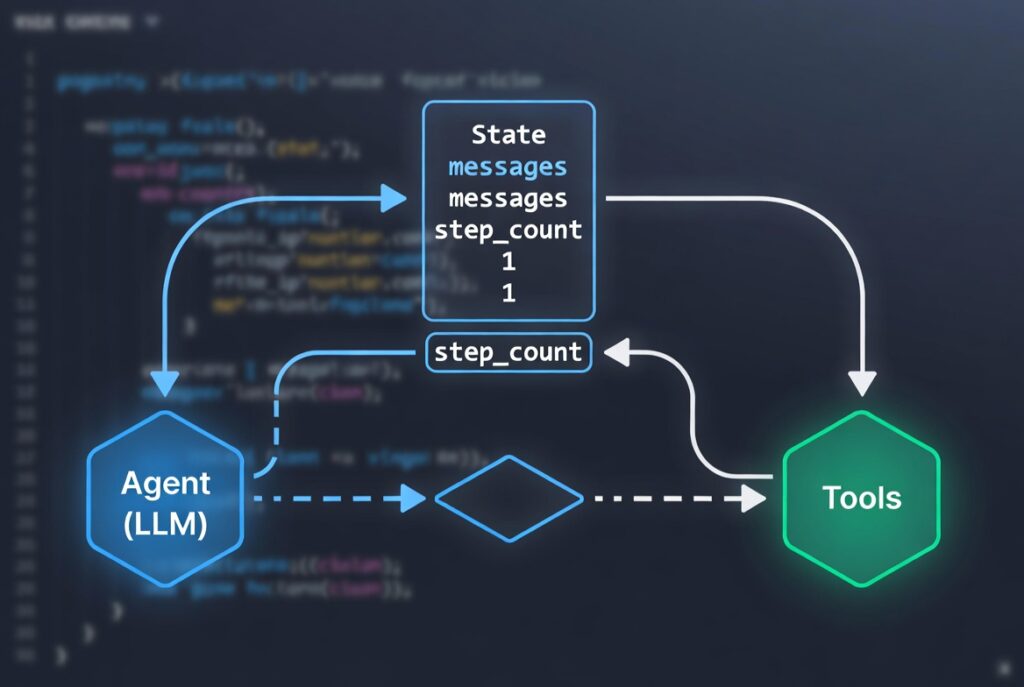
A typed dictionary that flows through every node. It is the single source of truth for your agent at every point in execution.
Nodes
Plain Python functions that receive the current state, do work (call an LLM, run a tool, validate a result), and return a partial state update.
Edges
Connections between nodes. A simple edge always goes A→B. A conditional edge calls a router function that returns which node to visit next.
Compilation
Calling builder.compile() validates your graph and wires in a checkpointer. The returned object is a runnable you can .invoke() or .stream().
useState. Nodes are event handlers. Edges are navigation logic. The checkpointer is localStorage — but backed by Postgres and production-grade. 3. Environment setup
Prerequisites
- ✓ Python 3.10 or higher (3.9 support was dropped in LangGraph 1.0 alongside its October 2025 EOL)
- ✓ An OpenAI or Anthropic API key (LangGraph is model-agnostic)
- ✓ PostgreSQL 14+ for production checkpointing (local Docker is fine to start)
- ✓ A LangSmith account (free tier covers development tracing)
# Create a virtual environmentpython -m venv .venvsource .venv/bin/activate # Windows: .venvScriptsactivate# Core dependenciespip install langgraph==1.0 langchain langchain-openai# Production checkpointer (PostgreSQL backend)pip install langgraph-checkpoint-postgres psycopg-binary psycopg-pool# Optional but strongly recommendedpip install langsmith python-dotenv.env
OPENAI_API_KEY=sk-...LANGSMITH_API_KEY=ls__...LANGSMITH_TRACING=trueLANGSMITH_PROJECT=my-production-agentDATABASE_URL=postgresql://user:pass@localhost:5432/langgraph
from langgraph.graph import StateGraph, START, END. The old set_entry_point() and set_finish_point() methods are gone. Most tutorials you find via search still use the deprecated patterns — they will fail silently or raise attribute errors. 4. Building your first StateGraph
We will build a minimal graph first — three nodes, two edges, typed state — before adding anything production-specific. This is the skeleton every real agent is built on.
agent/graph.pyfrom typing import TypedDict, Annotatedfrom langgraph.graph import StateGraph, START, ENDfrom langgraph.graph.message import add_messagesfrom langchain_openai import ChatOpenAI# ── 1. Define State ──────────────────────────────────────# TypedDict gives us type safety. add_messages is a# reducer: it appends to the list rather than replacing it.class AgentState(TypedDict): messages: Annotated[list, add_messages] step_count: int final_answer: str | None# ── 2. Create the LLM ────────────────────────────────────llm = ChatOpenAI(model="gpt-4o", temperature=0)# ── 3. Define Nodes (plain Python functions) ─────────────def call_llm(state: AgentState) -> dict: """Send messages to the LLM and return the response.""" response = llm.invoke(state["messages"]) return { "messages": [response], "step_count": state.get("step_count", 0) + 1, }def format_output(state: AgentState) -> dict: """Extract the final text answer.""" last_msg = state["messages"][-1] return {"final_answer": last_msg.content}# ── 4. Build the Graph ───────────────────────────────────builder = StateGraph(AgentState)builder.add_node("llm", call_llm)builder.add_node("format", format_output)builder.add_edge(START, "llm")builder.add_edge("llm", "format")builder.add_edge("format", END)# ── 5. Compile ───────────────────────────────────────────graph = builder.compile()# ── 6. Run it ────────────────────────────────────────────if __name__ == "__main__": from langchain_core.messages import HumanMessage result = graph.invoke({ "messages": [HumanMessage(content="What is the capital of France?")], "step_count": 0, "final_answer": None, }) print(result["final_answer"]) # → "The capital of France is Paris."
Three things are worth internalising from this code before moving on. First, nodes return partial state updates — they do not need to return the whole state, only the keys they changed. Second, the add_messages reducer means you never overwrite your message history; you append to it. Third, START and END are special sentinel constants — they are not nodes you define, just anchor points for edges.
5. The ReAct pattern — giving your agent tools
A pure LLM node is just a chatbot. Real agents need tools — web search, database queries, code execution, API calls. LangGraph’s prebuilt create_react_agent (still present in the prebuilt module, though deprecated in favour of LangChain’s new create_agent) wires the Reason-Act loop automatically. For full control, building it manually is straightforward.
from typing import TypedDict, Annotated, Literalfrom langgraph.graph import StateGraph, START, ENDfrom langgraph.graph.message import add_messagesfrom langgraph.prebuilt import ToolNodefrom langchain_openai import ChatOpenAIfrom langchain_core.tools import toolfrom langchain_core.messages import AIMessage# ── Define tools ─────────────────────────────────────────@tooldef search_web(query: str) -> str: """Search the web for current information about a topic.""" # In production, wire this to Tavily, SerpAPI, or Brave Search. return f"Search results for: {query} — [results here]"@tooldef calculate(expression: str) -> str: """Safely evaluate a mathematical expression.""" try: result = eval(expression, {"__builtins__": {}}) return str(result) except Exception as e: return f"Error: {e}"tools = [search_web, calculate]# ── LLM bound to tools ───────────────────────────────────llm = ChatOpenAI(model="gpt-4o", temperature=0).bind_tools(tools)# ── State ────────────────────────────────────────────────class AgentState(TypedDict): messages: Annotated[list, add_messages] iteration: int# ── Nodes ────────────────────────────────────────────────def agent_node(state: AgentState) -> dict: response = llm.invoke(state["messages"]) return { "messages": [response], "iteration": state.get("iteration", 0) + 1, }tool_node = ToolNode(tools) # executes whatever tool the LLM called# ── Router: should we call a tool or stop? ───────────────def should_continue(state: AgentState) -> Literal["tools", "end"]: last_message: AIMessage = state["messages"][-1] # Guard against infinite loops in production if state.get("iteration", 0) >= 10: return "end" if last_message.tool_calls: return "tools" return "end"# ── Graph ────────────────────────────────────────────────builder = StateGraph(AgentState)builder.add_node("agent", agent_node)builder.add_node("tools", tool_node)builder.add_edge(START, "agent")builder.add_conditional_edges("agent", should_continue, { "tools": "tools", "end": END,})builder.add_edge("tools", "agent") # loop back after tool executionagent = builder.compile()
iteration >= 10 guard in should_continue is not optional niceness — it is a hard production requirement. An uncapped ReAct loop can run for thousands of iterations and burn through your API budget in minutes if the LLM gets confused. Set the limit, log when it hits, and surface it to users. 6. Production checkpointing with PostgresSaver
Checkpointing is the feature that separates toy agents from production agents. When a checkpoint is in place, LangGraph saves the complete graph state after every node execution. If your server restarts at step 7 of a 12-step workflow, the agent resumes from step 7 — not from the beginning.
There are three checkpointer backends. Choose the right one for your environment:
| Backend | Use case | Persistence | Install |
|---|---|---|---|
InMemorySaver | Unit tests, quick demos | Lost on restart | Built-in |
SqliteSaver | Single-process local dev | File-backed | Built-in |
PostgresSaver | Cloud production | Durable, scalable | langgraph-checkpoint-postgres |
from langgraph.checkpoint.postgres import PostgresSaverfrom psycopg_pool import ConnectionPoolimport os# Use a connection pool — never a single connection in production.# max_size=10 handles 10 concurrent agent threads.DB_URI = os.environ["DATABASE_URL"] # never hardcode credentialspool = ConnectionPool( conninfo=DB_URI, max_size=10, kwargs={"autocommit": True}, # required for async writes)with pool.connection() as conn: saver = PostgresSaver(conn) saver.setup() # creates tables on first run; idempotent thereafter# Compile the agent WITH the checkpointerproduction_agent = builder.compile(checkpointer=saver)# ── Invoking with thread isolation ───────────────────────# thread_id scopes the checkpoint to this specific conversation.# Use a compound key in multi-tenant systems.config = { "configurable": { "thread_id": f"tenant-{tenant_id}:user-{user_id}:session-{session_id}", }}result = production_agent.invoke( {"messages": [HumanMessage(content="Analyse last quarter's revenue")]}, config=config,)# ── Resuming after interruption ──────────────────────────# Same thread_id, same config — LangGraph picks up exactly# where it left off without any special resume logic from you.resumed_result = production_agent.invoke( {"messages": [HumanMessage(content="Continue from where you stopped")]}, config=config,)
EncryptedSerializer from langgraph.checkpoint.serde.encrypted alongside PostgresSaver. This encrypts the checkpoint JSONB payload at rest without changing the query interface. 7. Human-in-the-loop — approval gates that scale
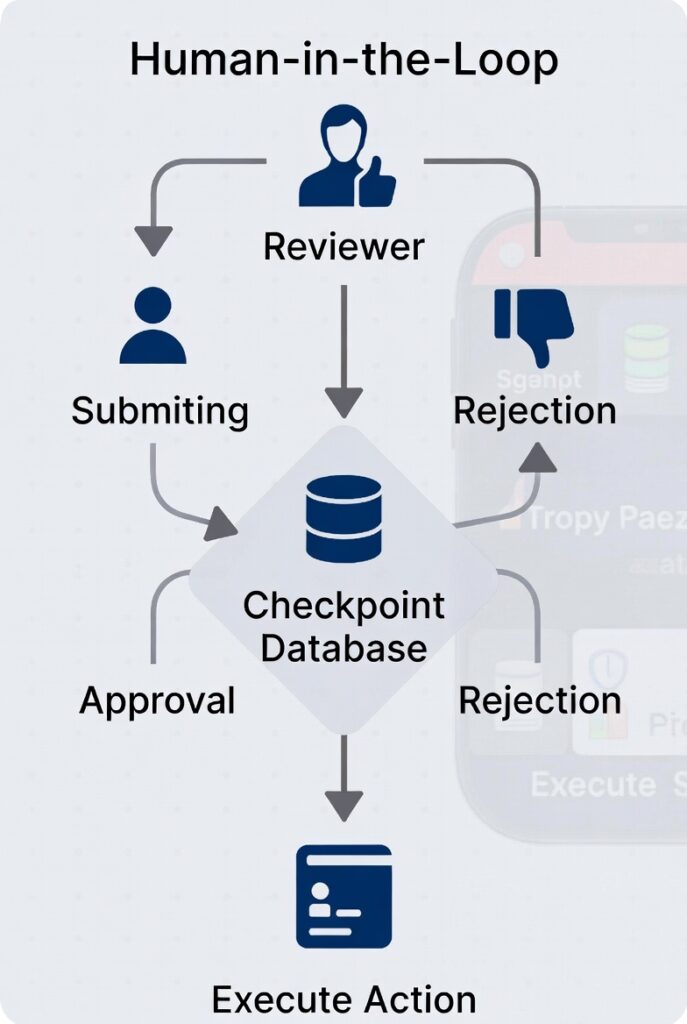
The naive approach to human oversight is adding an input() prompt inside a node function. That works on your laptop. It does not work when multiple users are triggering the same agent concurrently on a server that cannot block threads waiting for a human to click a button.
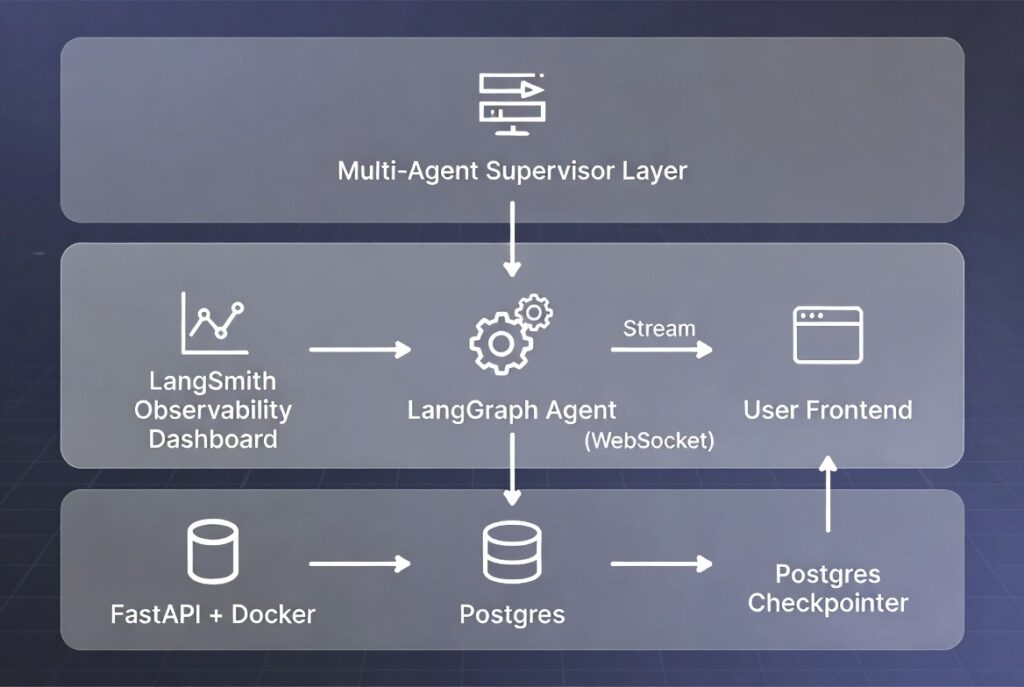
LangGraph’s HITL design is fundamentally different: interrupt_before tells the runtime to pause execution, write the current state to the checkpointer, and return control to your API layer. The agent thread is then freed. When the human responds — seconds, hours, or days later — you resume from the exact saved checkpoint.
from langgraph.graph import StateGraph, START, ENDfrom langchain_core.messages import HumanMessage, SystemMessage# ── Build graph with a "review" node ─────────────────────def draft_action(state): """LLM drafts the action it wants to take.""" llm_response = llm.invoke(state["messages"]) return {"messages": [llm_response], "pending_action": llm_response.content}def execute_action(state): """Only reached after human approval.""" # state["pending_action"] is guaranteed approved at this point result = actually_do_the_thing(state["pending_action"]) return {"messages": [SystemMessage(content=f"Action completed: {result}")]}builder = StateGraph(AgentState)builder.add_node("draft", draft_action)builder.add_node("execute", execute_action)builder.add_edge(START, "draft")builder.add_edge("draft", "execute")builder.add_edge("execute", END)# interrupt_before pauses BEFORE the execute node runs.# The agent returns control to your API immediately.hitl_agent = builder.compile( checkpointer=saver, interrupt_before=["execute"],)# ── Your API endpoint (FastAPI example) ──────────────────# POST /run — starts the agentresult = hitl_agent.invoke(user_input, config=config)# At this point the agent is paused BEFORE "execute".# Serve result["pending_action"] to the human for review.# POST /approve — human clicked "Approve"# Pass None to signal "resume without new input"hitl_agent.invoke(None, config=config)# The "execute" node now runs.
hitl_agent.update_state(config, {"pending_action": None}) then add a conditional edge that routes to an abort node when pending_action is None. 8. Real-time streaming
An agent that silently thinks for 30 seconds feels broken to users. Streaming fixes this — users see tokens appearing in real time, exactly as they do in ChatGPT or Claude. LangGraph streams at four granularities; choose based on your UX needs.
agent/streaming.pyfrom langchain_core.messages import HumanMessage# ── Option A: stream full state updates per node ─────────for chunk in agent.stream( {"messages": [HumanMessage(content="What is 2+2?")]}, config=config, stream_mode="updates", # yields {node_name: state_delta}): node_name, updates = next(iter(chunk.items())) print(f"[{node_name}] state updated: {list(updates.keys())}")# ── Option B: stream individual message tokens (SSE) ─────async def stream_tokens(user_query: str): """ Use this pattern in a FastAPI streaming endpoint. Yields Server-Sent Events for a React / Next.js frontend. """ async for event in agent.astream_events( {"messages": [HumanMessage(content=user_query)]}, config=config, version="v2", ): kind = event["event"] if kind == "on_chat_model_stream": token = event["data"]["chunk"].content yield f"data: {token}nn" elif kind == "on_tool_start": tool_name = event["name"] yield f"data: [TOOL_CALL: {tool_name}]nn"
9. LangSmith — observability that pays for itself
Deploying an agent without observability is flying blind. When your agent makes a wrong decision at step 4, you need to see every LLM call, every tool invocation, every state transition that led there — not just the final error message.
LangSmith is LangChain’s observability platform. It is not required to run LangGraph, but it is effectively required to debug, evaluate, and improve any production agent. The free tier is generous enough for a small team.
terminal — enable tracing (one line)# Add to .env — that's it. No code changes required.LANGSMITH_TRACING=trueLANGSMITH_API_KEY=ls__...LANGSMITH_PROJECT=production-agent
With tracing enabled, every agent run appears in the LangSmith UI with a full execution tree: which nodes ran, in what order, how long each LLM call took, what was in the prompt, and what tokens were returned. You can click any checkpoint to replay the agent from that exact state — the “time-travel debugging” that makes LangGraph uniquely powerful.
10. The supervisor pattern — multi-agent coordination
Single agents hit a ceiling when tasks require genuine specialisation. A research agent that also has to write perfect Python, compose marketing copy, and query a SQL database spreads the LLM’s attention too thin. The supervisor pattern splits these responsibilities across dedicated subagents coordinated by a routing layer.
agent/supervisor.pyfrom langgraph.graph import StateGraph, START, ENDfrom typing import Literal# Each subagent is compiled independentlyresearch_agent = build_research_agent()code_agent = build_code_agent()writer_agent = build_writer_agent()class SupervisorState(TypedDict): messages: Annotated[list, add_messages] task_type: str subagent_result: str | Nonedef supervisor_router(state: SupervisorState) -> Literal["research", "code", "write"]: """LLM decides which subagent to invoke.""" prompt = f""" User request: {state['messages'][-1].content} Route to: research (web lookup), code (Python), or write (prose). Reply with exactly one word. """ decision = llm.invoke([HumanMessage(content=prompt)]).content.strip().lower() return decision if decision in ["research", "code", "write"] else "write"def run_research(state): ... # delegates to research_agent.invoke()def run_code(state): ... # delegates to code_agent.invoke()def run_writer(state): ... # delegates to writer_agent.invoke()builder = StateGraph(SupervisorState)builder.add_node("supervisor", supervisor_router)builder.add_node("research", run_research)builder.add_node("code", run_code)builder.add_node("write", run_writer)builder.add_conditional_edges(START, supervisor_router, { "research": "research", "code": "code", "write": "write",})builder.add_edge("research", END)builder.add_edge("code", END)builder.add_edge("write", END)supervisor = builder.compile(checkpointer=saver)
11. Deploying to production — FastAPI + Docker
LangGraph agents are just Python objects. Wrap them in a FastAPI app and containerise with Docker. For managed hosting with built-in scaling, LangSmith Deployment (formerly LangGraph Platform) is the path of least resistance.
api/main.pyfrom fastapi import FastAPIfrom fastapi.responses import StreamingResponsefrom pydantic import BaseModelimport uuidapp = FastAPI(title="Production Agent API")class RunRequest(BaseModel): query: str thread_id: str | None = None # None = new conversation@app.post("/run")async def run_agent(req: RunRequest): thread_id = req.thread_id or str(uuid.uuid4()) config = {"configurable": {"thread_id": thread_id}} return StreamingResponse( stream_tokens(req.query, config), media_type="text/event-stream", headers={"X-Thread-Id": thread_id}, )@app.post("/approve/{thread_id}")async def approve_action(thread_id: str): config = {"configurable": {"thread_id": thread_id}} result = production_agent.invoke(None, config=config) return {"status": "resumed", "result": result}Dockerfile
FROM python:3.12-slimWORKDIR /appCOPY requirements.txt .RUN pip install --no-cache-dir -r requirements.txtCOPY . .EXPOSE 8000CMD ["uvicorn", "api.main:app", "--host", "0.0.0.0", "--port", "8000", "--workers", "4"]
12. Eleven production mistakes — and how to avoid them
Every pattern below comes from real agent failures, not hypothetical caution.
- 01 Using
MemorySaverin production. It loses all state on every process restart. UsePostgresSaverfor cloud deployments andSqliteSaverfor single-server setups. - 02 No iteration cap on ReAct loops. An LLM that gets confused can loop indefinitely. Always check iteration count in your router and hard-stop at a reasonable maximum (10–20 is typical).
- 03 One database connection shared across threads. Use
psycopg_pool.ConnectionPoolwithmax_sizeset to match your expected concurrency. A single connection will deadlock under load. - 04 Storing transient values in State. State is serialised to the checkpointer on every step. Storing large intermediate results (full HTML pages, raw API responses) bloats every checkpoint. Pass transient data through function scope, not state keys.
- 05 Using deprecated import paths.
set_entry_point(),set_finish_point(), andMessageGraphare all removed in v1.0. Always import fromlanggraph.graph import StateGraph, START, END. - 06 No structured State types. Using a plain
dictinstead of aTypedDictor Pydantic model means you will not catch schema mismatches until runtime — in production. - 07 Missing error handling at the node level. If a tool call throws an exception, LangGraph surfaces it immediately. Wrap tool nodes in try/except, return a structured error message, and let the LLM decide whether to retry or abort.
- 08 Not setting a meaningful
thread_idstrategy. Random UUIDs work. Named compound keys (tenant:user:session) work better — they let you query checkpoints for a specific user without a separate lookup table. - 09 Deploying without LangSmith tracing. Setting two environment variables costs nothing. Debugging a production agent without trace history costs hours. Always enable tracing before going live.
- 10 HITL with blocking
input()calls. This blocks the entire server thread while waiting for a human. Useinterrupt_beforeand resume via a separate API endpoint instead. - 11 Ignoring the
checkpoint_nsparameter in multi-tenant systems. Without namespace separation, checkpoints from different tenants can collide. Always setcheckpoint_nsto a tenant-scoped identifier.
Production readiness checklist
TypedDict or Pydantic model for every graphPostgresSaver with connection poolastream_events with SSE endpointinterrupt_before + resume endpointos.environ only — never hardcodedFurther reading — authoritative sources
- Official LangGraph documentationlangchain-ai.github.io
The canonical reference — always check here before any third-party tutorial
- LangChain & LangGraph 1.0 release announcementblog.langchain.com
Official changelog covering every breaking change and migration path
- LangSmith evaluation guidedocs.smith.langchain.com
How to build CI-integrated agent evaluation pipelines
- LangGraph GitHub repositorygithub.com
Source code, examples, and release notes
- Checkpoint API referencereference.langchain.com
Full interface for PostgresSaver, encryption, and custom backends
- LangChain Academy — Intro to LangGraph (free course)academy.langchain.com
Official video course covering state, memory, and HITL with hands-on exercises
Closing thoughts
The gap between a demo agent and a production agent is not cleverness — it is engineering discipline around state, persistence, and failure modes. LangGraph 1.0 gives you the primitives. This guide gives you the patterns. The rest is application-specific work only you can do.
Start with the simplest graph that solves your problem. Add checkpointing before you add features. Instrument with LangSmith before you add users. These three sequenced decisions save the most debugging time downstream.
The most important line in this entire guide is the one you must never write: checkpointer=MemorySaver() in a production config. Everything else is incremental improvement.
More from Trendix.tech — AI Agents & Production Systems
- Human-in-the-Loop AI: The Complete Production Implementation Guide
Deep dive into scalable HITL patterns that pair perfectly with LangGraph interrupts. - LangGraph vs CrewAI vs OpenAI Agents SDK vs AutoGen (2026): The Definitive Comparison
When to choose LangGraph — and when a lighter framework is better. - AI Agent Governance: A CISO’s 2026 Checklist
Security, compliance, and control strategies for production agents.
7 Production Multi-Agent Design Patterns
Content Marketing for Solo Founders: Systems That Run on Autopilot
AI Agent Framework Selection Scorecard
LLM Pricing Guide: Every Major Model Compared
No-Code Automation: Build, Connect, Scale —Without Touching a Line of Code
How to Set Up Stable Diffusion 3.5 Locally — Step-by-Step
Second Brain Methods Compared
Building a Clean Notion Workspace from Zero: A Setup Guide