



Prompt Engineering for Non-Techies: The Solopreneur’s Complete Guide
You don’t need to understand how AI works under the hood. You just need to learn how to talk to it — clearly, strategically, and with intent.
There’s a version of this guide that starts with “AI is changing everything.” You’ve read that sentence a hundred times already, so let’s skip it.
Here’s what’s actually true: 29.8 million solopreneurs are currently running businesses in the United States alone, contributing $1.7 trillion to the economy. And a growing wedge is forming between the ones who’ve figured out how to use AI tools properly and those who haven’t. That wedge shows up in billable hours, in content volume, in client response times, in revenue per hour worked.
Prompt engineering sounds intimidating. It has “engineering” right there in the name, which makes a lot of people assume you need a computer science degree to do it well. You don’t. Not even close. It’s really just the art of giving AI tools clear, specific instructions so they stop giving you generic, useless garbage and start giving you things you can actually use.
This guide is written for people running real businesses — coaches, consultants, designers, writers, marketers, course creators — who want to stop leaving productivity on the table. We’ll go from the absolute basics to the kind of nuanced techniques that separate the power users from everyone else.
- What Prompt Engineering Actually Is (No Jargon)
- Why It Matters More Than the AI Tool You Choose
- The Anatomy of a Great Prompt
- 5 Frameworks That Work Every Time
- Advanced Techniques (Still No Coding Required)
- Ready-to-Use Prompt Library for Solopreneurs
- The 8 Most Common Mistakes (And How to Fix Them)
- Real Solopreneur Case Studies
- Building a Prompt System for Your Business
- Which Tools to Use and When
What Prompt Engineering Actually Is
The name is misleading. The skill is surprisingly human.
A prompt is simply the instruction you give to an AI. “Write me a blog post about marketing” is a prompt. “Summarize this email” is a prompt. “What should I charge for my consulting services?” is a prompt. You’ve been writing prompts since the first time you opened ChatGPT.
Prompt engineering is just the practice of writing those instructions more deliberately — with enough specificity, context, and structure that the AI produces something genuinely useful rather than something that could have been written by any bored intern on autopilot.
Think of it this way: when you hire a freelancer for a project, the quality of their work depends heavily on how well you brief them. A vague brief (“write something about my product”) produces vague results. A detailed brief — with tone references, target audience, key messages, constraints, and examples — produces something you can actually use. AI is no different. It’s not smarter or dumber based on the tool itself (usually). It’s better or worse based on what you tell it.
The biggest misconception is that prompt engineering is about finding magic words. It isn’t. It’s about being a clear communicator — which is a skill every good business person already has.
— Myriam Tisler, Prompt Engineering Guide (2025)
The term itself has become a bit loaded in 2025. Some argue it’s becoming less relevant as models grow more capable of inferring what you mean. There’s some truth to that — modern models like GPT-4o, Claude Sonnet, and Gemini 2.5 are far more forgiving of sloppy prompts than their predecessors were. But here’s the thing: “forgiving” and “optimal” aren’t the same. You can get a passable result with a lazy prompt. You get a great result with a thoughtful one. For a solopreneur where quality and speed both matter, that gap is significant.
Why It Matters More Than the AI Tool You Choose
Most people spend time debating which AI tool is best. ChatGPT vs. Claude vs. Gemini vs. whatever just launched this week. That debate isn’t worthless, but it’s not where the real leverage is.
A mediocre prompt on a great model gives mediocre results. A great prompt on a decent model gives great results. The prompt is doing more of the heavy lifting than most people realize.
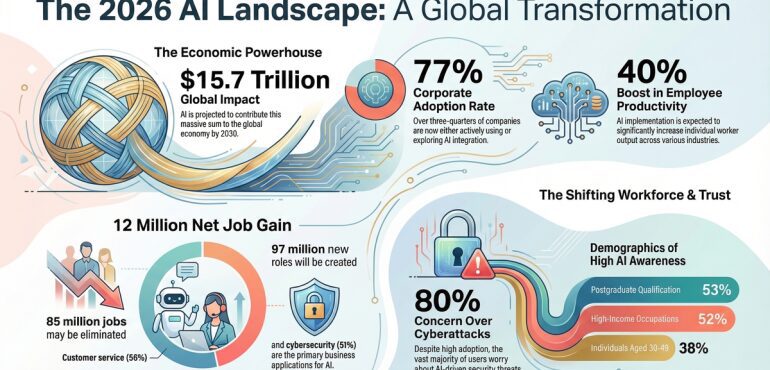
What those numbers don’t capture — what no survey can really capture — is how uneven the benefit is. Plenty of people use AI tools daily and save maybe 30 minutes. Others save entire days. The difference, almost always, comes down to how well they communicate with the tool. Which is prompt engineering.
The modern solopreneur tech stack costs around $3,000–$12,000 per year according to recent analysis — a 95–98% reduction compared to traditional staffing models. But that only translates to real competitive advantage if you’re using those tools at their ceiling, not their floor.
The Anatomy of a Great Prompt
Every strong prompt has the same core ingredients, combined in different proportions depending on the task.
Before you memorize any framework, it’s more useful to understand the building blocks. Most frameworks are just different arrangements of the same six elements:
- 1
Role / Persona
Who is the AI pretending to be? A senior copywriter? A financial advisor? A no-nonsense editor? Assigning a role primes the model to respond with the vocabulary, tone, and assumptions of that person. “You are an experienced B2B copywriter specializing in software consulting” produces very different output than “write some copy for my consulting firm.”
- 2
Task
What exactly do you want done? Be specific about the verb. “Write,” “rewrite,” “summarize,” “analyze,” “brainstorm,” “critique,” “compare” — these all lead to very different behaviors. Don’t say “help me with my email.” Say “write a follow-up email.”
- 3
Context
Background information the AI needs to do the job well. Who is your audience? What’s the business situation? What’s already been tried? What constraints exist? Context is where most beginners underinvest. The model cannot read your mind — you have to brief it like you would a new team member.
- 4
Examples (Few-Shot)
If you want a specific style or format, show it. Paste an example of writing you like, a previous email that worked well, or a sample output. This is called “few-shot prompting” and it’s one of the most reliably effective techniques available. According to Google Research, even one well-chosen example can dramatically narrow the model’s interpretation of what you’re asking for.
- 5
Constraints
What should the output not include? What’s off-limits? “No buzzwords,” “under 200 words,” “don’t mention competitors by name,” “avoid passive voice” — constraints narrow the possibility space and push the model toward what you actually want.
- 6
Output Format
How should the response be structured? A bullet list? A table? Markdown? A series of subject lines? Paragraphs suitable for direct copy-paste? Specifying format saves you editing time and makes outputs immediately usable.
You won’t need all six in every prompt. A quick task (“summarize this article in 3 bullet points”) only needs a couple. A complex, recurring task (generating client proposals) benefits from all of them. The skill is knowing which elements matter most for the job at hand.
What This Looks Like in Practice
Write a LinkedIn post about my new service.
You are a LinkedIn strategist who writes for independent consultants.Write one LinkedIn post announcing my new 90-day business strategy intensive for e-commerce founders. The post should:- Start with a counterintuitive hook, not a question- Reference a real pain point (founders scaling past $500K who hit an operations wall)- Be 150–200 words, no hashtags, no emojis- End with a soft CTA, not a hard sellTone: confident, direct, slightly contrarian. Think of how Patrick Lencioni writes — authoritative but conversational.
The difference in output quality between these two prompts is not small. It’s the difference between generic filler content and something you might actually post.
5 Frameworks That Work Every Time
Frameworks aren’t magic formulas. They’re mental scaffolding that helps you include the right information without having to think about it from scratch every time.
RTF — Role, Task, Format
The simplest and most widely applicable framework. Start here if you’re just getting comfortable with prompting. Works for 80% of everyday tasks.
COSTAR — Full-Stack Prompting
Originally created by data scientist Sheila Teo, this won Singapore’s first GPT-4 Prompt Engineering competition. Best for complex, high-stakes content.
CARE — Context, Action, Result, Example
Excellent for persuasive writing, case studies, and marketing copy. Helps AI understand the narrative arc you’re building toward.
TRACE — Task, Role, Audience, Constraints, Extras
Particularly useful when you need research synthesis, competitive analysis, or structured thinking on a complex topic.
RODES — Role, Objective, Details, Examples, Sense-Check
Best for generating customer communications, email sequences, and client-facing materials where tone and accuracy are both critical.
Don’t pick one framework and stick to it religiously. Learn RTF first, practice it until prompting feels natural, then layer in COSTAR or CARE when the task warrants it. Frameworks are tools, not dogma.
RTF in Action — A Walk-Through Example
# ROLEYou are a senior client success manager at a boutique UX consulting firm. You're warm, professional, and reassuringly organized.# TASKWrite a welcome email for a new client (a fintech startup) who just signed a 3-month brand identity project. This email should:1. Confirm what we'll be doing together (brand strategy, visual identity, messaging guide)2. Outline the first two weeks (discovery call, brand audit, stakeholder interviews)3. Ask them to send over any existing brand assets and competitors they admire# FORMATEmail format. Subject line included. No more than 250 words. Sign off as "Jordan." Conversational but professional — not corporate, not too casual. No bullet points in the body.
Advanced Techniques (Still No Coding Required)
Chain-of-Thought Prompting
Sometimes the AI gives you an answer without showing its reasoning, and that answer is wrong — or at least not well-suited to your situation. Chain-of-thought prompting tells the model to think out loud before giving you the final answer.
The classic implementation is simple: add “Think step-by-step” or “Walk me through your reasoning first” to your prompt. According to Google Brain research, this technique significantly improves accuracy on complex, multi-step problems — particularly math, logic, and strategic planning tasks.
I'm a freelance brand strategist considering raising my prices. My current rate is $150/hr and I want to move to project-based pricing.Before giving me a recommendation, think through:1. The typical pricing psychology of service businesses moving from hourly to project-based2. The risks of moving too fast vs. too slow3. How existing clients vs. new clients should be treated differentlyThen give me a concrete recommendation for how to transition, including how to frame it to existing clients.
Few-Shot Prompting — Teaching By Example
If you need the AI to match a specific style, format, or tone — your voice, your brand’s voice, a format that works for your audience — the most reliable way to get it right is to show examples. Researchers at Brown University demonstrated that even a handful of examples dramatically improves output consistency.
I need you to generate email subject lines in my brand voice. Here are 5 examples of subject lines from my past campaigns that performed well:1. "Your content calendar is a lie (here's what to do instead)"2. "I was wrong about niching down"3. "The 30-minute week in review that changed my business"4. "Why your best clients aren't finding you"5. "Unpopular opinion: consistency beats creativity"Notice the voice: direct, slightly provocative, specific, always a real claim or opinion — never vague or hype-y.Now write 8 subject lines for my upcoming email series on raising prices as a freelancer. Same voice, same style.
Iterative Prompting — The Conversation Approach
Most people treat AI like a vending machine: put in a prompt, take out an output, done. The better approach is a conversation. Start with a draft request, evaluate what you get, then refine with a follow-up prompt. This is sometimes called “multi-turn prompting” and it’s how professional users actually work.
Prompt → Evaluate → Refine → Repeat. Don’t delete and start over when you get something imperfect. Reply with specific feedback: “Good structure but the tone is too formal — make it feel more like I’m talking to a friend who happens to be an expert.” That instruction is faster and more precise than starting from scratch.
Persona Stacking
One underused technique: ask the AI to approach a problem as multiple different experts, then synthesize the views. This is surprisingly effective for decisions where you’d normally want multiple perspectives — pricing, marketing strategy, hiring decisions.
I'm deciding whether to offer a monthly retainer or project-based pricing for my social media management service.Analyze this decision from three perspectives:1. A CFO focused on predictable cash flow and financial risk2. A sales strategist focused on conversion rates and client acquisition friction 3. An operations consultant focused on time efficiency and scope creep riskAfter all three perspectives, give me your synthesis: the single recommendation you'd make if you had to choose one model for a solo operator at the $150K–$250K revenue stage.
Reverse Prompting — Ask AI to Write the Prompt
Stuck on how to phrase your prompt? Ask the AI to help you build it. Describe what you’re trying to accomplish in plain language and ask it to generate the optimal prompt for that goal. It sounds circular but it works well, especially when you’re exploring a new use case.
I want to use AI to help me prepare for sales calls with potential clients. The goal is to feel confident, anticipate objections, and know exactly how to position my offer.Write me the optimal prompt I should use before each sales call, given that I'll paste in the prospect's LinkedIn profile and a few notes about their business situation. The prompt should be reusable as a template.
Ready-to-Use Prompt Library for Solopreneurs
Copy, adapt, and save these. They cover the most common high-value use cases for solo operators.
🗂 Prompt Library — Common Solopreneur Tasks
Content & Marketing
Client Communication
Offer Development
SEO & Research
The 8 Most Common Mistakes — and How to Fix Them
After watching hundreds of solopreneurs start using AI tools, certain patterns show up repeatedly in the people who are disappointed with their results.
| Mistake | What It Looks Like | The Fix |
|---|---|---|
| Too vague | “Write something for my newsletter” | Specify audience, topic, angle, word count, and tone in a single prompt |
| No context | Asking for strategy without explaining your business situation | Front-load every important prompt with 3–5 lines of relevant background |
| Accepting first output | Using whatever the AI produces without iteration | Treat the first response as a draft. Reply with specific refinement requests |
| Forgetting the audience | Generic copy because you didn’t specify who it’s for | Always describe your reader as precisely as you would to a human writer |
| No format spec | Getting a wall of text when you wanted bullet points | End every complex prompt with “Format: [specify exactly]” |
| Starting fresh every time | Rewriting the same context from scratch for recurring tasks | Build a prompt library. Save your best prompts in a doc or tool like Notion |
| Trusting facts blindly | Publishing AI-generated stats without verification | Always verify specific claims, numbers, and quotes from primary sources |
| Over-relying on AI voice | Content that sounds like everyone else’s AI content | Use AI for drafts and structure. Add your specific opinions and examples manually |
AI models can and do generate false information stated with full confidence — particularly specific statistics, quotes, publication dates, and names of people. This isn’t a reason to avoid AI. It’s a reason to verify anything factual before you publish or present it. A good rule: if a fact would embarrass you if it were wrong, check it.
Real Solopreneur Case Studies
Freelance Brand Consultant — Content Production at Scale
A UK-based brand consultant was spending 12+ hours per week on content creation — LinkedIn posts, newsletter drafts, case study writeups, and proposal templates. She built a “content OS” in Notion with reusable prompts for each content type, including few-shot examples of her best-performing past content.
The prompts didn’t replace her voice or thinking — they handled structure, first drafts, and formatting. She still added her specific client examples and perspectives manually. Total time reduction: roughly 8 hours per week, which she redirected to an additional client engagement.
Independent Business Coach — Proposal Automation
Writing custom proposals was taking a business coach 3–4 hours per proposal. He created a master prompt template that included his methodology, typical deliverables, pricing tiers, and tone guidelines — along with space to paste in research about the specific prospect. With this single prompt, he reduced proposal creation to under 45 minutes, including final review and editing.
The key was specificity: he included example paragraphs from past proposals he was happy with, explicit constraints (no guarantees about outcomes, no passive voice, always include a “what makes us different” section), and a required structure he wanted every proposal to follow.
Online Course Creator — Research & Curriculum Design
A course creator in the e-commerce space was using AI for research but getting generic results. The shift came when she started using chain-of-thought prompting for curriculum design — asking the AI to think through what learners at each experience level would struggle with most, then structure content to address those specific friction points. She combined this with persona stacking to get multiple pedagogical perspectives on how to sequence material.
The result wasn’t AI-generated courses — her expertise and original content still drove everything. But the AI dramatically accelerated the thinking and structuring work that had previously been the most time-consuming part of curriculum development.
Building a Prompt System for Your Business
The difference between using AI occasionally and using it as true leverage is having a system.
Most solopreneurs use AI the same way they use Google — a reactive tool they turn to when they need something. That’s fine as a starting point. But the real productivity gains come when you build a proactive system: a library of pre-built prompts for your most common high-value tasks, organized and accessible so you don’t have to think about prompting from scratch each time.
Step 1: Audit Your Time First
Before building any prompts, spend one week tracking where your hours actually go. What are the recurring tasks that eat the most time? Content creation? Client communications? Research? Proposal writing? Administrative work? The answer is different for every business and should drive which prompts you prioritize building first.
Step 2: Build Prompts Around Your Highest-Value Recurrences
Pick the three tasks that take the most time and have the clearest repeatable structure. Start there. A well-built prompt for your weekly newsletter, for example, might take 90 minutes to develop and test — but it saves you an hour every single week from that point forward. That’s ROI you start seeing within six weeks.
Step 3: The Prompt Stack Structure
A well-organized prompt library has three layers:
| Layer | What It Contains | Example |
|---|---|---|
| Identity Prompts | Your core business context, voice, audience, and positioning — used as a prefix for many other prompts | “You are writing for [Your Name], a [role] who helps [audience] achieve [outcome]. Our voice is [description]…” |
| Task Prompts | Specific, ready-to-run prompts for recurring tasks — personalized to your needs with few-shot examples | Newsletter draft prompt, proposal prompt, LinkedIn prompt, client email prompt |
| Modifier Prompts | Short follow-up prompts used to refine outputs — your most-used editing and refinement instructions | “Make this less formal,” “Cut by 30% without losing the main points,” “Add a specific example for the third paragraph” |
Step 4: Store and Iterate
Notion, a simple Google Doc, or a dedicated tool like PromptBase works fine for storage. What matters is that your prompts are findable and regularly reviewed. Prompts decay over time as your business evolves, your voice changes, and the AI tools improve. Revisit your library quarterly and update prompts that are producing stale results.
Be thoughtful about what you paste into AI tools. Client names, proprietary data, financial details, and personally identifiable information should be anonymized before being included in prompts. Most consumer AI tools use conversation data for training unless you specifically opt out. For sensitive business contexts, use enterprise tiers or dedicated tools with stronger data protections.
Which Tools to Use and When
| Tool | Best For | Weak Points | Cost (2026) |
|---|---|---|---|
| ChatGPT (GPT-4o / GPT-5) | General writing, research, coding help, image generation, data analysis | Can be verbose; varies in consistency across sessions | Free tier available; Plus $20/mo |
| Claude (Anthropic) | Long document analysis, nuanced writing, following complex instructions, tone calibration | No image generation; web search in Pro tier only | Free tier; Pro $20/mo |
| Gemini (Google) | Research tasks, Google Workspace integration, real-time web access | Less consistent creative writing voice | Free; Advanced $20/mo |
| Perplexity AI | Real-time research with citations; replacing certain Google searches | Not designed for content creation or long-form writing | Free; Pro $20/mo |
| Notion AI | Prompting within your existing workflow and documents | Less powerful than standalone models for complex tasks | Add-on to Notion plans |
The honest advice: pick one and learn it deeply before chasing new tools. The switching cost of constantly moving between AI platforms is real — you lose the context, the conversation history, and the muscle memory of how to prompt effectively on that specific system. Most solopreneurs do well with one primary tool and one specialized tool (for example: Claude as your main writer, Perplexity for research).
The Real Competitive Edge
Solo-founded startups jumped from 23.7% of all new startups in 2019 to 36.3% by mid-2025. That’s a 53% increase in six years, and the tools available to solo operators have grown in proportion. The solopreneurs who will pull ahead in the next three years aren’t necessarily the ones with the best ideas — they’re the ones who build systems around their best capabilities and stop doing everything manually that a well-prompted AI could handle.
That said, a note of realism: AI is not a replacement for expertise, genuine client relationships, hard-won perspective, or good judgment. The outputs it produces are only as useful as the thinking you bring to the prompt. The solopreneurs who get this wrong are the ones who use AI to replace thinking rather than accelerate it.
Used well, prompt engineering gives you something rare: more time in your business to do the things that actually require you. The strategy calls. The client relationships. The creative leaps. The decisions that no AI will make better than you.
That’s worth learning.
1. Pick one recurring task that takes 2+ hours per week. Build a dedicated prompt for it this week using the RTF or COSTAR framework.
2. Create a “brand voice” reference document — 5 examples of your best past content, a description of your audience, and 5 adjectives that describe your tone. Paste this at the start of any content creation prompt.
3. Commit to the iterative approach for 30 days. Never use a first-draft AI output without at least one refinement prompt. Track how your results improve.
Sources & Further Reading
- OpenAI: The State of Enterprise AI (2025 Report)
- Solopreneur Statistics 2026: 29.8 Million Solo Businesses
- 2026 Small Business AI Outlook Report — Business.com
- Every Prompt Engineering Technique Explained — SurePrompts (2026)
- A Simple Framework for Writing Better AI Prompts — PMI
- Effective Prompts for AI: The Essentials — MIT Sloan
- How to Leverage AI for Business Productivity — US Chamber of Commerce
- Prompt Engineering Guide 2025 — Myriam Tisler
- The Ultimate Guide to Prompt Engineering 2026 — Lakera
- Prompt Engineering Frameworks — Parloa
More from Trendix.tech
Continue reading — these go deeper on the topics that matter most to solo operators.
AI Coding Agents: The Complete Guide for 2026
AI for Solopreneurs: The Definitive Playbook
AI Image Generators Ranked: Midjourney to Ideogram
Prompt Injection: What It Is and How to Defend Against It in Production
RAG Security: Attack Surfaces in Retrieval Pipelines
LLM Security Testing: Tools, Techniques, and What Garak Doesn’t Cover
AI is changing solo businesses forever — but not the way you think