

Small Business Marketing Automation Is Broken — Here’s What Works
Most small businesses waste months and thousands of dollars on automation tools that deliver nothing. This guide explains exactly why — and what the ones that actually succeed do differently.
The Honest Summary Before You Read Further
Three-quarters of businesses now use some form of marketing automation. Yet a 2025 industry analysis found that 42–54% of automation initiatives fail — abandoned, unused, or actively causing damage. The gap between “I have a tool” and “the tool generates revenue” is wider than it’s ever been.
- The core problem isn’t the software. It’s that small businesses automate broken or non-existent processes. Software can’t fix strategy.
- 73% of automation failures trace back to unclear objectives before implementation (QuickerWork, 2025).
- Only 16% of RevOps teams trust their own data accuracy — meaning most automations are firing on faulty signals (MarketingOps, 2025).
- The ROI, when done right, is real: $5.44 returned per $1 spent, and 76% of companies see positive ROI within year one (Nucleus Research).
- What works: Starting with a single, high-value workflow. Fixing your data first. Choosing simplicity over platform prestige. Measuring ruthlessly from day one.
- What doesn’t: Buying HubSpot before you have a defined sales process. Running welcome sequences you wrote in 2021. Automating outreach to list segments you’ve never validated.
- Next step: Read the “Minimum Viable Automation Stack” section and the five-step launch framework before touching any software settings.
Table of Contents
- Why Most Small Business Automation Fails
- The Five Root Causes (With Data)
- Case Study: The $800/Month Ghost Platform
- What Actually Works: The Evidence
- The “Process First” Framework
- The Minimum Viable Automation Stack
- Tool Comparison: Honest Scores for 2025
- Case Study: 3-Person Team, 47% More Leads
- The 5 Workflows That Deliver ROI for Small Businesses
- When to Avoid Automation Entirely
- 5-Step Launch Plan
- FAQ
- Final Verdict
Why Most Small Business Automation Fails
Let me be direct about something the software vendors won’t tell you: marketing automation is one of the most over-sold, under-delivered technology categories in the history of small business. I’ve watched it waste money, burn through goodwill with customers, and consume the time of owners who could’ve spent those hours on almost anything more productive.
That’s not a knock on the technology. The ROI data, when things go right, is genuinely compelling — Nucleus Research’s oft-cited figure of $5.44 returned per dollar spent holds up across multiple independent studies. The problem is that “when things go right” is a rare condition, and the vendors charging $300/month have no financial incentive to explain why your implementation will probably go wrong.
Here’s what the industry data actually shows: 76% of businesses now use some form of marketing automation, according to a 2024 survey aggregated across multiple marketing research publishers. But separately, analysis published in late 2025 found that between 42% and 54% of automation initiatives were either abandoned or deemed to have failed during the same period. That’s not a contradiction — it means most businesses have the tools running, but far fewer have them actually working.
“Automation can make a good process great, or a bad one disastrous. Too often, teams rush to automate every email, notification, and lead handoff without defining a clear strategy.” — Roketto Marketing Analysis, 2025
The disconnect is sharpest at the small business level. Enterprise companies have operations teams, integration specialists, and dedicated strategists who can wrestle a platform into shape over six to twelve months. A three-person retail brand or a solo service provider doesn’t have that. They have Tuesday afternoons and a browser tab with a half-read onboarding guide.
The Five Root Causes (With Data)
After reviewing multiple failure post-mortems, platform analyses, and operator surveys published between 2024 and 2025, the same problems come up with uncomfortable consistency. Here they are, in order of how often they cause failure:
1. Automating a Process That Doesn’t Exist Yet
This is the most common and most expensive mistake. A company hears about marketing automation, signs up for a platform, and then discovers they don’t actually have a defined lead nurture process — they have a vague idea that they should be “following up better.” You can’t automate a vague idea. What you get instead is a chaotic tangle of triggers and conditions that nobody fully understands, firing emails into the void with no coherent strategy behind them.
The BrightCarbon case (a 40-person professional services firm) documented this failure mode with unusual candor: “We didn’t have a marketing process to automate. Our marketing was very tactical. We got a tool that would help us automate our process, but we didn’t have a process.” They spent months configuring software for a workflow that didn’t exist in the real world. Every dollar of that subscription was waste.
2. Data Rot
Automation is only as good as the data driving it. A 2025 MarketingOps study found that only 16% of RevOps professionals trust their own data accuracy. That’s an astounding number. It means that in roughly 84% of organisations, the behavioral signals, contact attributes, and engagement history feeding automation decisions are unreliable.
For small businesses, data rot is almost universal. Contacts accumulated from a trade show three years ago sit in the same list as recent website leads. Email addresses haven’t been validated. Industry, company size, or job title fields are empty, wrong, or inconsistent. When your automation fires based on this data, it sends the right message to the wrong people, or the wrong message to the right people — both outcomes are bad, and neither is easy to diagnose without active monitoring.
If you haven’t done a list audit in the last 12 months, your automation is almost certainly firing on corrupted data. The average B2B list degrades at 22–30% per year as contacts change jobs, companies close, and emails become invalid.
3. Platform Complexity Mismatch
The sophisticated marketing automation platforms — Marketo, HubSpot’s Marketing Hub at scale, Salesforce Marketing Cloud — are engineering projects, not plug-and-play tools. They’re designed for teams with an operations specialist, a developer for integrations, and a strategy person who can map out a 12-stage customer journey. Selling them to a six-person e-commerce business is like selling a Formula 1 car to someone who needs to drive to the supermarket.
The result: small teams buy the platform, set up one or two workflows during the onboarding period, hit a wall of complexity, and then pay for a system they barely touch for the next 18 months. That’s not a hypothetical — it’s the modal outcome for under-resourced small business implementations.
4. Set-and-Forget Decay
Automation fails quietly. Unlike a manual email campaign that immediately tells you if something looks off, an automation can degrade over months without anyone noticing. The abandoned cart sequence that recovered 15% of carts in 2022 might be recovering 5% today because the email copy is stale, the discount is no longer competitive, and your sending domain’s reputation has drifted. The welcome series you wrote when you had one product is now reaching customers who signed up because of a completely different offer.
SalesManago’s 2025 analysis put it bluntly: old automations “become ineffective background noise that your customers learn to tune out.” The law of diminishing returns in automation is real and measured — but only if you’re looking.
5. Sales–Marketing Misalignment
This one is less about technology and more about organisational reality. A 2025 summary from QuickerWork noted that misalignment between sales and marketing teams is one of the three core causes of automation failure. When sales doesn’t trust the leads that marketing automation produces, they ignore them. When marketing doesn’t understand what sales actually needs from a qualified lead, they automate toward the wrong behaviors. The platform becomes a blame machine rather than a growth engine.
| Root Cause | % of Failures Affected | Detectability | Fix Difficulty |
|---|---|---|---|
| No underlying process | ~73% (QuickerWork, 2025) | Hard | High |
| Dirty / untrusted data | ~65% (MarketingOps, 2025) | Medium | Medium |
| Platform complexity mismatch | est. 50%+ | Easy | Low |
| Set-and-forget decay | est. 45%+ | Hard | Medium |
| Sales–marketing misalignment | est. 40%+ | Medium | High |
Sources: QuickerWork (Dec 2025); MarketingOps 2025 RevOps Data Study; Roketto Marketing (Dec 2025). Percentages reflect proportion of failed implementations citing each cause, not mutually exclusive.
Case Study: The $800/Month Ghost Platform
Professional Services Firm, ~$1.2M Revenue, 8 Employees
This business — a boutique HR consulting firm serving mid-size companies — signed up for HubSpot Professional because a competitor mentioned they used it. In the first month, they built a contact list of 1,400 people scraped from several years of conference badges, LinkedIn connections, and a few purchased lists. They set up a “lead nurture sequence” of four emails and a welcome automation. Then largely left it alone.
Fourteen months later: open rates had fallen from an initial ~28% to under 9%. Their sending domain had drifted toward a promotions/spam classification in Gmail. The four-email nurture sequence contained references to a service package they’d discontinued ten months prior. Of 1,400 contacts, roughly 380 were bouncing. Nobody had been removed.
What went wrong: No defined process before purchase. Contacts imported without validation. Zero monitoring after initial setup. Automation was treating a list of professional contacts like a mass-marketing database, firing generic sequences regardless of where each person was in the relationship.
What the fix looked like: Delete the entire list. Rebuild from scratch using only contacts who had responded to direct outreach in the last 24 months. Write two sequences — one for prospects, one for warm leads who’d had a conversation. Downgrade to Starter tier at $45/month. In month three after the reset: open rates at 41%, one attributed contract won.
What Actually Works: The Evidence
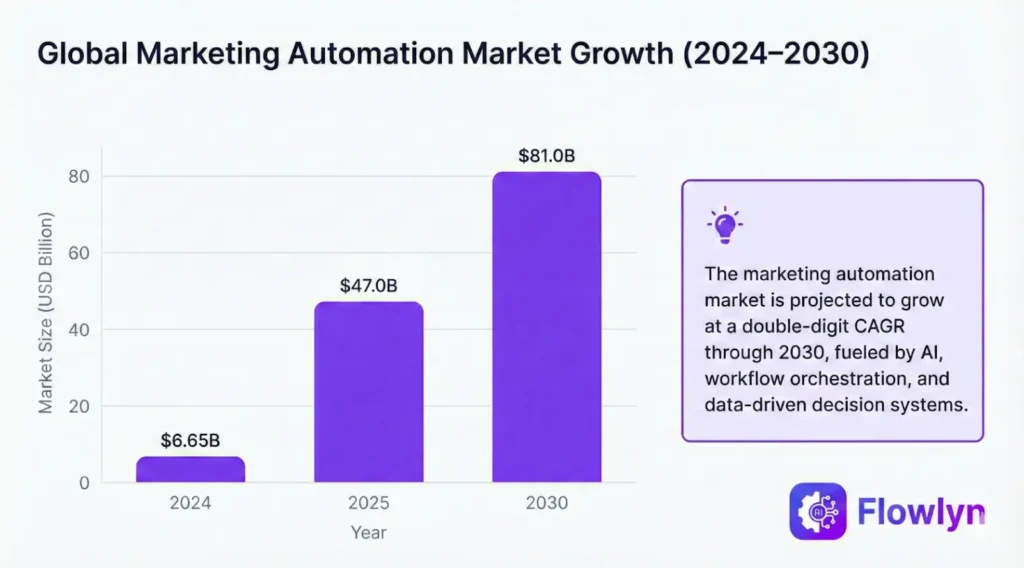
The headline ROI figures are real — but they’re conditional. A 2026 analysis across multiple research publishers (Nucleus Research, SQ Magazine, Flowlyn) consistently shows $5.44 returned per dollar spent across companies that implement automation correctly. The underlying mechanisms behind that return are documented and consistent enough to extract actionable patterns.
Here’s what the successful implementations have in common:
They Start With One Workflow, Not a Platform
Every case study from Roketto, Braze, Dotdigital, and other practitioners with documented results shows the same pattern: successful small business automation starts with a single, specific, measurable workflow before adding complexity. Not “let’s automate our entire customer journey.” Instead: “Let’s build a welcome sequence for new email subscribers that gets them to book a call.”
The Sophisticated Cloud analysis (February 2026) put it plainly: “Start with linear workflows. Step 1, step 2, step 3.” Non-linear, conditional, multi-branch logic is for teams that have already proven a simpler version works.
They Have Clean Data Before They Touch Any Tool
The businesses generating real ROI from automation treat list hygiene as a prerequisite, not an afterthought. That means email validation before import, contact segmentation based on actual behavioral signals rather than assumptions, and regular purges of inactive contacts. It’s unglamorous. Vendors don’t demo it. But it’s the difference between a welcome email landing in the inbox and landing in spam.
They Match Tool Complexity to Team Capacity
A recurring finding across practitioner analyses in 2025 and 2026: small businesses using simpler tools (Brevo, Mailchimp, MailerLite) with high consistency outperform small businesses using complex platforms (HubSpot Professional, ActiveCampaign at scale) with low consistency. The tool has to fit the team. A platform you barely use is worse than a simpler one you use well.
They Monitor Weekly, Not Quarterly
Automated emails degrade. Open rates shift. Triggers fire incorrectly. Link destinations break. Successful operators check their active automation metrics — open rates, click-through rates, conversion rates at each step — on a weekly or biweekly cadence. This is not a major time commitment: 20–30 minutes per week to review a dashboard. But it’s the difference between catching a broken workflow in week two versus discovering it after eight months of sending customers to a dead page.
Automated emails generate 320% more revenue than non-automated emails when properly segmented and maintained (SQ Magazine, 2026 data compilation). Welcome emails specifically see average open rates of 68.6% — the highest of any automated flow. Those numbers are available to any small business willing to do the setup work correctly.
The “Process First” Framework
Before you open a single automation tool, the following questions need clear, written answers. If you can’t answer them, you’re not ready to automate. You’re ready to define your process.
Define the Journey Before the Trigger
Write out, in plain language, what you want a new lead to experience from their first contact with your business to their first purchase (or first repeat purchase, if you’re working retention). What information do they need? What objections come up? At what point are they ready to buy? This doesn’t need to be elaborate — even a one-page flowchart is enough. The point is that the journey exists on paper before it exists in software.
Identify the One Highest-Value Interaction
Look at your existing customer data and find the single action that most reliably predicts a purchase or strong engagement. For many service businesses, it’s a discovery call. For e-commerce, it’s a second purchase within 60 days. For SaaS, it’s a specific feature activation. Your first automation should exist solely to move people toward that action. Everything else is a distraction until this one sequence is proven and optimized.
Audit Your Data Before Building Anything
Pull your existing contact list and run it through a validation tool (ZeroBounce, NeverBounce, or similar). Remove hard bounces, spam traps, and role-based addresses. Segment what remains into at minimum three buckets: people who have engaged in the last 90 days, people who engaged 91–365 days ago, and everyone else. The third group goes into a re-engagement sequence — or gets deleted. Sending automation to unengaged lists destroys deliverability and wastes every dollar of your platform subscription.
Pick the Simplest Tool That Does the Job
Match your platform to your current complexity, not your aspirational complexity. If you need a welcome sequence, a weekly newsletter, and one re-engagement flow, you don’t need HubSpot Professional. Brevo’s email-send pricing model, MailerLite, or Mailchimp’s free tier for sub-2,000 contacts will do it for a fraction of the cost. Upgrade when you’ve outgrown the tool — not before.
Set a 90-Day Review Cadence
Every 90 days: review every active automation’s performance metrics. Ask whether each one is still relevant to your current offer, current audience, and current business goals. Kill anything that’s underperforming without a clear reason. Update copy that references outdated products or promotions. Add contacts who’ve entered new segments. Remove those who’ve converted or gone cold. Automation without maintenance is a liability.
The Minimum Viable Automation Stack
For the majority of small businesses — say, under $2M revenue, under 5,000 active contacts, a team of fewer than 10 — the following stack covers 80–90% of genuine automation needs at a total cost of roughly $50–$150/month. The key word is “minimum viable”: the goal is to generate real ROI before you buy complexity.
| Function | Recommended Tool | Monthly Cost (approx.) | What It Replaces |
|---|---|---|---|
| Email automation + CRM | Brevo (formerly Sendinblue) | $0–$65 (send-volume pricing) | Manual follow-up sequences |
| Landing page + form capture | Carrd or existing website CMS | $0–$19 | Manual lead collection |
| Lead validation | ZeroBounce (pay-as-you-go) | $0–$16 (credits) | N/A — most skip this entirely |
| Scheduling / booking | Calendly Free | $0 | Email back-and-forth to book calls |
| Social scheduling | Buffer Free or Metricool | $0–$22 | Manual posting across platforms |
| Reporting | Google Looker Studio (free) | $0 | Scattered platform dashboards |
Note: Brevo’s pricing model (email-send volume rather than contact count) makes it significantly more cost-effective than Mailchimp or ActiveCampaign at 10,000–50,000 contacts. Verified pricing as of Q2 2025.
This is not an exhaustive automation infrastructure. It is a starting point that doesn’t require a $10,000 onboarding consultant, three months of integration work, or a developer who understands webhooks. Get these working, prove ROI, and then have a data-driven conversation about what to add next.
Tool Comparison: Honest Scores for 2025
The following scores are based on documented user reviews from G2 and Capterra (as of early 2026), pricing transparency, ease of setup for a small team with no dedicated ops resource, and quality of deliverability tooling — which many reviews ignore but which determines whether your emails actually arrive.
| Platform | Ease of Setup | Automation Depth | Cost (SMB) | Deliverability Tools | G2 Rating | Best For |
|---|---|---|---|---|---|---|
| Mailchimp | 9/10 | 5/10 | Medium | Basic | 4.3 | Beginners, newsletters, under 500 contacts |
| Brevo | 8/10 | 6/10 | Low | Strong | 4.5 | SMBs with large lists, e-commerce, transactional email |
| ActiveCampaign | 5/10 | 9/10 | Medium-High | Strong | 4.5 | SMBs with active sales pipelines, CRM+email together |
| MailerLite | 9/10 | 6/10 | Low | Adequate | 4.7 | Content creators, bloggers, lean teams |
| HubSpot Starter | 7/10 | 5/10 | Low ($15/mo) | Adequate | 4.4 | Teams who want CRM + basic automation, scalable later |
| HubSpot Professional | 3/10 | 10/10 | High ($800+/mo) | Excellent | 4.4 | Growing teams with dedicated ops; NOT for lean SMBs |
| Klaviyo | 6/10 | 9/10 | Medium | Excellent | 4.6 | E-commerce only; exceptional abandoned cart, post-purchase |
Ratings sourced from G2.com (verified reviews, Q1 2026). Ease of setup scores reflect reported time to first live automation for a non-technical user. Cost brackets: Low = under $75/mo for a typical SMB; Medium = $75–$300/mo; High = $300+/mo.
Mailchimp’s recent pricing and feature changes have shifted its value proposition significantly. What was once the default for small businesses now caps out faster on automation depth and has become more expensive as contact lists grow. If you’re above 2,000 contacts, the free tier disappears and the paid tier often isn’t competitive with Brevo or MailerLite. Evaluate carefully before defaulting to the familiar brand.
Case Study: 3-Person Team, 47% More Leads
Independent Accountancy Practice, Southeast UK
A three-person accounting practice had been relying entirely on word of mouth and annual newsletter for new client acquisition. The practice manager — not a marketer by training — spent roughly six hours over three weeks setting up the following:
- A five-email welcome sequence triggered by website enquiry form submission, spaced over three weeks
- A monthly “tax tips” automated broadcast to their 640-contact list (all verified opt-ins)
- A dead-simple calendar link in every email signature, routing discovery calls directly to Calendly
- A 90-day re-engagement sequence for contacts who hadn’t opened anything in six months
That’s four automations. No complex branching logic. No lead scoring. No CRM integration. Just clean contact data (they’d manually reviewed the list before uploading), relevant content, and a clear call to action.
Why it worked: The process existed before the tool. The list was clean. The automations were simple enough to understand, monitor, and maintain. The call-to-action (book a call) was concrete and frictionless. Nothing here required a marketing specialist — just clear thinking about what a prospective client actually needed to hear and when.
The 5 Workflows That Deliver Consistent ROI for Small Businesses
Not all automation is equal. Based on aggregated performance data from multiple studies (SQ Magazine, Dotdigital, ActiveCampaign internal benchmarks), the following five workflows consistently outperform across small business contexts:
1. Welcome Sequence
Average open rates of 68.6% — the highest of any automated email type. A three-to-five email sequence sent over the first two weeks of a contact’s relationship with your business. Goal: introduce who you are, demonstrate value, and create a first meaningful action (purchase, booking, download). This should be the first automation every small business builds. The data are unambiguous.
2. Abandoned Cart Recovery (E-commerce)
Average conversion rates of up to 10.7% on a sequence that requires zero human intervention after setup. A three-email sequence: first reminder within one hour, social proof or review content within 24 hours, optional time-limited incentive at 48–72 hours. For any e-commerce business not running this, the calculation is simple — you’re leaving 10% of nearly-complete transactions on the table every day.
3. Lead Nurture (Service Businesses)
A sequence of educational content delivered over 4–8 weeks to prospects who’ve expressed interest but haven’t converted. The goal isn’t to sell — it’s to stay relevant and credible until they’re ready. Companies using properly designed nurture sequences see up to 451% more qualified leads compared to those relying on ad-hoc follow-up (Nucleus Research). The key word is “qualified” — nurture filters as much as it converts.
4. Post-Purchase Onboarding / Re-engagement
A sequence triggered by first purchase, designed to drive second purchase, review submission, or referral. Repeat customers cost 5–7x less to acquire than new ones, and acquiring a second purchase significantly increases lifetime value. This is the automation with the fastest ROI for businesses with existing customer bases — and the one most small businesses completely neglect because they’re focused on top-of-funnel.
5. Re-engagement / Win-Back
A two-to-three email sequence sent to contacts who haven’t engaged in 90–180 days. Goals: either reengage them (confirm they still want your emails) or remove them cleanly. A healthy, engaged list outperforms a large, disengaged one on every metric — deliverability, open rate, conversion rate. Running re-engagement sequences regularly keeps your sending reputation intact and your cost-per-engaged-contact improving over time.
| Workflow | Avg. Open Rate | Avg. Conversion | Setup Time (Solo) | Difficulty |
|---|---|---|---|---|
| Welcome Sequence | 68.6% | Variable (action-dependent) | 4–8 hrs | Low |
| Abandoned Cart | 45–55% | Up to 10.7% | 3–6 hrs | Low |
| Lead Nurture | 25–40% | 451% more qualified leads* | 8–16 hrs | Medium |
| Post-Purchase | 40–55% | 2nd purchase rate +15–30% | 4–8 hrs | Low |
| Re-engagement | 12–20% | 10–20% list retention | 2–4 hrs | Low |
*Qualified lead increase vs. no nurture, from Nucleus Research benchmarks. Open rate and conversion figures from SQ Magazine 2026 data compilation and Dotdigital 2025 benchmarks.
When to Avoid Automation Entirely
This is the section you won’t find on most vendor blogs for obvious reasons. There are real situations where adding marketing automation makes things worse — and being clear about them is more useful than pretending automation is always the answer.
You Have Fewer Than 200 Contacts
At this scale, personal outreach outperforms every automation. A handwritten (or at least individually composed) email to 200 people will generate more response than any automated sequence. The overhead of setting up, testing, and maintaining automations is disproportionate to the potential return when your list is this small. Build the list first.
Your Sales Process Requires High-Touch Customisation
If every deal requires a bespoke proposal, a nuanced discovery process, and a relationship that takes months to develop — as is true for many high-value B2B services — automation adds friction rather than removing it. Prospects in these contexts notice, and resent, when outreach feels templated. One well-timed personal email beats three automated ones in high-trust B2B sales.
You Haven’t Validated Your Messaging Manually First
If you don’t know which subject lines get responses, which pain points resonate, and what call to action converts from your audience — don’t automate yet. You’ll just scale ignorance. Send thirty manual emails. See what works. Then automate the version that works.
Your Offer or Positioning Is in Flux
Automation set up during a period of business change goes stale almost immediately. If you’re in the middle of repositioning your offer, testing new pricing, or pivoting your target market, hold off on building automations until things settle. The worst outcome is an automation selling a version of your business that no longer exists.
5-Step Launch Plan: Getting Your First Automation Right
This is a practical sequence based on what the successful implementations have in common. Follow it in order. Don’t skip steps to save time — the skipped steps are usually why things fail.
- Write the process before you build the tool. Map your intended customer journey on paper or a whiteboard. What happens from first contact to first purchase? Where do people currently drop off? What information would help them move forward? This map should take two hours maximum. If it takes longer, you don’t know your customer journey well enough — stop and do that customer research first.
- Clean your list before you import anything. Run every contact through an email verification service. Remove hard bounces, role-based addresses, and anyone who hasn’t engaged in over 18 months. Segment what remains into: active (engaged in last 90 days), warm (91–365 days), cold (over 12 months, no engagement). Your first automation fires only to the active and warm segments.
- Build one automation, end-to-end, and test it thoroughly. Build your welcome sequence or highest-priority nurture flow. Test every email on desktop and mobile before activating. Send tests to yourself and at least two other email clients. Check every link. Confirm every trigger fires correctly with a test contact. The number of small businesses that launch automations with broken links, wrong dates, or test placeholder copy is much higher than you’d expect.
- Run it for 30 days before touching anything. Resist the urge to tweak. Let the automation accumulate statistically meaningful data — at minimum 200–300 sends — before drawing any conclusions. Premature optimisation based on 40 data points is noise, not signal.
- Review, revise, then expand. After 30–60 days of real data: what’s working? What’s the open rate, click rate, and conversion rate at each step? Which email performs weakest? Fix that one thing before adding a new automation. Repeat. Compound. The businesses that get real ROI from automation do so through consistent incremental improvement, not one-time setup.
The failure rates and ROI figures cited in this article draw from multiple independent sources published between mid-2024 and mid-2025, including Nucleus Research’s marketing automation ROI analysis, the MarketingOps 2025 RevOps Data Study, QuickerWork’s implementation failure analysis (December 2025), and SQ Magazine’s compiled statistics report (March 2026). Where figures come from a single study, this is noted. Readers should treat statistics as directional benchmarks, not precise universal averages — real-world outcomes vary significantly based on industry, implementation quality, and list characteristics.
Frequently Asked Questions
How much should a small business expect to spend on marketing automation?
For most small businesses (under $2M revenue, under 5,000 contacts), a functional automation stack costs between $50 and $150 per month. Entry-level tools like Brevo, MailerLite, or HubSpot Starter cover the core workflows at this price. You only need to spend more when your list size, automation complexity, or CRM needs outgrow simpler tools — which typically happens at 10,000+ contacts or when you need multi-channel orchestration across email, SMS, and paid retargeting simultaneously.
How long does it take to see ROI from marketing automation?
Industry data consistently shows that 76% of companies see positive ROI within the first year. In practice, a well-implemented welcome sequence or abandoned cart flow can generate measurable returns within the first 30–60 days. The caveat is “well-implemented” — poor setups on bad data can take six months to diagnose as failures. If you haven’t seen any attributed results after 90 days, audit your data quality and deliverability before blaming the strategy.
Is HubSpot worth it for a small business?
HubSpot’s Starter tier ($15/month) is genuinely useful for small businesses that want CRM and basic automation together. HubSpot Professional ($800+/month) is not justified for most small businesses — the complexity, onboarding time, and cost are calibrated for teams with dedicated marketing operations staff. The risk is that small businesses buy Professional, use 10% of its features, and pay for the rest out of inertia. Start with Starter or a specialist tool, and only upgrade when you’ve hit a specific ceiling that more expensive tools would solve.
What’s the difference between email marketing and marketing automation?
Email marketing is broadcasting — sending the same (or lightly personalised) message to your list on a scheduled basis. Marketing automation is behavioural — it triggers based on what contacts do (or don’t do). Clicking a link, visiting a pricing page, abandoning a cart, or not opening three emails in a row are all triggers that automation can respond to in real time. The distinction matters because it determines which tool you need: a newsletter tool for the former, a behavioural automation platform for the latter.
Can I run marketing automation without any technical skills?
Yes, with caveats. Tools like MailerLite, Brevo, and Mailchimp are designed to be operated by non-technical users and their visual automation builders require no coding. Where technical skills help: custom integrations between platforms (connecting your CRM to your e-commerce store, for example), advanced segmentation based on external data, and troubleshooting when triggers don’t fire correctly. For linear workflows — welcome series, abandoned cart, re-engagement — technical expertise is not required.
How do I know if my marketing automation is working?
The metrics that matter: open rate (benchmark: 30%+ for triggered emails), click-through rate (benchmark: 3–5% for well-segmented lists), conversion rate at each workflow step, revenue directly attributed to automated sequences, and list health over time (are you growing engaged contacts faster than you’re losing them?). If your open rates are below 15% consistently, your deliverability is compromised — investigate before optimising copy or offers.
What’s the biggest mistake small businesses make with automation?
Importing a large, unvalidated contact list and immediately firing automated sequences at it. This destroys email deliverability (your domain gets flagged for sending to inactive or invalid addresses), erodes trust with contacts who weren’t expecting to hear from you, and produces data that tells you nothing useful because the noise-to-signal ratio is too high. Clean data is the foundation everything else rests on.
Should I use AI-powered features in my automation tools?
Selectively, yes. AI-driven subject line suggestions, send-time optimisation, and basic audience segmentation recommendations are genuinely useful and require no additional expertise to activate. Fully AI-generated email copy without human review tends to produce generic, low-converting content — use it as a draft, not a final product. Predictive AI for lead scoring and churn prevention starts to deliver meaningful returns only when you have substantial behavioral data to train on, which typically requires 12+ months of platform use and thousands of active contacts.
How often should I review and update my automations?
A full review every 90 days minimum. Weekly monitoring of key metrics (open rates, click rates, conversion rates). Immediate review if open rates drop more than 5 percentage points week-over-week. Any automation that references a specific product, promotion, price, or seasonal event should be flagged for review whenever that underlying information changes — which happens more often than people expect.
Is marketing automation suitable for very small businesses — say, a solo operator or freelancer?
Absolutely, with the right scope. A freelancer with a 300-person newsletter list, a welcome sequence, and a quarterly re-engagement flow is running marketing automation. The mistake solo operators make is over-engineering — building complex conditional flows when a simple three-email sequence would achieve the same result with a fraction of the maintenance overhead. For solopreneurs, the best automation is the one you’ll actually keep updated.
Which automation workflows should I build first?
In order of recommended priority: (1) Welcome sequence — it’s the highest-performing automated flow and sets the tone for every future interaction. (2) Abandoned cart or enquiry follow-up — highest direct revenue impact. (3) Post-purchase re-engagement — the easiest ROI win if you have existing customers. Only move to more complex nurture sequences or lead scoring after these three are live, optimised, and generating consistent results.
Final Verdict
Marketing automation for small businesses is broken in the same way that a gym membership is “broken” for most people who buy one — not because the equipment doesn’t work, but because the infrastructure around it (process, habit, measurement, honest expectation-setting) isn’t in place.
The ROI is real when implemented correctly. The failure rate is real when it’s not. The difference between the two outcomes is not which platform you choose — it’s whether you’ve defined the process you’re automating, verified the data you’re operating on, and committed to monitoring and maintaining what you build.
If you take nothing else from this article: build one workflow, on clean data, using the simplest tool that does the job, and check its performance every week for the first three months. That alone puts you ahead of the majority of small businesses currently paying for platforms they barely use.
The businesses generating $5 for every $1 spent on automation aren’t doing something exotic. They’re doing the fundamentals, consistently, without the shortcuts that everyone else takes.
More from Trendix.tech
Contact Us
AI for Marketers & Creators The 2026 Reality Check
AI for Small Business: The Complete Honest Guide