
Personal Knowledge Management
Personal Knowledge Management:
Stop Losing the Ideas That Matter
A practical, research-backed guide to building a system that captures what you learn, organises it without friction, and — crucially — lets you use it when it counts.
1. What PKM Actually Is — and What It Isn’t
Personal Knowledge Management — PKM, if you want the abbreviation — is the set of habits, structures, and tools an individual uses to capture, organise, retrieve, and actively use information in their own life. Not a company’s information. Not a team’s wiki. Yours.
The definition sounds deceptively simple. In practice, PKM is one of those things that touches almost everything you do: how you take notes in a meeting, whether you remember that article you read six months ago, whether an idea you had in the shower ever becomes anything real. Getting it right doesn’t just make you slightly more organised — it changes how you think.
What it isn’t, despite what some corners of the internet would have you believe, is an app. Buying Obsidian or setting up a Notion workspace won’t do anything on its own. PKM is fundamentally a practice, and the tool is just the container. This distinction matters a lot for beginners, who often spend weeks choosing software and zero time building habits.
Quick definition: PKM is a “bottom-up” approach to knowledge work where individuals, rather than organisations, take ownership of their own learning and information flow. The goal is not to store more — it’s to be able to use more of what you already encounter.
The concept has been around in some form since at least the 1990s — Peter Drucker wrote about the importance of individual knowledge workers managing their own development decades before smartphones existed — but the modern PKM movement really took off after 2017, when productivity educator Tiago Forte launched his Building a Second Brain course and began systematising ideas that had previously been scattered across GTD forums and personal productivity blogs.
2. Why This Matters More in 2025–26 Than Ever Before
We are producing and consuming information at a pace that is genuinely without historical precedent. That’s not rhetorical flourish — the numbers are striking.
A figure worth pausing on: 60% of work time is now spent on “work about work” — searching for information, switching between applications, attending status updates, tracking down documents. That’s from Asana’s State of Work Innovation research, and it aligns with what most knowledge workers feel but can’t quite articulate. We’re not actually doing our jobs; we’re managing the infrastructure around doing our jobs.
PKM doesn’t fix all of this. But a well-built personal knowledge system meaningfully reduces the time you spend hunting for things you’ve already processed, the cognitive load of keeping half-formed thoughts in working memory, and the nagging sense that important insights are slipping through your fingers daily.
The real problem isn’t too much information. It’s the gap between information you encounter and knowledge you can actually act on. Most people have consumed vastly more than they’ve retained or used. PKM is how you close that gap.
3. How the Brain Loses Knowledge (and Why External Systems Help)
Hermann Ebbinghaus mapped the “forgetting curve” in the 1880s. Without reinforcement, humans forget roughly 50% of new information within an hour, around 70% within a day, and up to 90% within a week. The curve has been replicated so many times it’s essentially not disputed anymore — it’s one of the most robust findings in cognitive psychology.
Spaced repetition, the technique of reviewing material at increasing intervals, directly counteracts this. A 2024 randomised controlled trial published in PubMed found that students using spaced repetition flashcards showed significantly higher knowledge retention at both one month and three months compared to traditional lecture-based learning — the difference was statistically significant at p ≤ 0.001 at both timepoints. (Pubmed reference.)
More broadly, research cited in a 2025 paper in the International Journal of Asian Social Science Research confirms that spaced repetition and active retrieval practice “significantly boost long-term knowledge retention compared to traditional learning methods.” The spacing effect is real, and it has direct implications for how you design a PKM system.
The cognitive load argument
David Allen, creator of the Getting Things Done methodology, put it memorably: “Your mind is for having ideas, not holding them.” The science backs this. Working memory — the mental scratchpad — holds roughly 4±1 chunks of information at a time. Every unresolved task, half-remembered fact, or open loop you’re keeping in your head competes for that limited space.
An external knowledge system doesn’t replace thinking. It offloads the remembering so you can use your cognitive resources for the harder task of actually reasoning. This is sometimes called “cognitive offloading,” and there’s a growing body of cognitive science research showing it allows deeper, more original thinking rather than shallower recall-dependent work.
“A PKM system is not a substitute for thinking. It is a scaffold that lets you think at a level you couldn’t sustain otherwise.”
— Tiago Forte, Forte Labs4. The Three Dominant PKM Methods
There’s no shortage of PKM frameworks on the internet. Most of them are variations or combinations of three main approaches. Understanding the logic behind each helps you pick what actually fits the way you think — rather than just copying whatever the most popular YouTuber recommends this week.
PARA Method
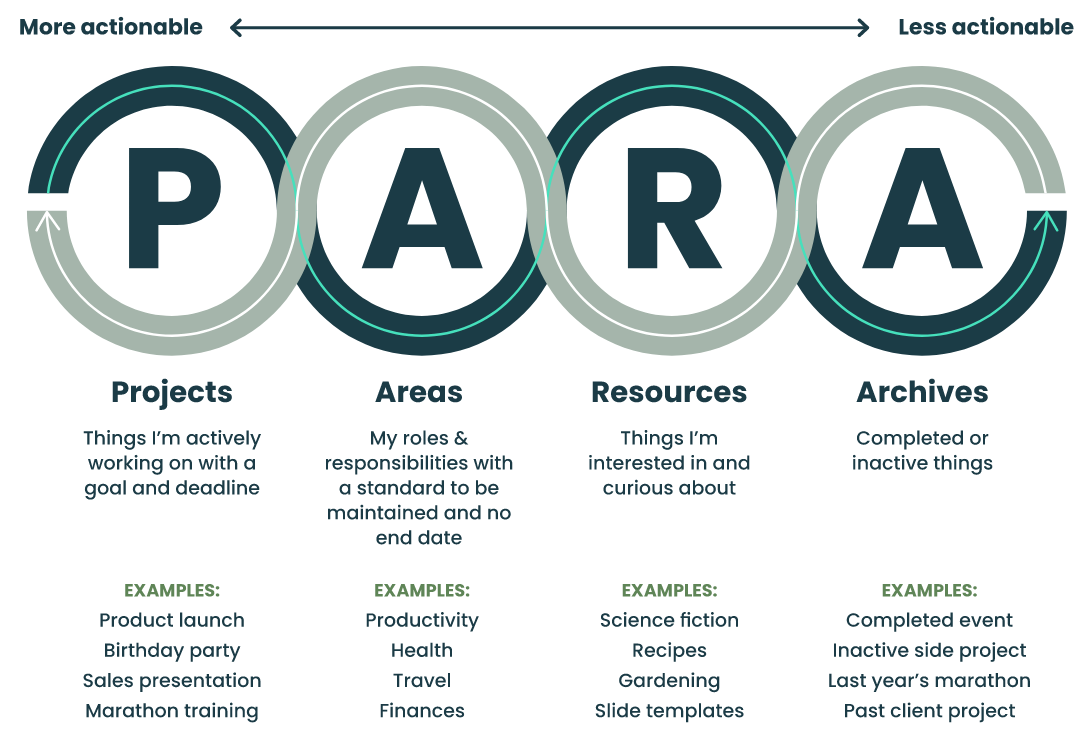
Organises everything — notes, files, emails, tasks — into four buckets: Projects, Areas, Resources, Archives. Created by Tiago Forte. Built on actionability rather than topic. The simplest system to implement quickly.
Zettelkasten
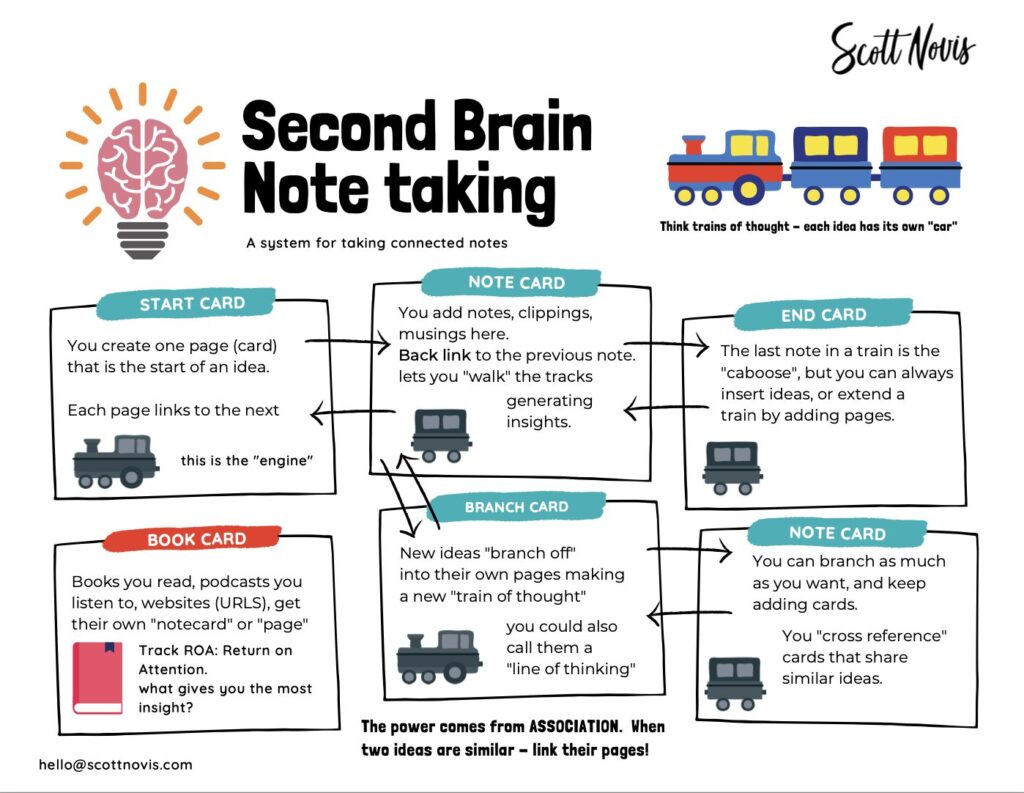
Atomic notes, each containing a single idea, linked to each other by explicit connections. Developed by German sociologist Niklas Luhmann, who used it to produce over 70 books and 400 papers. Deeply suited to creative and research work.
Building a Second Brain
Forte’s full methodology, combining PARA (organisation) with CODE (workflow). Emphasises “progressive summarisation” — distilling notes over time until only the highest-value insight remains. The most widely taught PKM system today.
These aren’t mutually exclusive. Many experienced practitioners use Zettelkasten-style linking inside a PARA-structured vault. The point isn’t method purity — it’s what actually reduces friction in your specific workflow.
5. PARA: The Organisational Backbone
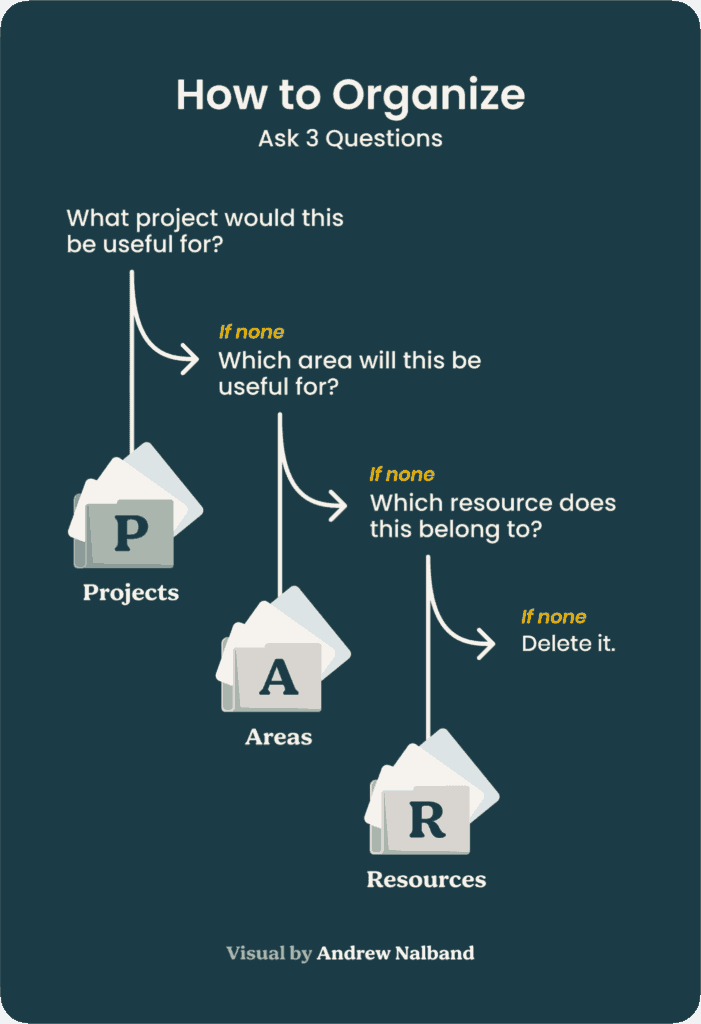
PARA stands for Projects, Areas, Resources, Archives. What makes it distinctive — and genuinely useful — is that it organises information by how actionable it is right now, not by topic or type. Most people organise by topic (“Finance,” “Health,” “Work”). The problem with that is you end up with a massive “Health” folder containing your gym programme, your blood test results, and an article you read about sleep — three things that have nothing to do with each other from a practical standpoint.
| Bucket | Definition | Examples | Has a deadline? |
|---|---|---|---|
| Projects | Short-term outcomes with a finish line | Launch product feature, write Q3 report, plan Japan trip | Yes |
| Areas | Ongoing responsibilities with no end date | Health, finances, direct reports, creative writing | No |
| Resources | Topics you’re interested in or might need later | UX design, coffee, climate policy, book notes | No |
| Archives | Inactive items from the other three categories | Completed projects, past job notes, dropped hobbies | N/A |
The critical distinction Forte emphasises is between Projects and Areas. A trip to Japan is a Project — it has a goal and a defined endpoint. “Travel” is an Area — an ongoing interest that may fuel many future projects. Getting this wrong is one of the most common reasons people feel like their systems are always unfinished: they’re treating Areas as Projects and wondering why they never complete them.
Practical tip: When you’re unsure where something goes, ask: “Does this have a specific outcome I’m working towards right now, with a deadline or intended completion date?” If yes, it’s a Project. If no, it’s probably an Area or Resource.
6. CODE: The Workflow Loop
PARA handles where things live. CODE handles how information moves through your system. Developed alongside PARA by Forte, the CODE framework is the engine that actually makes a second brain productive rather than just organised.
The part most beginners skip — and the reason most second brains don’t compound in value over time — is the E. Expression is where knowledge becomes useful. A note you never reference, a connection you never act on, a resource you capture “for later” but never use: these aren’t part of a knowledge management system. They’re part of a knowledge hoarding system. The difference matters.
Progressive summarisation, the Distil step, deserves more attention than it usually gets. The idea is to process notes in layers over time — not all at once when you first capture, but gradually as you return to a note in the course of active work. Each pass extracts a bit more signal, discards more noise. Eventually, what remains is genuinely yours.
7. Zettelkasten: The Thinking Method
Where PARA and CODE are primarily about information management, Zettelkasten (German for “slip-box”) is about idea development. Niklas Luhmann, the sociologist who used the method to produce an extraordinary body of work — by some accounts over 70 books and more than 400 academic papers — described his Zettelkasten as a “conversation partner.” That’s not poetic licence; it’s how the system functions at scale.
The core rules are genuinely simple:
- Each note contains exactly one idea (atomic notes)
- Every note gets a unique identifier
- Notes link to other notes explicitly — the connection is the point
- Notes are written in your own words, never copied verbatim
- The system is permanent: you never throw notes away, only add links
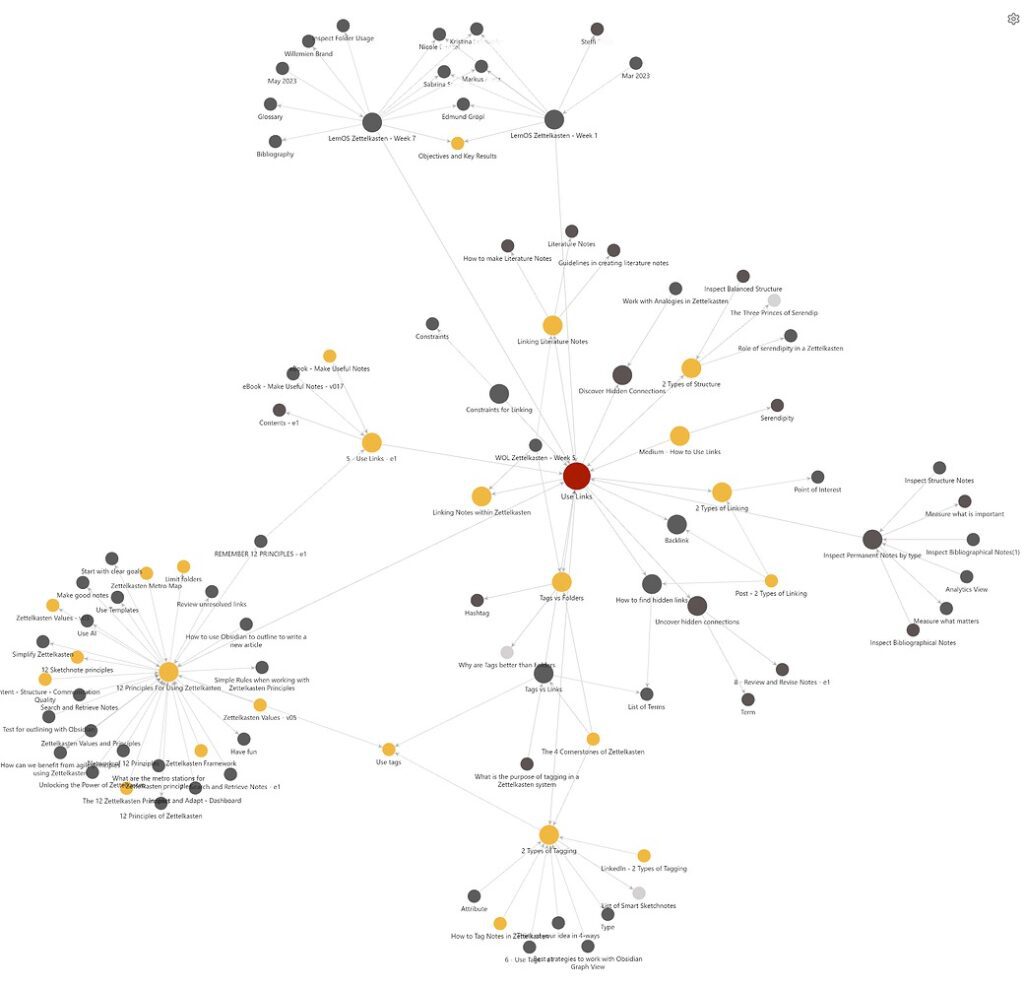
What emerges over months and years is a web of interconnected ideas where unexpected connections surface naturally. You’ll notice you’ve been thinking about a problem in three different contexts without realising it, or that an insight from a book you read two years ago directly answers a question you’re working on now.
It’s slower than just pasting articles into a folder. The payoff is compounding: after two or three years, a Zettelkasten becomes something you couldn’t have planned — a map of your own intellectual development, with all the cross-links visible.
Is Zettelkasten for everyone? Probably not. It requires comfort with ambiguity, patience with slow initial returns, and a genuine interest in the connections between ideas rather than just the ideas themselves. Writers, researchers, and people with multiple intellectual interests tend to thrive with it. People who primarily need to manage tasks and projects often find PARA alone more practical.
8. PKM Tools Compared (2025–26 Edition)
There are now dozens of tools positioned as PKM software. Most of them are fine. Almost all of them are better than no system. The differences that actually matter come down to: where your data lives, how you get it out, how well it fits your thinking style, and what you’re willing to pay and maintain.
One honest observation before the table: tool switching is one of the most common time-wasters in the PKM community. People spend months going from Notion to Obsidian to Logseq to Capacities and back again. The compounding value of a PKM system comes from consistency over time, not from being on the most sophisticated platform. Pick something, use it for at least six months, and resist the urge to migrate just because you saw an impressive setup on Reddit.
| Tool | Best For | Data Storage | Pricing (2026) | Learning Curve | PKM Methods Supported |
|---|---|---|---|---|---|
| Obsidian | Power users, writers, researchers who want full data ownership | Local files (Markdown) | Free personal; Sync from $4/mo | Moderate | Zettelkasten, PARA, BASB |
| Notion | Teams, structured databases, all-in-one workspace | Cloud (Notion servers) | Freemium / $10/mo Plus | Low–Moderate | PARA; limited linking |
| Logseq | Researchers, outline thinkers, daily journalers | Local files (Markdown/Org-mode) | Free & open source | High | Zettelkasten-style, BASB |
| Capacities | Users wanting structured object-based notes with cloud sync included | Cloud + local export | Freemium / ~$12/mo | Moderate | Object-based linking, PARA |
| Roam Research | Networked thought, block-level linking enthusiasts | Cloud | $15/mo | High | Zettelkasten, daily notes |
| Apple Notes | Apple ecosystem users wanting zero-friction capture | iCloud | Free | Very Low | Basic; no linking |
| Evernote | Long-term note storage; strong web clipper | Cloud | Freemium / from $14.99/mo | Low | PARA (manual); no native linking |
The honest take on Obsidian vs Notion
These two tools dominate conversations about PKM, and they represent genuinely different philosophies. Obsidian stores your notes as plain Markdown files on your own device. You own them. You can open them in any text editor, use them in 20 years when Obsidian might not exist, and never worry about a price change locking you out. The trade-off is that sync across devices requires either the paid Obsidian Sync service ($4/month annually) or technical workarounds using iCloud, Dropbox, or Git.
Notion is cloud-first, which means seamless sync everywhere and a genuinely impressive visual interface for databases and structured content. The trade-offs are data portability (Notion’s export isn’t perfect), occasional slowness on large databases, and a pricing model that could change. For teams and people who need collaborative workspaces, Notion wins. For individuals who want a private, permanent knowledge base they control completely, Obsidian is hard to beat.
If you’re a complete beginner: Start with whatever you already use for notes — even Apple Notes or a Google Doc. The habit matters more than the tool. Once you understand what you actually need, the tool choice becomes obvious. You’ll know you need Obsidian when you start wanting to link ideas together. You’ll know you need Logseq when you find yourself thinking in outlines. Don’t buy the fancy tool first.
9. How to Start: A Realistic 30-Day Plan
The biggest mistake people make when starting a PKM system is trying to build everything at once. They read three books, watch fifteen YouTube videos, choose a tool, set up a perfect folder structure, import all their old notes, and then abandon it two weeks later because the system is too complex to maintain alongside actual work. Start smaller than you think you need to.
-
Week 1: Capture only.
Pick one tool — any tool you already have. For one week, just capture things that resonate with you: an interesting sentence from an article, an idea in a meeting, a question you couldn’t answer. Don’t organise. Don’t summarise. Just capture. The goal is to build the habit of externalising thought, not to build a perfect system.
-
Week 2: Add basic PARA structure.
Create four folders or notebooks: Projects, Areas, Resources, Archives. Take 30 minutes to put what you captured in week one into these buckets. Don’t overthink it — a rough placement is infinitely better than leaving everything in one pile. Notice that most things naturally want to go into Resources.
-
Week 3: Distil one note per day.
Take one note you’ve already captured and spend five minutes summarising it in your own words. Bold one phrase that matters. Write one sentence at the top explaining why you saved it. This is progressive summarisation, and five minutes a day is enough to start seeing value within a week.
-
Week 4: Express something.
Use your notes to produce something — an email to a colleague with a relevant idea, a short reflection on a decision you’re making, a first draft of a document you’ve been putting off. The output doesn’t have to be public. It just needs to exist. Expression is how you discover what your system is actually good at.
By day 30, you’ll have a simple but functional PKM system. You’ll also have a much clearer sense of what you actually need, which makes any subsequent tool or method choices much easier to evaluate honestly.
10. The Most Common Mistakes Beginners Make
After surveying the PKM community extensively, the same failure patterns appear over and over. None of them are difficult to avoid — but they’re easy to fall into if no one points them out.
Collecting without using
This is probably the most common. People build beautiful, well-organised vaults of thousands of notes and never produce anything from them. The symptom is finding yourself spending more time maintaining the system than doing actual work. If your weekly review of notes takes longer than the work those notes were meant to support, something’s wrong. PKM should reduce friction, not add it.
Copying instead of processing
Pasting an article into a note is not the same as understanding it. The note won’t help you later if all it contains is the original text. Processing means reading, thinking, and writing the key idea in your own words. It takes longer. It also actually works. Research consistently shows that re-encoding information in your own language is one of the most reliable ways to retain it long-term.
Building for the theoretical future self
One of the subtler traps: creating elaborate systems for the version of yourself that reads 50 books a year, writes prolifically, manages complex projects, and has infinite organisational patience. Most of us are not that person on a Tuesday evening. Build a system for your actual self — the one who has 20 minutes, is tired, and needs friction to be as low as possible.
Reorganising instead of creating
Tidying your note structure feels productive. It isn’t, usually. Every hour spent on taxonomy is an hour not spent on the work those notes are supposed to support. A slightly messy system you actually use beats a perfectly organised system you spend all your time maintaining.
The “tool switching” trap: Logseq has a better feature than Obsidian, so you migrate. Then Capacities launches something interesting, so you migrate again. Three migrations later, you have a fragmented mess across platforms and no consistent habit. Choose a tool that’s good enough and stay with it for at least six months before reconsidering.
11. AI and the Future of PKM
It would be strange to write a guide on personal knowledge management in 2026 and not address AI’s role honestly — both what it can actually do and where the hype runs ahead of the reality.
The most genuinely useful AI features in PKM tools right now are: semantic search (finding notes based on meaning rather than exact keywords), automatic tagging and summarisation, and AI-assisted linking (surfacing notes that might connect to what you’re currently writing). Obsidian’s community plugins, Notion AI, and tools like Capacities are all implementing versions of these, with varying degrees of reliability.
What AI doesn’t do, and probably won’t for a while, is replace the judgment involved in PKM. Deciding what’s worth capturing, what a note means to you, how two ideas connect in the context of your specific work — these require the kind of contextual understanding that current AI systems handle inconsistently at best. The value of a PKM system comes from how it reflects your own thinking, and that’s not something you can outsource.
There’s also a data ownership question worth taking seriously. If your PKM system is cloud-based and AI-powered, you’re trusting a third party with a remarkably intimate record of how you think. For most people, that’s an acceptable trade-off. But it’s worth making the trade-off consciously rather than by default.
What’s actually worth using AI for in PKM
- Summarising long articles or transcripts before deciding whether to capture them
- Generating first-draft connections between a new note and existing ones
- Writing rough outlines from a collection of notes (for Expression, the E in CODE)
- Translating or reformatting clipped content into your note style
- Semantic search across a large vault when you can’t remember exact terms
What it’s not reliably good at yet: generating genuine insight from your notes, making judgments about what matters to you personally, or replacing the active processing that makes knowledge stick.
12. Frequently Asked Questions
How much time should I spend on my PKM system each week?
Genuinely, not much. A capture habit that runs throughout the day (a few minutes), a weekly review of 15–30 minutes to organise and distil, and time spent on output (which varies based on what you’re working on). If you’re spending more than a couple of hours a week maintaining the system itself — separate from using it — it’s probably overbuilt.
Do I need to use a dedicated PKM tool, or can I use paper?
Paper works for some things — particularly for processing ideas and doing the thinking work. Many people find handwriting more cognitively engaging than typing. Where it breaks down is search, linking, and accessibility across devices. Most practitioners end up with a hybrid: handwriting for processing, digital for storage and retrieval. That’s completely valid.
How long before a PKM system starts compounding in value?
Based on practitioner experience across the PKM community, the rough timelines are: noticeable value within 30 days, meaningful compounding visible around 6–12 months, and genuinely transformative effect (the “this is a different way of thinking” feeling) around 2–3 years. The timeline depends heavily on consistency and on how actively you use notes in actual output rather than just storing them.
I have thousands of old notes scattered everywhere. Should I import them all?
Almost certainly not. Old notes that you haven’t used in six months have probably served their purpose or weren’t useful to begin with. The realistic advice: don’t import old notes proactively. If you find yourself needing something from the old pile, retrieve it then and decide if it belongs in your new system. Starting fresh with a clean structure is far less overwhelming than trying to migrate a decade of digital debris.
Zettelkasten sounds interesting but complicated. Is it worth the effort?
It depends entirely on what you’re using your PKM for. If your primary goal is to manage projects, track information, and support work deliverables, PARA + CODE is probably more directly useful. If you’re doing creative or research work where cross-pollination of ideas over time is the actual goal — writing, research, design, philosophy, strategy — Zettelkasten’s compounding effect on idea generation is hard to beat. Try PARA first. Add Zettelkasten-style linking later if you find yourself wanting it.
Key Takeaways
- PKM is a practice, not an app. The system matters more than the software.
- Information overload is measurable and costly — $900B annually in the US alone. A personal system is a genuine productivity lever, not just a hobby.
- PARA organises by actionability (Projects, Areas, Resources, Archives). CODE describes how information flows (Capture, Organise, Distil, Express).
- Zettelkasten is ideal for idea development and creative work; PARA is ideal for project and knowledge management. Use both if your work warrants it.
- Obsidian suits long-term knowledge builders who want data sovereignty. Notion suits teams and structured workflows. Logseq suits researchers and outline thinkers.
- Start small. One week of capture-only. Then add structure. Then distil. Then express. Resist the urge to build the perfect system before you’ve built any system.
- The compounding value of a PKM system becomes visible around six months in — but only if you’re using notes to produce output, not just storing them.
- AI is a useful PKM assistant for search, summarisation, and drafting. It’s not a replacement for your own judgment about what matters.
Sources & Further Reading
Forte Labs — The 4 Levels of Personal Knowledge Management
PubMed — Spaced Repetition in Dental Education (2024 RCT, p≤0.001)
PMC — Spaced Repetition in Undergraduate Paediatrics (2025)
Speakwise — Information Overload Statistics 2026
LumApps — Managing Information Overload (2025)
Enterprise Knowledge — Top KM Trends 2025
Livepro — Knowledge Management Trends & Statistics 2025
theEMPLOYEEapp — Information Overloading in the Digital Age
Speakwise — Knowledge Worker Productivity Statistics 2026
SoftPicker — Obsidian vs Logseq in 2026
Explore More on Trendix
Recommended reading from trendix.tech
0 responses to “Personal Knowledge Management: A Complete Beginner’s Guide”