

How to Set Up a Zettelkasten
in Obsidian
A detailed, no-nonsense walkthrough — from installing Obsidian and understanding the slip-box method, through vault structure, note types, linking strategies, and the small handful of plugins that genuinely help. No productivity theater, no 40-plugin stacks.
What’s inside
- What Zettelkasten actually is — and what it isn’t
- Why Obsidian is a strong fit for Zettelkasten in 2025–2026
- The three note types you actually need
- Setting up your vault: folders, naming, and frontmatter
- The art of linking — where most people go wrong
- Maps of Content (MOCs): the navigation layer
- Plugins worth installing (and ones to skip)
- Starter templates you can copy right now
- The daily workflow that keeps a Zettelkasten alive
- Seven mistakes that kill Zettelkasten projects early
- Real-world use cases: researchers, writers, developers
- FAQ
01 /What Zettelkasten actually is — and what it isn’t
Let’s start with the honest version of history, because a lot of what gets written about Zettelkasten online is either slightly mythologized or over-simplified to the point of being useless.
The system was developed — or at least most famously practiced — by the German sociologist Niklas Luhmann. Over roughly 40 years, he produced somewhere between 50 and 70 books and more than 600 published articles, across topics as varied as systems theory, love, mass media, and the sociology of risk. His slip-box — a literal cabinet of handwritten index cards — contained around 90,000 notes by the time he died in 1998. Bielefeld University has been digitizing the archive and has made portions of it publicly accessible.
What matters practically is this: Luhmann didn’t use categories. He didn’t have a folder for “sociology” and a folder for “philosophy.” Instead, each card had a unique identifier, and cards referenced each other directly. A new idea didn’t get filed away — it got connected. Over time, clusters of ideas formed naturally, and those clusters were where his most productive thinking happened.
“I, of course, do not think everything by myself. It happens mainly within the slip-box.”
— Niklas Luhmann, “Communicating with Slip Boxes,” 1981 (translation via zettelkasten.de)The modern popularization of this method largely traces back to Sönke Ahrens’ 2017 book How to Take Smart Notes, which abstracted Luhmann’s practice into a teachable framework — introducing the terminology of fleeting notes, literature notes, and permanent notes. It’s worth noting, as researcher Ernest Chiang has written, that this three-part classification is largely Ahrens’ contribution, not something Luhmann himself described explicitly. That doesn’t make it wrong — it’s genuinely useful — but it helps to know the source.
What Zettelkasten is NOT
This point deserves its own subheading because the internet is full of impressive-looking vault screenshots that have nothing to do with the actual method:
❌ Not a filing system
- Hierarchical folders organized by topic defeat the purpose
- Notes filed away by category are hard to rediscover later
- The goal is connection, not organization
❌ Not a second brain for everything
- Task management belongs elsewhere (Todoist, Notion, paper)
- Zettelkasten is specifically for developing ideas and thinking
- Mixing it with everything creates cognitive noise
✅ What it actually is
- A networked set of atomic, linked notes
- A tool for thinking, not just storing information
- Something that compounds in value over years
Most people who “set up a Zettelkasten” are actually building an elaborate filing cabinet with bidirectional links. They spend weeks perfecting their folder structure and templates, then abandon the system by month three. The method works — the problem is usually over-engineering the infrastructure before building the habit of actually writing notes.
02 /Why Obsidian is a strong fit for Zettelkasten in 2025–2026
There are a dozen apps you could use for this — Logseq, Roam Research, Notion, even a well-organized folder of text files. Obsidian has real advantages, but it also has real tradeoffs, and it’s worth being honest about both rather than just saying “it’s the best.”
The genuine advantages
Your files are plain Markdown, stored locally. This is the single biggest advantage and it’s not a trivial one. As of 2025, Obsidian had over 1.5 million monthly active users, but the thing that makes that number less relevant is that your notes don’t depend on Obsidian continuing to exist. If the company shut down tomorrow, your vault is just a folder of .md files. You can open them with any text editor on any operating system, now and presumably forever. That matters a lot for a system designed to compound over decades.
Bidirectional linking is first-class. When you link from Note A to Note B in Obsidian, both notes know about each other. The backlinks pane shows you every note that references the current one. This matches Zettelkasten’s core mechanic exactly — ideas reference other ideas, and you can discover those connections from either direction.
The plugin ecosystem is enormous. As of March 2026, Obsidian’s community plugin directory holds over 2,700 plugins, maintained by a distributed global community. The core team is tiny — reportedly around 7 people — and has deliberately kept the official app lean while opening the extension layer to the community.
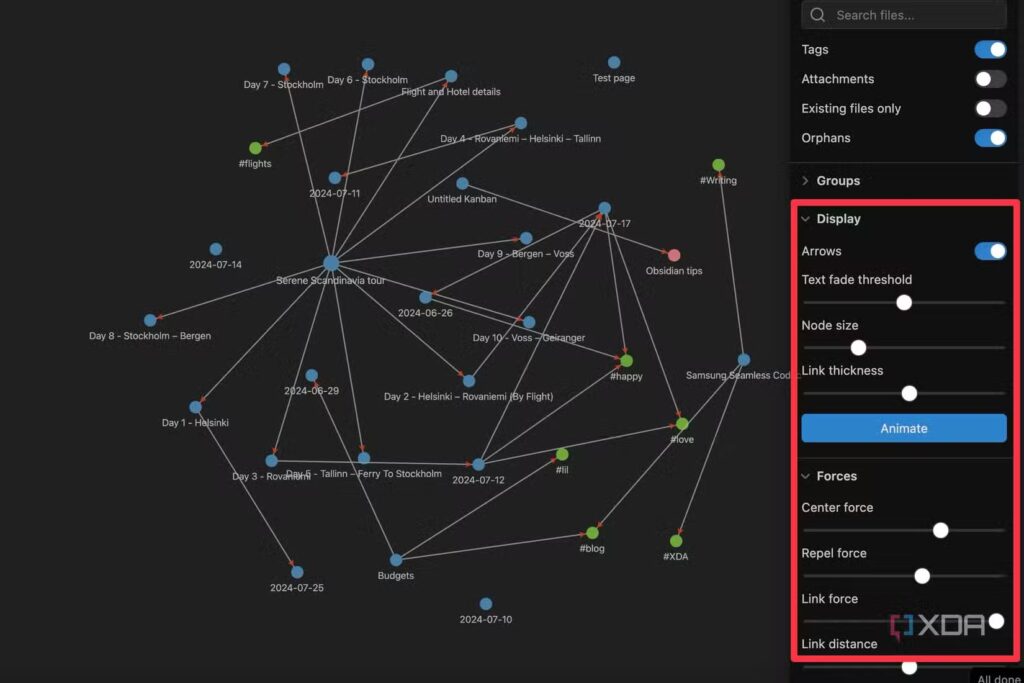
The graph view is genuinely useful (eventually). When your vault is small, the graph view is just noise. Once you have a few hundred linked notes, it becomes a real tool for discovering unexpected clusters and orphaned ideas. Don’t obsess over it early.
The real tradeoffs
Mobile is still not great for serious writing. The 2026 Obsidian community report card gave the mobile version a community score of 3.1 out of 5, with multiple reviewers noting that quick capture is still awkward. Quick capture on mobile — genuinely the most common use case while you’re out — involves loading the entire vault before creating a note. Until that improves, most people use a separate capture app (Apple Notes, a paper notebook) and process into Obsidian later.
Collaboration is not what Obsidian does. If you’re working with a team, you’ll need workarounds. Obsidian Sync is reliable for personal cross-device use at $4–8/month, but real-time co-editing isn’t there.
Obsidian is a privately-held, bootstrapped company and doesn’t publish official user counts or financials. The 1.5M active monthly users figure comes from multiple third-party estimates and community discussions, not an official announcement. Treat it directionally, not as a precise verified metric.
03 /The three note types you actually need
The Ahrens framework gives you three note types. Understanding what each one is for — not just what it’s called — is the difference between a Zettelkasten that grows and one that becomes a graveyard of half-processed ideas.
🖊️ Fleeting Notes
Raw capture, no polishing required. Ideas in the shower, something interesting from a podcast, a half-formed thought during a meeting. They exist solely to be processed later. They are not permanent. Most get deleted or discarded.
LIFESPAN: Hours to days
📖 Literature Notes
Notes about source material — books, papers, articles, talks. Written in your own words, focused on what you found useful and why it matters to your thinking. Not summaries. Not highlights. Your reaction to the material.
LIFESPAN: Permanent (linked to permanent notes)
💡 Permanent Notes
One idea, written as clearly as you’d write it to a smart stranger. Self-contained. Densely linked to other permanent notes. These are the actual Zettelkasten — what you’re building toward. Every other note type is feeding material toward these.
LIFESPAN: Indefinite — designed to compound
A practical note about quantity
The most common beginner anxiety is “am I creating enough permanent notes?” The answer is that you probably don’t need to rush. Luhmann didn’t sit down and create 90,000 notes — those accumulated over 40 years of slow, deliberate reading and thinking. In a healthy workflow, you might process two or three fleeting notes into one permanent note on a good day. That’s fine. A vault with 200 genuinely connected permanent notes is more valuable than 2,000 half-baked captures with no links.
Write permanent notes as if writing to your future self who has forgotten everything about the source material. Don’t write “interesting point from Kahneman chapter 4.” Write what the point actually is, why it matters, and how it connects to something else you already know. That’s the whole method, compressed into one sentence.
04 /Setting up your vault: folders, naming, and frontmatter
Here’s an opinion that will save you weeks of fiddling: use the simplest folder structure that prevents confusion, and resist the urge to design it like an enterprise file system. The links are doing the organizational work, not the folders.
A minimal starting structure
The numbered prefixes keep folders in a stable order regardless of what you name them. Some people use the PARA method (Projects/Areas/Resources/Archive) instead, and that works too. The important thing is that your permanent notes aren’t buried inside a topic-based hierarchy — they should all sit flat inside 30-Permanent/, differentiated by their links, not their folder.
Note naming conventions
There are two main schools of thought, and both are defensible:
| Convention | Example | Pros | Cons |
|---|---|---|---|
| Timestamp ID | 202506141032 | Unique, collision-free, traces creation date | Opaque — can’t tell what the note is about from the name |
| Descriptive title | Working memory limits retention | Immediately readable, links look natural in text | Titles can be vague or overlap; harder to sort chronologically |
| Hybrid | 202506 - Working memory limits retention | Both unique and readable | Slightly verbose; some people find it ugly |
For most people starting out, descriptive titles work better because your links will read naturally in context. [[Working memory limits retention]] inside a note about learning is self-explanatory. [[202506141032]] is not.
YAML frontmatter that actually earns its space
Frontmatter is the metadata block at the top of a note. A lot of guides will have you adding eight fields to every note before you’ve written a word. Start with three and add only what you actively use:
---created: 2025-06-14type: permanenttags: [cognition, learning, memory]---# Working memory limits retentionThe human working memory can hold approximately 4 ± 1 chunks ofinformation at once (Cowan, 2001). This has direct implications forhow we should structure learning material — each concept introducedshould be chunked deliberately before the next is added.This connects to [[desirable difficulties in learning]], where addingcognitive load in specific ways can actually improve retention, notjust frustrate the learner.## References- Literature note: [[Cowan 2001 - The magical number 4]]- Connected idea: [[spaced repetition beats massed practice]]Use tags sparingly. A tag is useful when you want to retrieve notes by broad category without knowing what specific note you’re looking for. But if you find yourself tagging and then not linking, the tag is probably a crutch. Every tagged idea should also be linked to at least one other related note. If it isn’t, it will stay isolated in the graph indefinitely.
Configure Obsidian’s core settings first
- 1
Set the default location for new notes
Go to Settings → Files & Links → Default location for new notes and set it to your
00-Inboxfolder. Everything lands there first, nothing gets lost. - 2
Enable wikilinks
Settings → Files & Links → Use [[Wikilinks]] should be on. This gives you the
[[note name]]syntax with autocomplete. - 3
Turn on the Templates core plugin
Settings → Core Plugins → Templates. Point it at your
60-Templatesfolder. You’ll add Templater later, but start with the built-in plugin. - 4
Enable Backlinks and Outgoing links panels
These two sidebars are arguably more useful than the graph view for daily work. Backlinks shows what links to your current note. Outgoing links shows what your note links to — and flags any broken links.
- 5
Set your attachment folder
Settings → Files & Links → Attachment folder path. Point it somewhere deliberate (like a subfolder inside
50-Reference) so dropped images don’t scatter through your vault.
05 /The art of linking — where most people go wrong
Linking is the entire point of the system. It’s also where most people underperform, for two reasons: they link too little (creating isolated islands of content), or they link mechanically (adding connections that don’t reflect real intellectual relationships).
Three kinds of links worth making
🔗 Concept links
- Link when one idea genuinely sheds light on another
- These are the backbone of your graph
- Ask: does this connection change how I think about either note?
🔗 Opposition links
- Link ideas that contradict each other — this is underused
- The tension between opposing ideas often generates the most interesting writing
- Label them: “See also (but challenge): [[X]]”
🔗 Sequence links
- Link prerequisite ideas — what you need to understand before this note makes sense
- Useful for building coherent argument chains
- “This extends [[X]]” or “This follows from [[Y]]”
How to write links in context
Inline context is what separates a useful link from a link that’s just noise. Don’t just drop [[note name]] at the bottom of a note. Embed it in a sentence that explains why the connection matters:
❌ Weak:This relates to memory. See also: [[working memory limits retention]]✅ Good:The four-item limit in working memory ([[working memory limits retention]])suggests that lecture slides with six or more new concepts per slideare structurally ineffective, regardless of how clearly each conceptis explained individually.The second version creates a real thought. The link earns its place.
A useful test before adding any link: would a reader benefit from following this link to understand the current note better? If yes, link. If the connection is tenuous or just “these topics overlap,” skip it. Diluted links degrade the signal quality of your network over time.
Don’t wait until a note is “finished” to link
This is a habit that separates Zettelkasten that compound from ones that stay static. Link from day one — the network builds itself from habit, not from planning. When you create a new permanent note, scan your existing notes for relevant connections before you’re done writing. Obsidian’s quick-switcher (Ctrl/Cmd + O) and the Backlinks pane help here.
06 /Maps of Content (MOCs): the navigation layer
A Map of Content is essentially a curated list of links — a navigation note that groups related permanent notes around a theme. The concept was popularized by Nick Milo (who calls it his “LYT” framework), and while some of the LYT ecosystem gets overly systematized, the basic MOC idea is genuinely useful.
The critical thing to understand: don’t create MOCs in advance. A MOC earns its existence when you already have enough notes on a topic that finding them is becoming difficult. If you can hold all the relevant notes in your head, you don’t need a MOC for that topic yet.
What a MOC looks like in practice
---type: moccreated: 2025-08-22---# MOC — Cognitive ScienceThis is a navigation note for my permanent notes related to howhumans think, learn, and remember. Not a summary — just a map.## Memory & Learning- [[Working memory limits retention]]- [[Spaced repetition beats massed practice]]- [[Desirable difficulties in learning]]- [[Testing effect strengthens long-term memory]]## Decision-Making- [[Dual process theory — System 1 and System 2]]- [[Availability heuristic distorts probability estimates]]- [[Loss aversion vs. risk aversion — different mechanisms]]## Attention- [[Directed attention fatigue and restoration theory]]- [[Flow states require matched challenge-skill ratio]]## Tensions worth exploring- Does [[growth mindset research replicate]]? See [[Dweck 2006 vs replication concerns]]Notice what that MOC doesn’t do: it doesn’t summarize the notes. It doesn’t explain what’s in each one. It just points to them, with enough clustering to make navigation intuitive. The permanent notes carry the actual thinking.
If you find yourself maintaining more MOCs than permanent notes, something has gone sideways. MOCs are secondary infrastructure. The thinking happens in permanent notes. It’s easy to spend a whole afternoon reorganizing your navigation structure while creating zero new ideas — that’s not Zettelkasten work, that’s procrastination with extra steps.
07 /Plugins worth installing (and ones to skip)
There are over 2,700 community plugins available for Obsidian. You need maybe five or six for a well-functioning Zettelkasten. Here’s a practical breakdown:
| Plugin | Type | What it actually does | Priority |
|---|---|---|---|
| Templater | Community | Advanced templates with dynamic fields, dates, file names. Replaces the built-in Templates plugin once you outgrow it. Supports JavaScript scripting if you want it. | High — install early |
| Dataview | Community | Query your notes like a database. Find all notes tagged with a specific tag, all literature notes from 2025, all permanent notes with no links. Genuinely powerful once your vault grows. | High — install when vault exceeds ~100 notes |
| Backlinks | Core | Shows all notes linking to the current note. Already built into Obsidian — just enable it in Core Plugins and pin the pane. | Essential — enable immediately |
| Graph View | Core | Visual network of your notes. Useful for discovery in larger vaults. Built-in. Don’t rely on it as a productivity measure early on — a sparse graph just means you’re still building. | Medium — built-in, use occasionally |
| QuickAdd | Community | Keyboard shortcuts to create notes of specific types with pre-filled templates. Reduces friction considerably for daily note capture. | Medium — add when daily routine is stable |
| Zotero Integration | Community | Pulls references and annotations from Zotero directly into Obsidian. Invaluable for academics or anyone reading a lot of papers and books. | High — for researchers and writers |
| Calendar | Community | Adds a visual calendar in the sidebar for navigating daily notes. Useful if you use daily notes as your fleeting note capture point. | Optional |
| Kanban | Optional | Task boards inside Obsidian. Task management in your Zettelkasten vault is usually a mistake — keep them separate. Only install if you actively want this. | Low — usually scope creep |
Every plugin adds maintenance overhead. They conflict occasionally, slow startup, and require updates. A vault with 8 well-chosen plugins running smoothly is better than one with 30 half-configured plugins. Add plugins one at a time, wait a few weeks to see if you actually use them, and remove anything that isn’t carrying its weight.
08 /Starter templates you can copy right now
These templates are intentionally minimal. They give you structure without strangling you. You can elaborate once you know what fields you actually use.
Fleeting Note Template
---created: <% tp.date.now("YYYY-MM-DD HH:mm") %>type: fleeting---# <% tp.file.title %><!-- Write the raw thought here. Don't edit. Don't polish. --><!-- Review date: check within 48 hours -->## Next action- [ ] Process into permanent note- [ ] Discard — not useful- [ ] Needs more reading first: Literature Note Template
---created: <% tp.date.now("YYYY-MM-DD") %>type: literatureauthor: year: source: tags: []---# <% tp.file.title %>## Main argument (in my words)## What I found interesting and why## Disagreements or questions this raises## Permanent notes this feeds into- [[]]- [[]]Permanent Note Template
---created: <% tp.date.now("YYYY-MM-DD") %>type: permanenttags: []---# <% tp.file.title %><!-- Write one idea, clearly, as if explaining to a smart stranger --><!-- who has no context about where this came from. -->## Connected ideas- [[]]## Opposing or challenging ideas- [[]]## Sources- [[]]The <% %> blocks require the Templater community plugin. If you’re using the built-in Templates plugin, replace those with plain text placeholders and fill them in manually. Don’t let template setup be a reason to delay starting.
09 /The daily workflow that keeps a Zettelkasten alive
The system doesn’t maintain itself, and the gap between “people who set up a Zettelkasten” and “people who have a working Zettelkasten” is almost entirely about workflow consistency, not initial setup quality.
Here’s a realistic daily and weekly rhythm:
Daily Zettelkasten Workflow
Weekly: the review session
Once a week, spend 20–30 minutes on maintenance rather than creation:
- Find orphaned notes (no incoming or outgoing links) and either link or delete them
- Check if any topic cluster has grown large enough to warrant a new MOC
- Review this week’s literature notes and ask: did any generate permanent note ideas you didn’t write yet?
- Clear the Inbox folder completely — nothing should sit there more than a week
You can use a simple Dataview query to surface orphaned notes automatically:
```dataviewTABLE file.mtime as "Last Modified"FROM "30-Permanent"WHERE length(file.inlinks) = 0SORT file.mtime ASC```This shows permanent notes that nothing links to. Not all of them will need links — some are legitimately standalone — but reviewing the list regularly prevents your vault from turning into a pile of isolated ideas.
On days when motivation is low, don’t aim for a productive session. Aim for three notes: process one fleeting note, add one connection to an existing note, and verify one backlink is accurate. That’s it. Small consistent actions compound. A week of “three good notes” days outperforms one marathon session followed by two weeks of nothing.
10 /Seven mistakes that kill Zettelkasten projects early
These aren’t abstract warnings. They’re the patterns that appear repeatedly on the Obsidian forums, Reddit, and in any honest conversation with people who tried and abandoned the system.
| # | Mistake | What it looks like | Fix |
|---|---|---|---|
| 1 | Over-engineering before you have notes | Spending two weeks building folder hierarchies and custom templates before writing a single permanent note | Set up the 5-folder structure, one template per note type, and start writing. Refine later. |
| 2 | Treating fleeting notes as permanent | Your “permanent” folder is full of bullet points copied from articles | If a note isn’t fully written in your own words with at least one link, it’s not permanent yet. |
| 3 | Tagging instead of linking | Every note has 8 tags and zero links. The graph is just disconnected dots. | Every tag should also have at least one corresponding link. If you can’t think of what to link, the note needs more development. |
| 4 | Importing everything from Readwise / Kindle | 5,000 highlight imports in week one. “My Zettelkasten is huge!” Not really. | Imported highlights are raw material, not notes. They need processing. Import selectively. |
| 5 | Plugin hopping | Installing and uninstalling 10 plugins per month trying to find the “perfect” setup | Commit to a setup for 30 days before changing anything. Most plugins reveal their value or worthlessness with use, not configuration. |
| 6 | Never deleting anything | The vault grows but the signal-to-noise ratio drops. Every note feels important so nothing gets deleted. | Delete fleeting notes that don’t lead anywhere. Archive old literature notes whose ideas you’ve already processed. Signal quality matters more than quantity. |
| 7 | No output habit | Building notes indefinitely without ever using them to write anything | Zettelkasten was designed as a writing tool. Connect your vault to a regular writing output — essays, articles, a journal, a blog. The system reveals its value through output. |
11 /Real-world use cases: researchers, writers, developers
The system looks different depending on what you’re building it for. Here are three realistic profiles, not hypothetical marketing personas.
Academic researcher (PhD student / postdoc)
The Zotero Integration plugin becomes essential here. A typical workflow: annotate papers in Zotero → import annotations as literature notes into Obsidian → develop those into permanent notes that form clusters → use those clusters as the thinking infrastructure for papers and chapters. The main challenge for researchers is managing a high volume of literature notes without letting them crowd out permanent note development. A useful heuristic: aim for at least one permanent note per literature note, even if it’s brief.
Non-fiction writer / journalist
The Zettelkasten functions as a “permanent research layer” that crosses book projects. Idea for book 1 might link to an insight that becomes crucial for book 3. This cross-pollination is exactly what Luhmann described and what a standard filing system can’t do. Writers often supplement with a separate “Projects” folder for each book-in-progress, which contains notes assembled from the permanent layer specifically for that project — but the permanent layer remains shared across all projects.
Software developer / knowledge worker
Developers use Zettelkasten for conceptual knowledge (architecture patterns, debugging principles, interesting approaches to problems) rather than code itself. Code lives in repositories — the Zettelkasten holds the thinking around it. Notes might include “When to prefer composition over inheritance,” “Trade-offs in eventual consistency,” or “Mental model for understanding async/await execution.” These connect into MOCs for specific domains (distributed systems, frontend architecture, etc.) and get referenced when making design decisions.
Matt Giaro, who has written extensively about Obsidian workflows, maintains a vault of 3,000+ notes built over three years. He’s been clear that early attempts were over-complicated, and that the system that actually worked was simpler than what most guides recommend. One user on the Obsidian forum reports working with 53,000 files and 48 active plugins without performance issues on desktop — though that’s an outlier, not a target to aim for.
12 /Frequently asked questions
Do I need to use all three note types right away?
No. Start with just permanent notes and the inbox. Fleeting notes and literature notes are processing tools — they exist to feed permanent notes. If you’re capturing ideas and turning them into linked permanent notes, the system is working, regardless of what you call the intermediate steps.
How long should a permanent note be?
Long enough to fully express one idea, short enough that it covers only that idea. In practice, this is usually 100–400 words. If you’re writing 1,000 words in a “permanent” note, you probably have two or three separate ideas that should be split into separate notes.
Should I use daily notes as my fleeting note capture point?
Some people love this; others find it creates a messy daily note that’s hard to process. If you use daily notes for journaling, mixing fleeting idea captures into them can make both practices suffer. A separate 10-Fleeting folder with individual notes per idea is often cleaner.
Can I import my existing notes from Notion, Evernote, etc.?
Yes, technically. Obsidian’s importer handles Markdown, and there are community tools for converting Notion and Evernote exports. The real question is whether your existing notes are in a form that works as Zettelkasten input. Most legacy notes need significant rewriting — they were written as summaries or records, not as linked atomic ideas. Don’t expect an import to give you a working Zettelkasten. It gives you raw material that still needs processing.
What about mobile capture? The app feels slow.
This is a real limitation. Many Obsidian users maintain a separate capture workflow for mobile — Apple Notes, Bear, or even a physical notebook — and process those captures into Obsidian during desktop sessions. The 2026 community report card gave Obsidian mobile a score of 3.1/5, specifically citing slow vault load times as the main issue for quick capture use cases.
Is Zettelkasten right for me if I’m not a researcher or writer?
Possibly, but honestly maybe not. The system is optimized for people who read a lot, synthesize information across sources, and produce output that benefits from that synthesis. If you need a task manager, project tracker, or team wiki, there are better tools. Don’t adopt Zettelkasten because it sounds impressive — adopt it if the core problem it solves (compounding connected ideas over time) matches a problem you actually have.
More from Trendix.tech
Explore related guides, tools, and deep dives on productivity, technology, and knowledge systems.
Zettelkasten vs. PARA: Which System Actually Works?
12 Proven Obsidian Techniques for Researchers: The Complete Setup Guide
Obsidian vs. Notion: Which PKM Tool Actually Fits Your Workflow?
AI Hallucinations in Academic Writing: What They Are and How to Catch Them
How to Write a Literature Review Using AI: Step-by-Step Guide
How to Set Up Stable Diffusion 3.5 Locally — Step-by-Step
Atomic Habits for Knowledge Workers:Small Actions, Massive Results