

Updated 6 November 2026. Compiled from published research, company case studies, and news reports. No tool was independently tested for this article; where a number comes from a vendor, it is labeled.
The short version
- The problem is real and well measured. Microsoft’s telemetry puts the average interruption interval at about two minutes in core hours. Attention research says recovery after an interruption takes on the order of 23 to 25 minutes.
- Putting focus work on the calendar helps, with or without AI. The strongest support is indirect: lab work on attention residue, a large meta-analysis on if-then planning, and a 76-company survey on meeting-free days.
- AI’s proven contribution is upkeep, not magic. It re-solves your schedule when a meeting moves. The documented gains are mostly scheduling time saved and focus hours defended. Claims of 25–30% “productivity” gains are managers’ estimates in marketing material.
- A tool can disappear. Clockwise, one of the best-known AI focus-time tools, shut down on 27 March 2026 with about a week’s notice. Any setup you build should survive that.
- You can test this on yourself in four weeks with the scorecard in the last section. That beats any case study, including the ones below.
Why your calendar isn’t protecting you
Microsoft’s 2025 Work Trend Index analyzed telemetry from Microsoft 365. It reported that the average worker is interrupted roughly every two minutes during core hours, around 275 times a day, with daily averages of 117 emails and 153 Teams messages (CNBC via NBC New York; TechSpot). The same report found that 57% of meetings are called at a moment’s notice, without a calendar invite (Microsoft Switzerland).
That last number matters more than it looks. It means a calendar with a blank afternoon can still be a minefield. A block only protects you from interruptions that arrive through the calendar.
Two cautions on these figures. The sample is Microsoft 365 users, and “interruption” includes any ping, so the two-minute average is not a description of your Tuesday. Treat it as the shape of the problem, not a personal forecast.
What an interruption actually costs
Gloria Mark, informatics professor at UC Irvine, is the researcher behind the best-known figure: over 23 minutes to fully regain focus after an interruption (UCI). Her 2023 book Attention Span rounds this to about 25 minutes and reports an average of 47 seconds on any one screen before switching (publisher summary in a library catalogue).
Notice the two numbers don’t match exactly. That’s normal for a measured average that gets restated across a decade of talks and books. Use “roughly 23 to 25 minutes” and don’t build a spreadsheet that treats it as a constant. People differ, tasks differ, and Mark herself notes that many interruptions are self-inflicted.
The mechanism behind the cost has a name. Sophie Leroy (University of Washington Bothell) showed in two experiments that people struggle to disengage from an unfinished task, and that the next task suffers for it (Organizational Behavior and Human Decision Processes, 2009). She called it attention residue. Her later work found that a “ready-to-resume” plan reduces the damage from interrupted tasks (author page listing the study). That is the most practical sentence in this whole article: when you get pulled away, write down where you stopped and what comes next.
What the evidence says about blocking time
I sorted the claims below by how much weight I’d put on them. This is my judgment, and the reasons are in the right-hand column.
| Claim | Confidence | Why |
|---|---|---|
| Interruptions are frequent in knowledge work | High | Large telemetry sample plus decades of observational research |
| Unfinished tasks drag on the next task | High (lab setting) | Controlled experiments; real offices are messier |
| Specific “if X, then Y” plans improve follow-through | High, effect varies | Meta-analyses; smaller effects for sustained habits |
| Meeting-free time is associated with better self-reported productivity | Moderate | Survey of 76 firms; ratings are perceptions, not output |
| AI schedulers save scheduling time | Moderate | Obvious mechanism; evidence is vendor-reported |
| AI schedulers raise output quality by 25–30% | Low | Managers’ estimates in marketing case studies |
| AI scheduling beats a disciplined manual system | Unknown | I found no independent trial |
If-then planning is the hidden engine
A calendar block is an implementation intention in disguise: if it’s Tuesday at 9:00, then I open the proposal. Gollwitzer and Sheeran’s 2006 meta-analysis of 94 independent tests found a medium-to-large average effect on goal attainment (d = 0.65) (record at the University of Konstanz). A review in Frontiers in Human Neuroscience describes it as covering more than 8,000 participants and notes that most comparison groups had already formed a goal intention, which makes the result more notable (Wieber, Thürmer & Gollwitzer).
The honest footnote: for sustained behaviors like exercise, one summary reports a smaller effect of around d = 0.31 (The Behavioral Scientist). Deep work is closer to a sustained behavior than to taking a pill. Expect a real but smaller lift.
What 76 companies reported about meeting-free days
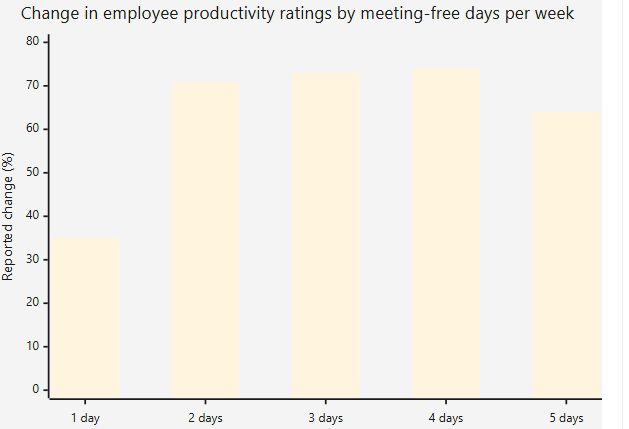
The best independent evidence I found on protecting time comes from a 2022 MIT Sloan Management Review study by Laker, Pereira, Budhwar, and Malik. They surveyed 76 companies, each with more than 1,000 employees, that had introduced between one and five meeting-free days a week (accepted manuscript; published article).
Employees’ productivity ratings rose with each added day up to a plateau, then fell when meetings were removed entirely:
| Meeting-free days | 1 | 2 | 3 | 4 | 5 |
|---|---|---|---|---|---|
| Productivity rating change | +35% | +71% | +73% | +74% | +64% |
Values as reported in secondary summaries of the study (Praxis; Asia Economy). Check the manuscript before quoting the table in print.
Read this carefully before borrowing the headline. These are employee ratings collected by survey, not measured output. The authors themselves land on three meeting-free days as the optimum and keep two for meetings, mainly to maintain social ties. And critics note that no-meeting days can push the overload onto the remaining days if meeting habits don’t change.
Why does it matter for AI time blocking? Because it tells you what the tools are really trying to buy: large contiguous stretches, not scattered half-hours.
Three vendor case studies, read critically
Reclaim.ai’s customer stories are the most-cited “proven cases” for AI time blocking, so I read them with the marketing stripped away. They are hosted on a third-party case-study index (CaseStudies.com) and link to the vendor’s own pages. I could read the summaries but not the full vendor write-ups, so nothing below goes beyond what the summaries state.
| Company | Reported result | Type of number |
|---|---|---|
| AllCloud (cloud consulting) | 2.1 h/week saved on scheduling; 9.8 h/week “defended” for productive work; 5.8 more client calls/week; manager estimates +30% productivity | Hours from tool data as presented; the 30% is an estimate |
| 1Password | 1.3 h/week saved on scheduling; 4.3 more focus hours; about 18 back-to-back meetings avoided per week; manager estimates +25% | Same split |
| Vella (listing) | Headline claims 12.7 protected focus hours/week | I saw only the headline, not the method |
What to take from them:
- The most believable number is time saved on scheduling. It’s mechanical: software that finds meeting slots saves clicks.
- “Hours defended” is a middle tier. It proves blocks were created and survived. It doesn’t prove the work inside them got done, or done well.
- The productivity percentages are the weakest tier, and each one is a single manager’s guess.
- These are survivors. A vendor publishes the customers who loved it. The ones who quietly cancelled aren’t in the collection.
A one-week solo test, for scale
A writer who tested Reclaim for a week, letting it plan the calendar instead of her usual manual blocking, reported finishing all her tasks ahead of schedule (summary on Let’s Data Science, 19 January 2026). The aggregator itself rates the evidence as anecdotal: one person, one week, no control. It’s worth reading as a story, not as a result.
What users complain about
User reviews are scattered and uneven, but the complaints repeat. G2 reviewers cite calendar duplication and unclear instructions (G2). One independent review roundup warns that heavy auto-rescheduling can feel unstable in an overloaded calendar, and that setup needs realistic priorities and durations (Unite.AI). Another compilation of user reviews mentions auto-rescheduling overriding meetings set at an exact time, and no native mobile app (Hackceleration). Treat those as reported by users, not verified by me.
The common thread is simple: an AI scheduler amplifies the quality of what you feed it. Feed it a calendar with no slack and inflated task estimates, and it will shuffle the same overload around all week.
The tool that vanished: a vendor-risk case
Here is the part of the story that case studies leave out. Clockwise, an AI calendar tool that auto-created focus time and moved flexible meetings, served more than 40,000 organizations by its own history. In March 2026, Salesforce hired the Clockwise team for its Agentforce work, and the product was shut down on 27 March 2026 (news report mirrored from The Register; Doodle’s migration note). Accounts reportedly stopped working, with user data deleted shortly afterward rather than transferred, and prepaid subscribers received prorated refunds (usecarly summary). Some of these details come from competitors’ migration pages, so I’m relying on the consistent core: announced about a week out, shut down 27 March.
Why this belongs in a time-blocking article: if your whole deep-work system lives as rules inside one vendor’s app, a one-week notice resets your productivity to zero.
Reclaim, the other name you’ll see most often, remains operational. It was acquired by Dropbox in August 2024, with the company stating at the time that it had no planned pricing changes (Reclaim help center). It added Outlook support in 2025 (Business Wire), so older guides saying it only works with Google Calendar are out of date. But “operational today” isn’t a guarantee, as Clockwise showed.
A small continuity checklist:
- Write your block rules (weekly focus hours, protected mornings, buffers) in a plain document, not only inside the tool.
- Keep the actual blocks on a standard Google or Outlook calendar so they survive without the AI layer.
- Don’t prepay annually until you’ve used a tool daily for a couple of months.
- Know how to remove the tool’s auto-created events if you leave it, since some users report leftovers.
Picking a tool type (no prices, because they change)
Pricing for these products varies a lot between review sites and changes often, so check each vendor’s page on the day you decide. The categories are steadier:
| If your main problem is… | Tool type | Examples named in 2026 reviews | Watch out for |
|---|---|---|---|
| Meetings keep eating my focus hours | Focus-time defender | Reclaim | Needs realistic weekly targets; can over-pack without buffers |
| My to-do list never fits the calendar | Task auto-planner | Motion | Heavier setup; you must trust it to move things |
| I want to plan deliberately, no automation | Guided manual planner | Sunsama | Rescheduling burden stays on you |
| I just need the basics | Native calendar focus blocks | Google Calendar, Outlook | No automatic repair when meetings move |
| I need team-wide quiet time | Team calendar policy | Reclaim team features; agreed no-meeting days | Clockwise is gone; Microsoft has reportedly begun adding auto-rescheduling to Copilot, but I couldn’t confirm a full rollout |
If you’re unsure, start with the cheapest option that does the job. One reviewer’s observation applies: AI scheduling only pays off if you actually let it move things, and that takes getting used to (independent roundup).
A playbook that survives Wednesday
This is my synthesis of the research above, not a protocol anyone has trialed. Treat it as a hypothesis you’ll test in the next section.
1. Count first. Look at last week. How many hours were actually free of meetings, and how many of those did you use for demanding work? Most people overestimate both. Without a baseline, you can’t tell whether anything improved.
2. Ask for hours, not slots. Set a weekly focus target, such as 8 hours, and let the tool place the blocks. Pick a number you can defend. Eight hours that survive are worth more than fifteen that get eaten by Thursday.
3. Protect your best two hours first. For many people that’s the morning, though it varies. Mark the best window as the least movable. Let lower-priority blocks flex.
4. Put an if-then line in every block. Not “write report.” Try “If 9:00, then open the draft and write the pricing section.” The first action is the point; the Gollwitzer research suggests that removing the in-the-moment decision is where the benefit comes from.
5. Add a ready-to-resume note when you’re pulled away. Two lines: where you stopped and the very next step.
6. Close the other door. A calendar block does nothing about a chat window that’s still open. Microsoft’s data shows many interruptions arrive outside the calendar. Mute channels during blocks, and tell the people who’ll notice.
7. Review for ten minutes every Friday. Which blocks got eaten, by whom, and why? Fix the cause (a standing meeting, a Slack habit), not the symptom.
If you use a general chatbot instead of a calendar tool: paste in your week’s commitments and ask it to propose a block layout and flag conflicts. It can’t see or move your calendar, so you copy the result in by hand. That costs you the automatic repair, but it also carries no vendor risk.
When this doesn’t work
- Reactive roles. Support, clinical, and on-call work can’t protect much time. A tool will simply move your blocks all day.
- Overloaded calendars. If commitments exceed available hours, AI scheduling reveals the problem instead of solving it.
- Manager pings. No block stops a boss who messages at 9:05. The fix is a conversation, not software.
- Team-wide effects. If only you protect your mornings, interruptions may shift to colleagues. The MIT Sloan authors’ advice to keep informal channels open points the same way.
- Perfect-plan thinking. Blocks that never flex break the first time reality shows up. Build in buffers.
Run your own four-week test
You’ll learn more from your own numbers than from anyone’s case study. This is an uncontrolled test on one person, so it can’t prove cause, but it will tell you whether the setup is worth keeping. Use a spreadsheet or a notes file.
The schedule
| Week | What you do |
|---|---|
| 1 | Change nothing. Just log. |
| 2 | Manual time blocking with if-then lines |
| 3 | Add the AI tool (or chatbot layout) with the same weekly target |
| 4 | Same as week 3; fix whatever broke in week 3 |
What to log each Friday
| Metric | How to count it | Week 1 | Week 2 | Week 3 | Week 4 |
|---|---|---|---|---|---|
| Deep-work hours actually done | Honest self-log or tracker | ||||
| Blocks planned | Count | ||||
| Blocks that survived untouched | Count; divide by planned | ||||
| Minutes spent rescheduling | Rough estimate | ||||
| Meaningful deliverables finished | Count of things you’d show someone | ||||
| Self-rated focus (1–5) | One number, end of week |
How to read it
- If deep-work hours rose in week 2 and stayed flat in weeks 3–4, manual blocking was the active ingredient, and the tool may not be worth paying for.
- If “minutes rescheduling” fell and “blocks survived” rose in weeks 3–4, the tool is earning its keep.
- If the numbers moved only in week 2 and week 3 simply matches it, you’re probably seeing novelty. Run another week.
- Weeks are not equal: a deadline week or a holiday will distort the comparison. Note anything unusual next to the number.
If you try it, I’d like to know what happened. A few real before/after logs would be better evidence than most of what’s published on this topic.
Frequently asked questions
How much focus time should I aim for? There’s no verified universal number. Choose a target you can actually defend, such as the hours you protected last week plus a little, and adjust using your Friday review.
Does AI time blocking really work? It reliably reduces the effort of keeping a blocked schedule intact. Whether that turns into better output depends on how realistic your plan is and whether other interruptions are controlled. I found no independent trial that compares AI-managed schedules with manual schedules.
Is Reclaim or Motion better? They solve different problems in 2026 reviews: Reclaim is usually described as better at defending focus time around an existing calendar, and Motion as stronger at automatically planning tasks and projects. Check current features and pricing yourself.
What happened to Clockwise? It shut down on 27 March 2026 after Salesforce hired its team. See the vendor-risk section above.
Are meeting-free days better than AI scheduling? They address the same issue differently. The MIT Sloan survey suggests meeting-free days help, though the evidence is self-reported. Many teams could combine the two: agree on the quiet days, then use a tool to enforce them.
What if I have no control over my calendar? Start with the parts you control: the if-then lines, the ready-to-resume note, muting channels, and a ten-minute Friday review. Those need no software.
Sources
- Microsoft 2025 Work Trend Index coverage: CNBC via NBC New York; TechSpot; Microsoft Switzerland
- Mark, G. (2023). Attention Span. Hanover Square Press. UCI note; catalogue record
- Leroy, S. (2009). Why is it so hard to do my work? Organizational Behavior and Human Decision Processes, 109(2), 168–181. Record; BPS Research Digest; author page
- Gollwitzer, P. M., & Sheeran, P. (2006). Implementation intentions and goal achievement. Advances in Experimental Social Psychology, 38, 69–119. doi:10.1016/S0065-2601(06)38002-1. Record; Wieber et al. review
- Laker, B., Pereira, V., Budhwar, P., & Malik, A. (2022). The surprising impact of meeting-free days. MIT Sloan Management Review. Article; manuscript
- Reclaim.ai case studies: CaseStudies.com index; outlook release: Business Wire; acquisition FAQ: Reclaim help center
- User and review sources: G2; Unite.AI; Hackceleration; Let’s Data Science
- Clockwise shutdown: news report mirror; Doodle; usecarly
Methodology and limits
Figures are as published at the sources above as of 6 November 2026. Vendor-reported numbers are labeled. The MIT Sloan table is taken from secondary summaries and should be verified against the manuscript before print use. I could not read the full vendor case studies, only their summaries, and I did not test any of the tools. Pricing is deliberately omitted because sources disagree and it changes often. Corrections welcome.