

AI for Developers
& Indie Hackers:
The 2026 Reality Check
The landscape has shifted faster than almost anyone predicted. Claude Code went from zero to $2.5B run-rate in nine months. A solo founder in Lisbon hit $10K MRR in 47 days without writing a single line of code by hand. Here’s what’s actually working — and what isn’t.
Something quietly crossed a threshold in 2025. AI went from being a useful coding sidekick to something closer to a full co-developer — and for a growing number of solo founders, it became the entire team. What used to take a small startup to build can now, in many cases, be shipped by one person in weeks. That’s not hype. The numbers back it up, and so do the Stripe dashboards of hundreds of indie hackers sharing their receipts publicly on X and Indie Hackers.
None of this means it’s easy. The tooling got genuinely powerful, but choosing the wrong setup, or not really understanding how to use it, can cost you weeks of false starts. The gap between developers using AI fluently and those still treating it like a fancy autocomplete is widening noticeably.
This post won’t pretend to have all the answers. But after synthesizing data from over a dozen major surveys — Stack Overflow’s 49,000-developer study, JetBrains’ January 2026 AI Pulse, Google’s DORA 2025, the Pragmatic Engineer’s senior-developer cohort — here’s the clearest picture we can give you of where things actually stand.
The state of play right now
By almost any measure, AI coding tool adoption has crossed into saturation territory for professional developers. 90% of developers now use at least one AI tool at work, according to JetBrains’ January 2026 AI Pulse survey of 10,000+ working professionals. Stack Overflow’s 2025 measure came in at 84%, and among the Pragmatic Engineer’s senior-developer cohort, that figure hit 95%.
The competitive picture at the top has genuinely fragmented. GitHub Copilot still leads on raw user count (26M+ total, 29% workplace adoption), but Cursor and Claude Code are tied at 18% workplace usage each. That’s a meaningful shift from even a year ago, when Copilot was the only serious enterprise option most teams considered.
Different surveys yield different rankings because they measure different populations. Stack Overflow’s dataset includes a large share of learners who use ChatGPT as their primary AI coding tool. JetBrains surveys working professionals. The Pragmatic Engineer surveys senior engineers. Each is correct for its population — which is exactly why “ChatGPT is the #1 coding tool” and “Claude Code is growing fastest” can both be true simultaneously.
The bigger story isn’t which tool leads in market share — it’s the velocity. Claude Code went from zero to $2.5B annualized run-rate in nine months, which Anthropic itself has called the fastest developer product growth in history. Cursor hit $2B ARR in roughly 28 months, outpacing Wiz, Deel, and Ramp in speed. OpenAI’s Codex CLI reached 3+ million weekly active users by April 2026 despite barely existing six months prior.
For indie hackers specifically, a parallel shift is underway. The cost to run a production-grade SaaS has dropped from roughly $5,000/month in 2019 (a small remote team) to somewhere between $85–$200/month in 2026 for a single founder using AI tooling throughout. That’s not a marginal efficiency gain — it’s a structural change in who can build what.
The coding agent wars: Claude Code vs Cursor vs Windsurf vs Copilot
Let’s get into the actual tools, because the choice genuinely matters and the marketing around all of them is, at best, selectively honest.
The four main philosophies
What makes 2026 interesting is that the top tools aren’t just competing on features — they have fundamentally different architectural philosophies. Understanding this matters more than reading any benchmark.
GitHub Copilot is the incumbent. It says: “your editor is your workspace; let me help you inside it.” It works everywhere — VS Code, JetBrains, Neovim, even a standalone CLI. The February 2026 update added Claude and Codex model access for all paid users, which is a significant upgrade. At $10/month for Pro with unlimited completions, it’s the cheapest serious option. For daily inline work, nothing beats the price-to-value ratio.
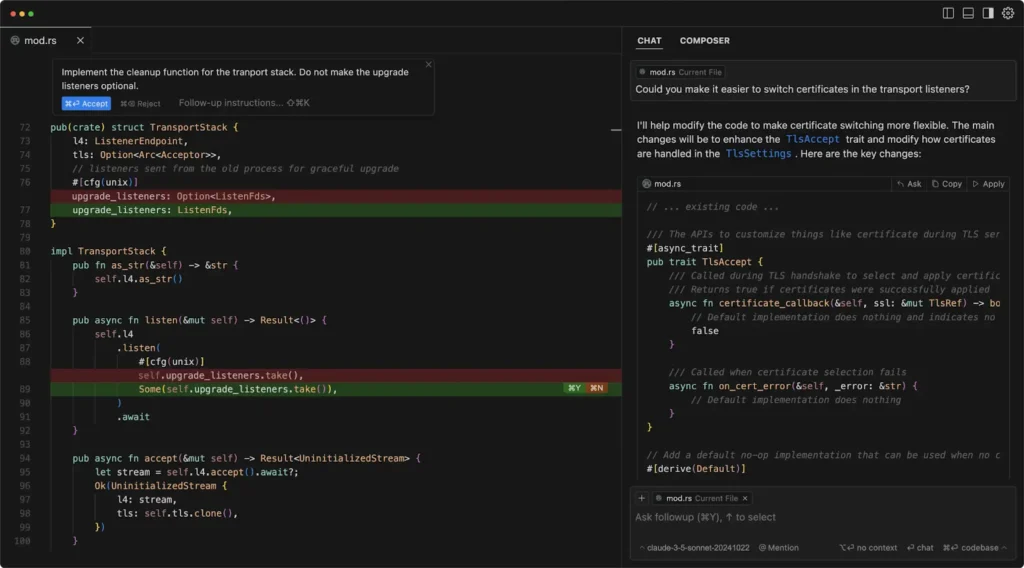
Cursor says: “let me rebuild your workspace around AI.” It’s a VS Code fork with AI woven through everything — Tab completions, chat, background agents, multi-file context. The product experience is excellent, honestly one of the best in this category. The complication is the pricing model. In mid-2025, Cursor switched from request-based billing to a credit system, which caught a lot of users off guard. One team reportedly depleted a $7,000 annual subscription in a single day. Individual developers were seeing $10–20 in daily overages. The CEO publicly apologized, but “I love the product but I don’t trust the company” became a common refrain in developer forums. That trust damage is real and worth weighing.
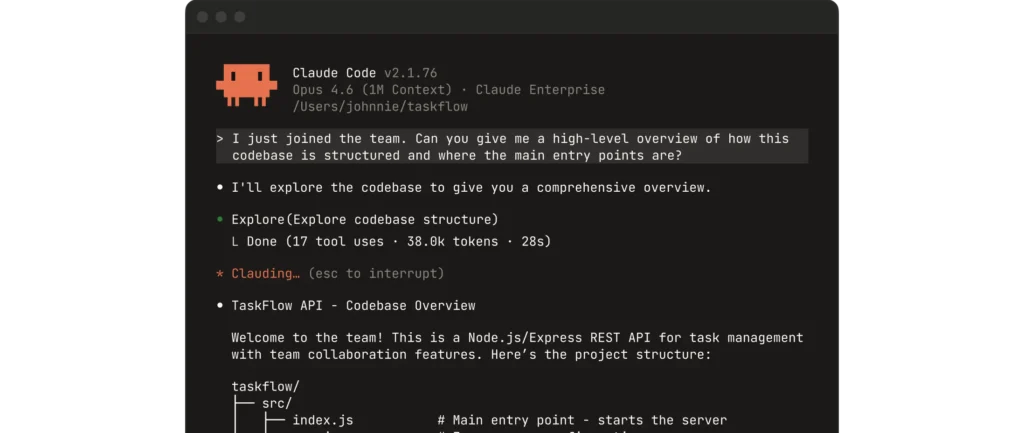
Claude Code says: “your workspace is wherever you work, and I’ll meet you there.” It’s a terminal-first tool — no IDE, no editor, just a command-line interface that reads your codebase, writes files, runs commands, and executes multi-step workflows through conversation. This sounds limiting until you actually use it on a complex refactor. Where Cursor and Windsurf start losing context at around 40+ files, Claude Code handles large cross-codebase changes comfortably, which is why developers describe it as “Cursor for daily work, Claude Code for the hard stuff.” It’s also the most autonomous — it feels less like a smart collaborator and more like handing a task to a competent colleague.
Windsurf (now under Cognition after a chaotic three-way acquisition split in July 2025) sits between Cursor and Claude Code. Its Cascade persistent-context agent keeps the AI aware of everything happening in your workspace without constant re-explanation. JetBrains plugin support gives it a direct edge over Cursor for IntelliJ/PyCharm shops. At $15/month, many developers switched from Cursor to Windsurf after the billing controversy, trading $5/month for essentially equivalent daily capability. The caveat: the founding team departed to Google, so long-term direction carries some uncertainty.
| Tool | Price/mo | Best for | Context depth | Trust/Stability |
|---|---|---|---|---|
| GitHub Copilot Pro | $10 | Daily autocomplete, any IDE, budget-conscious teams | Good (single-file strong; cross-file improving) | Highest — Microsoft/GitHub backing |
| Cursor Pro | $20 | Flow-state feature work, VS Code users | Very good (loses track at 40+ files) | Damaged — billing controversy |
| Claude Code Pro | $20 | Complex refactors, agentic automation, large codebases | Excellent (handles 100+ files comfortably) | High — API costs can spike |
| Windsurf Pro | $15 | JetBrains users, value alternative to Cursor | Very good (Cascade persistent context) | Uncertain — post-acquisition |
| OpenAI Codex | bundled | ChatGPT Plus/Pro users, speed-prioritized tasks | Good (o3 reasoning model) | High — 3M+ weekly actives |
The setup most experienced developers have settled on in 2026 is not one tool but two: an IDE agent (Cursor or Windsurf) for daily editing, plus Claude Code for complex tasks, infrastructure automation, and large refactors. The most cost-effective starting point is Copilot at $10/month plus Claude Code Pro at $20/month — $30 total, and you have both daily autocomplete and serious agentic capability.
A note on benchmarks
You’ll see SWE-bench Verified scores cited constantly in comparisons. Claude Code scores 80.9%, Codex CLI 77.3%, and so on. These are real, but they measure performance on isolated GitHub issues under controlled conditions. In production, scaffolding matters as much as the underlying model — Anthropic’s own data shows that running the same model through different agent architectures can produce results 17 problems apart on 731 total issues. So treat benchmarks as one input, not a verdict.
What productivity gains actually look like
This is where things get more honest and more complicated. The marketing says AI makes developers 55% more productive. The research says it depends enormously on who you are, what you’re doing, and how long you’ve been using the tool.
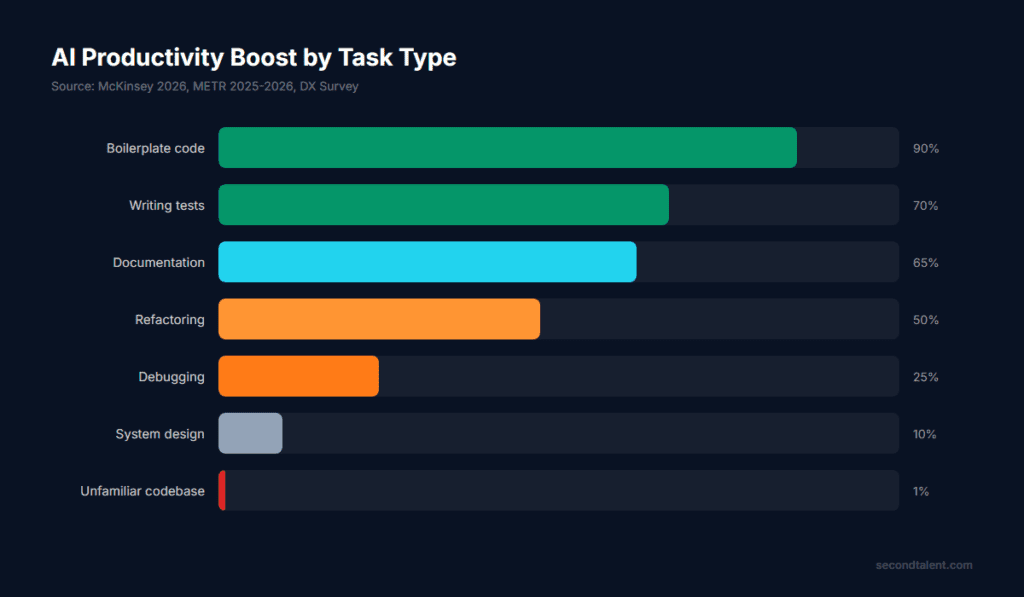
McKinsey surveyed 4,500 developers across 150 enterprises and found AI coding tools reduce time on routine coding tasks by 46%. The key qualifier: “routine coding tasks” means boilerplate, test writing, and documentation — not system design, debugging complex issues, or understanding unfamiliar codebases. DX analyzed data from 135,000 developers and found an average of 3.6 hours saved per week per developer. Individual throughput rises 21–55% with AI assistance, per DORA 2025.
“The METR study showed a 19% slowdown for developers new to AI tools — and an 18% speedup for the same developers a year later. The tools improved, but so did the developers’ sense of when and how to use them.”
— Second Talent AI Productivity Report, April 2026
That METR finding is important and under-discussed. A randomized controlled trial found developers estimated 20% productivity gains but measured a 19% slowdown — at first. The same developers, 12 months later, measured an 18% speedup. The implication: early adoption is genuinely bumpy, and teams that judge AI tools after three weeks are drawing the wrong conclusions. But teams that never invest the learning time are also leaving real gains on the table.
A Fortune 100 retailer deployed AI code review agents and reportedly saved over 450,000 developer hours in a year — roughly 50 hours per developer per month. But they didn’t reduce headcount. They redeployed those hours toward feature development and system architecture. This is likely the more realistic near-term outcome for most teams: the same people doing higher-value work, not fewer people doing the same work.
For indie hackers, the calculus is different. You’re not a team of 200 people where organizational friction eats half your productivity gains. You’re one person. If AI saves you 15 hours a week, that’s 15 hours you can spend on marketing, user research, or just shipping the next feature. The compounding effect on a solo product is much sharper.
MCP: the protocol that’s rewiring how everything connects
If you haven’t been following the Model Context Protocol (MCP), you’ve probably heard the buzz and dismissed it as another API abstraction layer. That would be a mistake. MCP is genuinely significant, and understanding it changes how you think about building AI-powered products.
Anthropic introduced MCP in November 2024 as an open standard. The idea was simple: before MCP, integrating an LLM with external tools meant writing custom function schemas for OpenAI, then re-implementing the same adapters for Claude, Gemini, and local models, then maintaining all of it as models updated. MCP standardizes that interface. One server, any model. It’s the USB-C analogy that keeps getting used — slightly tired, but accurate.
MCP has been adopted by OpenAI, Google, Microsoft, and thousands of developer tools. Platforms with MCP servers now include HubSpot, Salesforce, Mailchimp, Slack, Teams, Google Analytics, Google Search Console, LinkedIn, Google Ads, Gmail, Zapier, Shopify, and WordPress. If you’re building an AI-powered product that touches any of these, you have a standardized way in.
One team at AutoBlogging.Pro reported reducing their integration surface from 47 custom adapters to 6 MCP servers — smaller codebase, more reliable system, agents that behaved like actual agents instead of “overcomplicated chatbots.”
Running an MCP server has become nearly as common as running a web server among active AI developers, according to reporting from The New Stack. That’s a remarkable rate of adoption for something that didn’t exist 18 months ago.
For indie hackers specifically, MCP opens up some interesting opportunities. The “outcome-as-a-service” agency model — charging $3,000/month to deliver actual content, leads, or code rather than selling access to a $49/month tool — becomes much more scalable when you can wire up an AI agent to your client’s existing tools through standardized MCP connections rather than building bespoke integrations for every new client.
What to watch: the 2026 MCP roadmap
The MCP steering committee published a 2026 roadmap in March with three additions that matter: a stateless HTTP transport variant (enabling horizontal scaling behind standard load balancers), webhooks for proactive data pushes, and server-bundled domain knowledge (agents that don’t just have a tool, but know how to use it). The security work is also progressing — OAuth 2.1 authentication is in preview, addressing the main criticism that MCP was built for simplicity rather than security.
A candid note: running MCP in production requires care. The sensible practice is read-only by default until you have robust approval workflows. Log every tool call, every result, every action. An agent with write access to your production systems is not a productivity win — it’s a liability until you have audit trails and guardrails in place.
The lean indie stack for 2026
Here’s something striking: running a production-grade SaaS in 2026 costs roughly $85–$200 per month for a solo founder. Compare that to 2019, when a small remote team would run you at minimum $5,000/month. The barrier hasn’t lowered — it’s effectively evaporated for determined builders. Here’s what the stack looks like in practice.
Coding & Development
Automation & Integration
Design & Product
The best developers in 2026 use an average of 2.3 AI tools together, according to Second Talent’s productivity report. The most productive setup is an IDE agent for daily editing plus a terminal agent for complex tasks. Don’t buy five tools and use none of them deeply. Pick one, learn its edges, then add a second for the gaps the first one can’t fill.
Real stories: what indie hackers are actually building
Numbers are useful. Actual stories are more instructive. Here are a handful of real recent examples — verifiable, public, shared by the founders themselves.
Samuel built a portfolio of SaaS products over several years, eventually reaching $28K/month across multiple products. The core lesson he shares: AI dramatically reduced time-to-MVP for each subsequent product. His approach — same boring stack each time (Next.js/Node), AI to scaffold the boilerplate, focus on distribution from day one. His observation on AI: “It’s not about avoiding the code. It’s about reducing the time to value.” He used AI heavily in the MVP phase for each product, then moved to manual refinement once he had paying users validating the direction.
Cameron left his job, moved in with his parents to cut costs, and built a product that hit $62K MRR in under 90 days. The speed-and-fundamentals combination — genuine pain point, aggressive distribution, AI-accelerated build cycle — is increasingly the pattern for fast-growing indie products. His 2026 goal is 5x growth to $300K MRR. This is on the extreme end of what’s possible, not a typical outcome, but it illustrates that the ceiling for well-executed solo products has moved up substantially.
Reported by Indieis in February 2026: a solo founder launched a SaaS from a co-working space, hit $10K MRR in 47 days, and never wrote a single line of code by hand. AI generated the app, AI wrote the docs, AI handled support tickets, AI ran ad campaigns. Her “team” was a laptop and a $200/month tool budget. This case gets cited constantly — because it was unthinkable two years ago and is now merely unusual rather than impossible.
Hirvesh, a self-taught developer from Mauritius, built a habit tracking mobile app and grew it to $1K MRR in 8 months. Not a rocket ship, but instructive for different reasons. He used AI for code scaffolding, documentation, and support — but the growth came from consistent user feedback loops and a changelog strategy that made users feel like active participants in building the product. “New users see the app is alive.” Small, sustainable, genuinely useful. This is probably the more common realistic arc.
The common thread across these stories isn’t any single tool or stack. It’s the combination of AI-accelerated building with real distribution strategy. Founders who ship fast and have a clear channel to reach users are the ones seeing traction. The ones who build fast but launch into silence are having the same experience as before AI — just arriving at the cricket-chirping moment sooner.
The part people don’t talk about enough
Any honest assessment of where AI and development meet in 2026 has to reckon with the uncomfortable parts. Not to be doom-and-gloom about it — the opportunity is real. But a few specific risks are worth naming directly.
Vibe coding’s 80% problem
Andrej Karpathy coined “vibe coding” in February 2025 — programming by feel, accepting AI suggestions without reading the diffs, copying error messages back until it works. It went viral and landed in Merriam-Webster within a month. By early 2026, Karpathy himself had moved on to “agentic engineering” as the next phase. But vibe coding persists as the default mode for a growing share of developers who learned programming with AI from the start.
The problem is what Quickbase calls “the 80% problem”: AI gets you to a working prototype fast, but the last 20% — edge cases, security, scalability, maintainability — still requires real engineering judgment. Products that ship on vibes alone tend to accumulate technical debt at a pace that eventually stalls them. Vibe-coded products also tend to have security issues that don’t surface until they matter. This is particularly relevant for indie hackers, where there’s no team review process to catch what you miss.
Pricing surprises
Claude Code’s API pricing can spike dramatically under heavy agentic use. Cursor’s credit system has already burned several teams. Running unmonitored automation loops with commercial models is a real financial risk — one developer reported burning through hundreds of dollars in hours when an automation loop ran unconstrained. Always set spending limits. Always monitor usage. The per-token economics of heavy agentic workflows don’t match the flat-rate mental model most developers carry from SaaS subscriptions.
Ownership concentration and vendor risk
Windsurf’s three-way acquisition drama in July 2025 — Google taking the founders, Cognition taking the product and employees, with OpenAI’s original deal collapsing — is a case study in how quickly the infrastructure underneath your workflow can change. The more tightly you integrate a single tool into your process, the more exposed you are to that tool’s corporate trajectory. The most risk-tolerant setup is open-source where possible (OpenCode, Aider, Cline), with commercial tools used as layers rather than foundations.
The code quality question
AI now generates 41% of all code written globally. A lot of that code is fine. Some of it has subtle bugs that only appear at scale. Some of it has security vulnerabilities that wouldn’t pass a careful review. The teams that are getting the best outcomes in 2026 are treating AI-generated code with the same review rigor they’d apply to code from a new hire — which is to say, not unconditional trust, but not paranoid rejection either. The discipline of actually reading the diff before you accept it is increasingly the thing that separates good engineering from technical debt accumulation.
MCP servers introduce an expanded attack surface. Tool poisoning (malicious tool descriptions), cross-server shadowing, and prompt injection through tool outputs are all real attack vectors. If you’re building production systems with MCP, read Thoughtworks’ coverage of toxic flow analysis and use tools like mcp-scan before connecting agents to anything critical. The S in MCP doesn’t stand for security — you have to build that yourself.
Where this is all heading
Gartner predicts 40% of enterprise applications will include task-specific AI agents by end of 2026, up from less than 5% in 2025. That’s an extraordinary deployment velocity if it holds. The $30B agent orchestration market analysts projected for 2030 may arrive three years early.
For developers, the strategic question isn’t whether to use AI tools — that’s settled. It’s how to build the right habits around them. The developers who will have the most leverage in two years are the ones who understand their tools deeply enough to know when AI is genuinely helping and when it’s generating plausible-looking nonsense. That judgment doesn’t come from reading about AI tools. It comes from months of intentional use on real projects.
For indie hackers, the window is genuinely open right now. Not because “anyone can build anything” — that’s always been oversold — but because the cost of shipping has dropped dramatically, and the market for hyper-specialized AI-powered micro-SaaS is expanding fast. The micro-SaaS segment is projected to grow from $15.7B in 2024 to $59.6B by 2030, roughly 30% annual growth. The opportunity has shifted clearly away from general tools toward surgical, AI-powered solutions for specific pain points.
The old model was: build a tool, sell subscriptions, hope the market finds you. The 2026 model that’s working is: solve one real problem completely, use AI to deliver the outcome rather than just access to a dashboard, build trust through transparency, and compound from there. It’s harder in some ways than it looks, and more possible in others than it sounds.
- Pick one coding agent and spend real time learning its edges before adding a second tool to your stack
- Treat AI-generated code like code from a talented new hire — useful, worth reviewing, not unconditionally trusted
- Build an MCP server for at least one internal integration; the learning will pay off as the ecosystem matures
- Set hard spending limits on any pay-per-token tool before running autonomous workflows
- Don’t mistake fast MVP speed for product-market fit — distribution still does the actual work
- The 80% problem is real; the last 20% of any product still requires your judgment, not the model’s
- Read the diff before you accept it. Every time.
The tools are genuinely good now. Not perfect, not magic, but good enough that a solo founder with real engineering judgment and a clear pain point to solve can build and ship competitive products faster than a small team could three years ago. That’s a real shift.
The developers thriving in this environment aren’t the ones with the flashiest stack or the most subscriptions. They’re the ones who picked a few tools, learned them deeply, and kept their focus on shipping things that solve real problems for real people. That part hasn’t changed, and probably won’t.
More from Trendix
Trusted analysis for builders who want to stay ahead without the noise
Cursor vs Claude Code: 6 Months in Production — Which Is Actually Better?
AI Coding Agents: The Complete Guide for 2026
Cursor vs Claude Code: Developer Workflow Deep Dive
Best AI Tools for Freelancers—Build a $40/Month Stack That Works
No-Code Automation: Build, Connect, Scale —Without Touching a Line of Code
9 AI Tools for Qualitative Researchers: Transcription, Coding, and Analysis Strategies That Actually Work
AI Coding Assistants: The Complete 2026 Guide