

The Underrated AI Tools Nobody Hypes — But Practitioners Actually Use
ChatGPT, Gemini, Copilot. You already know them. This piece is about the tools that make those headline models actually useful — the ones sitting quietly in the background, saving 10 hours a week for people who bothered to find them.
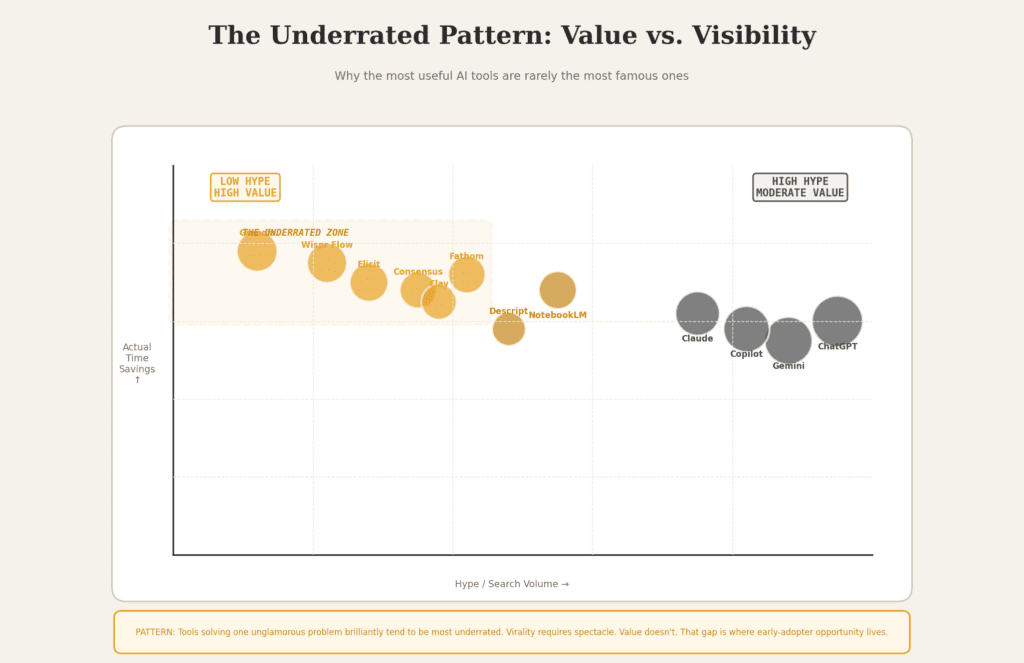
- Most “top AI tools” lists rehash the same five products. The real leverage is in the second tier.
- Granola just raised at a $1.5B valuation and most people still haven’t heard of it. That gap is opportunity.
- Wispr Flow users hit 184 WPM dictation speed. That’s more than 2× the average typing speed — for free at the basic tier.
- Elicit searches 125 million papers; Consensus answers yes/no research questions with an evidence meter. Neither gets enough credit.
- The pattern: tools that solve one unglamorous problem brilliantly tend to be the most underrated. Virality requires spectacle. Value doesn’t.
I keep a running list of tools I’ve tested. It’s somewhere north of 180 at this point, across every category from meeting intelligence to research synthesis to coding assistants. Most of them were forgettable. A few were genuinely excellent. Almost none of the excellent ones were the ones tech Twitter was arguing about that week.
What follows is the result of that list — filtered down to the tools I’d actually recommend to a smart colleague who didn’t have time to test everything themselves. Some of these are growing fast and probably won’t qualify as “underrated” in six months. That’s fine. Get there early.
One honest caveat before we start: my testing skews toward B2B knowledge work — writing, research, sales, and product. If you’re a hardware engineer or a nurse, some of these will be less relevant. I’ll say so where I can see it clearly.
Search score derived from relative SEMrush volume (normalized). Time-savings score based on documented user productivity data and practitioner reports, 1–100 scale. Visualization is illustrative, not based on a formal study — my sample skews B2B knowledge work.
Meeting Intelligence & Voice
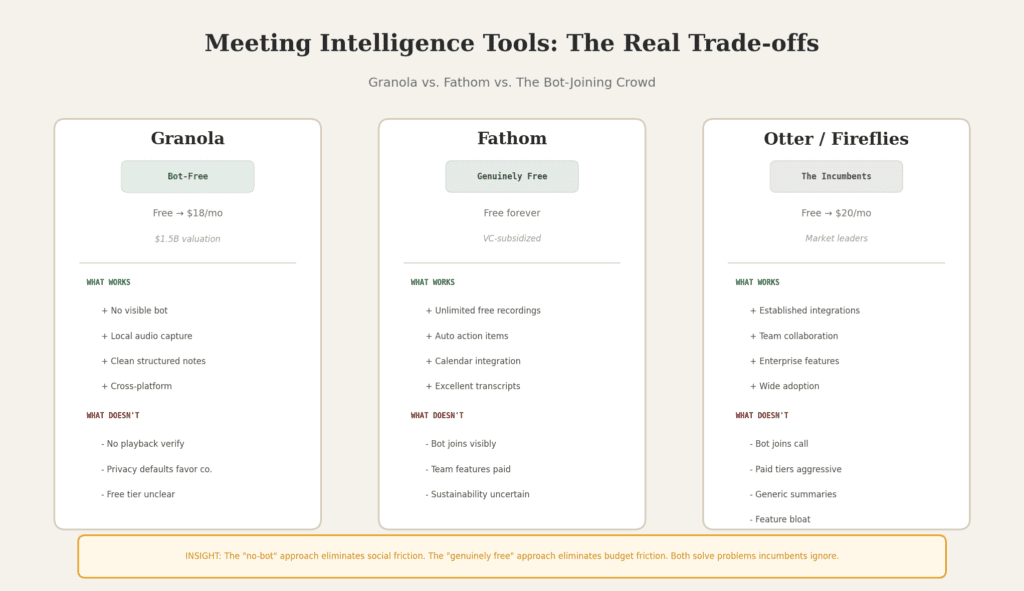
Most AI meeting tools work by joining your call as a visible participant — a bot with a name like “Otter Note Taker” sitting in the attendee list, slightly creeping everyone out. Granola sidesteps this entirely by capturing audio directly from your device. It doesn’t join. It just listens, the way you do, and produces genuinely good structured notes afterward.
Its 2026 release of “Spaces” added team workspaces with granular access controls, and enterprise clients now include Vanta, Gusto, Asana, and Cursor — not exactly companies with low standards. The MCP server integration means meeting context can now feed directly into broader AI workflows. Enterprise is coming whether the early-adopter community wants it or not.
The honest catch: there’s no video or audio playback. If the transcript makes a mistake, you cannot go back and listen. For multilingual meetings or heavy jargon, that matters. And Granola trains its AI on your data by default unless you’re on Enterprise — worth reading their privacy policy before putting confidential client calls through it.
- No bot joining = zero friction
- Works across Zoom, Teams, Meet
- Notion-style notes, actually readable
- Ask Granola queries past meetings
- No audio/video playback to verify
- Privacy defaults favor the company
- Free tier limits unclear
- Requires software install
→ granola.ai — No sponsorship. Tested independently.
Apple Dictation transcribes what you say. Wispr Flow figures out what you meant to write. It’s a subtle but enormous distinction. When you’re in Gmail, outputs sound professional. When you’re in Slack, it’s casual. In a code editor, it strips filler words. The context-awareness is what turns a decent transcription tool into something genuinely strange and useful.
The 2× typing speed figure isn’t a marketing claim — a developer who reviewed it publicly logged 182,718 words dictated across 36 apps. Consistently hitting the top 1% of all Wispr Flow users puts that in perspective. For anyone who writes heavily across email, Slack, docs, and notes, this kind of throughput isn’t marginal.
Where it falls short: audio goes to external servers (privacy-sensitive users will prefer SuperWhisper for on-device processing), there’s a 6-minute recording cap per session, and the free tier’s 2,000-word weekly limit runs out fast for heavy users. If you need full data sovereignty, this isn’t your tool.
- Works in any app with a text field
- Context-aware formatting (email ≠ Slack)
- HIPAA compliant out of the box
- Cross-platform sync
- Audio sent to cloud (not fully offline)
- 6-minute session cap
- Free tier burns fast for power users
- Not for occasional, light use
One practitioner I follow has recorded and transcribed nearly 300 calls with Fathom without paying a cent. That’s not a bug — it’s deliberate VC subsidization of user acquisition. Whether that’s sustainable long-term is a fair question. But right now, for someone who needs reliable call recording and structured summaries without a budget, Fathom is an obvious choice that surprisingly few people have heard of outside sales circles.
The summaries aren’t just transcript dumps. They’re structured notes with action items pulled out — useful in a way that raw transcripts almost never are. It integrates with your calendar and shows up automatically. The one cosmetic annoyance: the Fathom tile sitting in the corner of Google Meet.
- Genuinely free with unlimited recordings
- Action items extracted automatically
- Calendar integration = no setup per call
- Transcription quality is excellent
- Bot joins visibly (like most rivals)
- Team collaboration features need paid tier
- Long-term free tier sustainability unclear
The Research Tools Academics Know, Everyone Else Doesn’t
This is the category that frustrates me most. There are tools that have genuinely transformed how literature review and fact-checking work, and they’re almost entirely invisible outside academia. Elicit and Consensus deserve a much wider audience.
Ask Elicit a research question in natural language. It searches 125 million academic papers and returns structured tables with methods, outcomes, sample sizes, and limitations extracted automatically from each source. For anyone doing systematic literature review — or just trying to quickly understand the evidence behind a claim — this is borderline magical compared to the alternative, which is reading thirty abstracts yourself.
The specific audience is people who need evidence, not opinions: policy analysts, consultants, healthcare professionals, academics, and anyone building arguments that need to survive scrutiny. Outside those groups, Elicit is overkill. Inside them, it’s one of the most underutilized tools in existence.
I’ve used Elicit to research topics ranging from AI governance policy to behavioral economics. The structured extraction column is genuinely useful — you can compare methodologies across 20 papers in one table. What it can’t do: synthesize or argue. That’s still your job. Think of it as a very fast, very thorough research assistant rather than a writer.
Consensus is more opinionated than Elicit in a useful way. You ask a specific question — “Does intermittent fasting reduce insulin resistance?” — and instead of returning a list of papers, it synthesizes the weight of evidence into a visual signal called the Consensus Meter. Searches 200 million papers. Shows you what the literature agrees on.
For quick evidence questions where you need to know roughly what the science says before diving deeper, this is faster than any alternative I’ve found. For full systematic review work, Elicit is more rigorous. These two tools are complements, not competitors.
Limitation: The Consensus Meter is an aggregation signal, not a clinical verdict. It can overweight recent papers, miss important nuances in study quality, and doesn’t distinguish RCTs from observational studies unless you dig into the individual papers. Use it for direction, not doctrine.
Here’s the thing about NotebookLM that most people miss: the constraint is the feature. Every other AI assistant tries to answer from the entire internet, which means it confidently answers from the wrong part of the internet sometimes. NotebookLM only works from documents you upload. It cannot hallucinate external facts because it has no access to them.
Paste in a YouTube video URL and you can interrogate the full transcript. Upload 10 PDFs and ask comparative questions across all of them. Use the Audio Overview feature and it generates a surprisingly coherent podcast-style summary of your source material. For researchers dealing with institutional AI governance restrictions, it’s often the first tool that doesn’t get blocked — because you’re only uploading published material, not sending proprietary data into a general model.
Upload 100+ papers expecting comprehensive synthesis and you’ll be disappointed. NotebookLM performs best with curated source lists of 5–15 highly relevant documents. Quantity defeats the quality constraint. The quality-over-quantity rule here is non-negotiable.
“The Consultant Who Trusted the Evidence Meter”
A management consultant I know was using Consensus to quickly pull evidence for a client deck on a health-related intervention. The Consensus Meter showed strong agreement across studies. He cited it without drilling into the individual papers. Three of the top results were observational studies with confounded populations — not randomized trials. The client’s scientific advisors caught it in review.
Mechanism: Consensus summarizes breadth of agreement, not study quality. A hundred weak observational studies can outvote two strong RCTs in the meter.
Cost: Two days of rework, a delayed deck, and a difficult conversation about research methodology. No lasting damage, but preventable.
Fix: Use the Consensus Meter for direction, then click into the actual papers and check study design before citing anything in a high-stakes context. Elicit’s structured extraction helps here — it shows methodology at a glance.
Clay: The Sales Tool That Actually Reads Your Prospect
Clay pulls data from LinkedIn, Crunchbase, Google Search, and dozens of other sources, then uses a large language model to draft personalized outreach emails for each contact. You set the filters; Clay builds the list, researches each person, and writes a message that actually references something specific about them. The automated workflows now detect website visitors, qualify leads, and trigger emails within minutes of a visit.
It’s not cheap for solo operators. But for any sales team doing outbound at scale, the math on time saved versus hourly cost of manual research tends to close fast. The caveat I’d add: Clay’s personalization is only as good as the data it can find publicly. For senior executives who keep a low profile, it often falls back to generic signals. And anyone who’s been on the receiving end of a Clay-generated email knows they’re starting to pattern-match as “AI outreach.” The window of authentic-seeming personalization is narrowing.
- Multi-source data enrichment in one tool
- GPT-generated first drafts save hours
- Automated workflows for visitor detection
- Massive time savings on list-building
- Expensive at $149+/mo entry point
- Recipients increasingly recognize AI outreach
- Data quality varies by prospect profile
- Steep learning curve for non-technical teams
Descript Studio Sound & Podcastle: Audio Tools That Solve Real Problems
Descript gets mentioned because people know it for video editing. The Studio Sound feature — which transforms audio recorded in genuinely terrible conditions into something resembling a professional setup — gets vastly less attention than it deserves. Recording from a laptop mic in a room with echo? Run Studio Sound. It removes the echo, suppresses the background noise, and adds presence to the voice that wasn’t there in the original recording.
I’ve used it on recordings made in a coffee shop, on a train, and in a hotel room at 11pm. All of them became usable. Not perfect — if you listen carefully, there’s a quality ceiling — but usable for professional publication, which was previously impossible for those recordings.
What makes it underrated specifically: most people who’d benefit from it (small podcast producers, trainers creating video courses, consultants recording client explainers) don’t know Descript has it, because they associate Descript with its video editing interface and stop reading.
Podcastle’s “Magic Dust” feature does what it says: removes background noise, sharpens voice clarity, and deletes filler words. The eye contact correction for video — fixing the slight downward gaze that happens when you read from a screen — is a genuinely novel feature that shouldn’t exist yet, but does. For anyone making training content or video explainers without a proper studio, this is one of those tools that eliminates a problem you’d previously just accepted.
Honest scope check: This is specifically useful for people producing podcast or video content at a small-to-medium scale. If you’re a large production house, Adobe Audition with manual engineering is still better in absolute quality. Podcastle’s value is automating 80% of the workflow for people who don’t want to learn audio engineering.
Quick Comparison: Which Tool for Which Job
| Tool | Primary Job | Free Tier | Best For |
|---|---|---|---|
| Granola | Bot-free meeting notes | Limited | Individuals, small teams |
| Wispr Flow | Voice → formatted text | 2K words/wk | Heavy writers, multi-device |
| Fathom | Meeting recording + summary | Unlimited | Anyone on a budget |
| Elicit | Academic literature review | Yes | Researchers, analysts, healthcare |
| Consensus | Evidence-based Q&A | Yes | Quick evidence checks |
| NotebookLM | Grounded document Q&A | Fully free | Anyone with PDFs to interrogate |
| Clay | Sales outreach automation | No | Outbound sales teams |
| Descript Studio Sound | Audio quality enhancement | Limited | Podcasters, course creators |
| Podcastle | Podcast/video production | Yes | Solo creators, small teams |
| Perplexity Pages | Research-to-publication | Yes | Content teams, analysts |
Perplexity as a research tool gets reasonable coverage. Pages — the feature that lets you turn a Perplexity research thread into a published, shareable document with inline citations — gets almost none. For content teams that need to quickly produce well-sourced backgrounders, briefing documents, or research summaries, Pages produces a professional output in a fraction of the time it would take to write from scratch.
The limitation worth knowing: Pages inherits Perplexity’s core trade-off — breadth and speed over depth and nuance. It won’t write anything analytical that required your own judgment. What it will do is handle the scaffolding — the structure, the sourcing, the factual foundation — and let you add the thinking on top. For that specific slice of work, it’s genuinely underused.
The most underrated tools in 2026 tend to have a specific and unglamorous job. Nobody tweets about “my meeting notes were clean today.” Nobody goes viral because their audio sounded professional. The value is real; the visibility isn’t. That gap is where the opportunity lives for early adopters.
What Could Be Wrong with This List
A few things worth naming honestly before you take any of this at face value:
The “underrated” label has a shelf life. Granola just raised $125M at a $1.5 billion valuation. It won’t be underrated for long. By the time you read this, several of these tools may have been acquired, pivoted, repriced, or shut down. The AI tools market is volatile in a way that most software markets aren’t.
My sample is skewed. I work primarily in B2B knowledge work — writing, research, product, sales. Tools like Elicit and Consensus that I rate highly might be genuinely irrelevant to a graphic designer or a logistics manager. Context always matters more than any list.
The “AI outreach” window is closing. Clay-generated personalization was remarkably effective 18 months ago. Recipients are increasingly pattern-matching it. The tool is still useful, but the effectiveness ceiling is dropping as the category gets crowded and buyers get more sophisticated.
Privacy defaults matter. Several tools on this list — Granola, Wispr Flow — send your data to external servers by default and train on it unless you’re on an enterprise plan. For anyone working with sensitive client data, read the privacy policies before committing anything confidential to these tools.
“The most valuable AI tools are rarely the most famous ones — they’re the ones doing one unglamorous job so well you stop noticing how hard it used to be.”
More from the AI Tools Desk
Best PKM Tools: The Complete Ranked List
AI Hallucinations in Academic Writing: What They Are and How to Catch Them
Best AI Research Tools: The Definitive Expert Guide
NotebookLM for Researchers: A Deep Dive Into the Most Underused AI Tool
9 AI Tools for Qualitative Researchers: Transcription, Coding, and Analysis Strategies That Actually Work