

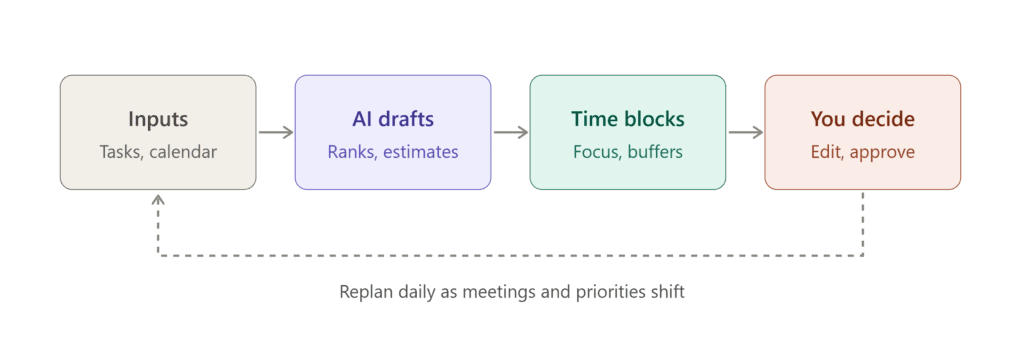
Five real cases, from a randomized study at Microsoft to a calendar startup that shut down in a week, and what they say about letting software guard your focus hours.
By [Author name] · Updated October 31, 2026 · About 15 minutes · Numbers in [brackets] point to the source list at the bottom
How to read the evidence labels
Every claim in this article carries one of five labels, so you can see how much weight it can bear.
| Label | Meaning |
|---|---|
| 🟢 Peer-reviewed | Published in an academic venue with independent review |
| 🔵 Observational | Published research that watched people but did not test an intervention (including the Harvard Business Review study, which is editor-reviewed, not academically peer-reviewed) |
| 🟠 Vendor-reported | Numbers from a company selling the product, or from its customers’ stories |
| ⚪ Press or secondary | Reported by a news outlet, analyst or summary, not read in the original |
| 🟣 Judgment | My reasoning, not a finding |
The short answer
- Protected focus blocks help. The best evidence is two small Microsoft Research studies from 2023. People with computer-protected time reported better performance and wellbeing, and meeting and communication volume did not drop. 🟢 [1][2]
- Nobody has shown that an AI scheduler beats a disciplined manual calendar. What software adds is that blocks defend themselves when meetings pile up. That is a convenience claim, not a proven productivity claim. 🟣
- Vendor numbers (9.8 hours here, 44% there) measure different things. Read them as direction, not as a forecast for you. 🟠
- Tools disappear. Clockwise, the best-known focus-time optimizer, was shut down on March 27, 2026, about a week after announcing it. ⚪ [9][10]
- Where AI helps most is the boring planning around deep work. The deep work itself is still yours. 🟣
The problem is not your attention span
Gloria Mark, an informatics professor at UC Irvine, has measured how people use screens for about twenty years. She told CNN that average attention on one screen was roughly two and a half minutes in 2004, about 75 seconds some years later, and 47 seconds in her most recent measurements. ⚪ [3]
| Period | Average time on one screen |
|---|---|
| 2004 | ~150 seconds (2½ minutes) |
| “Some years later” (no year given) | ~75 seconds |
| Most recent measurements | 47 seconds |
Source: CNN interview with Gloria Mark, 2023 [3]. Mark gave no year for the middle figure, so none is shown.
The 23-minute number deserves suspicion
The statistic repeated most often is that it takes 23 minutes to get back to a task after an interruption. Mark herself now cites about 25 minutes. Before you build a system on it, know what it measured: a field study of 24 information workers at one company, from before Slack and phone notifications were everyday things. The spread was huge (a standard deviation of nearly 55 minutes), and in between, people were usually busy with other work, not staring at the wall. ⚪ [4]
So the honest reading is that interruptions are expensive and unpredictable, not that every ping costs exactly 23 minutes.
A related idea has firmer footing. In 2009, Sophie Leroy described attention residue: part of your mind stays on the unfinished task you just left, and the next task gets less of you. 🟢 [5]
The volume problem
Microsoft’s 2025 Work Trend Index reported 275 pings a day (meetings, email and chat) for the busiest fifth of Microsoft 365 users, which works out to about one every two minutes in core hours. Two qualifiers matter: that is the heavy end, not the average worker, and a ping is not necessarily an interruption. Microsoft did not observe 275 attention shifts. 🟠 [6] The same report found that 80% of surveyed workers said they lack the time or energy to do their job properly. 🟠 [6]
Where the hours go
Clockwise analyzed a year of calendar data (to May 2022) covering 1.5 million meetings, 80,000 software engineers and more than 5,000 companies. It defined focus time as a free block of at least two hours. 🟠 [7]
| One week of an average engineer (36.8 hours of calendar) | Hours |
|---|---|
| Focus time (blocks of 2+ hours) | 19.6 |
| Meetings | 10.9 |
| Fragmented gaps (too short to use) | 6.3 |
Managers in the same data spent 17.9 hours a week in meetings. Source: Clockwise analysis as reported by DevOps.com and Computerworld [7]. I did not re-derive these figures.
The number to stare at is 6.3. Those hours are not in meetings and not usable for hard thinking either. Fragmentation is a separate problem from meeting load. The two made-up days below each contain exactly three hours of meetings:
9 10 11 12 13 14 15 16 (■ = meeting, □ = open)Day A: ■ ■ ■ □ □ □ □ □ longest free stretch: 5 hDay B: □ □ ■ □ ■ □ ■ □ longest free stretch: 2 hIllustration, not data. Identical meeting hours, but only Day A has room for a real deep work session. Turning Day B into Day A is the job an AI calendar is meant to do: move flexible meetings so the open time clumps together. 🟣
Five cases
Each case is labeled by how much weight its evidence can bear. The ones you would most like to be true, the vendor customer stories, have the least independent proof behind them.
Case 1: Microsoft Research tested protected time against a control group
🟢 Peer-reviewed
In 2023, two Microsoft Research papers studied the Focus Time feature in Viva Insights. It books up to four hours of focus time on your calendar each day, shows you as busy, and can mute Teams chats during the block. [1][8]
- “Focused Time Saves Nine” (Das Swain and colleagues, CHI 2023) analyzed existing users, then ran a randomized intervention on 89 workers who had never had protected time. Those given it self-reported higher performance, more job resources and deeper immersion in their work. [1]
- Saha and Iqbal (CHI 2023 Extended Abstracts, with a longer version at CHIWORK 2023) followed Focus Time users over six weeks and reported gains in wellbeing and work engagement. [2]
- In the researchers’ own summary, protected time changed when people did things, not how much they did, cut after-hours activity, and did not reduce overall meeting and communication use. 🟠 [8]
What it shows: Computer-protected time changes how a day is arranged and how people feel about their work, without costing them meeting time.
What it doesn’t: The samples are small and the outcomes self-reported. The tool is rule-based scheduling, not a language model. The block also mutes chat, so “protected time” and “fewer notifications” are bundled together. And the researchers work for the company that makes the feature.
Case 2: Clockwise, the best-known focus optimizer, gone in about a week
🟠 Vendor-reported · ⚪ Press
Clockwise’s pitch was automation: tell it which hours count as focus time, and it moved flexible meetings out of the way. In a 2021 survey of its own users it reported that people said their focus time rose 39% and productivity 32%. Those are self-reported numbers from a company selling the product. [11]
In March 2026, CEO Matt Martin announced that the team was joining Salesforce (to work on Agentforce) and that the product would close on March 27. Customers had roughly a week. Because Salesforce hired the people and did not buy the product, customer data was not carried over, and prepaid subscriptions were refunded pro rata. Coverage differs on how much export was possible in the final days. ⚪ [9][10]
What it shows: The fragmentation Clockwise measured is real and large (see the week table above). It also shows the practical risk of building your week on one small vendor.
What it doesn’t: Whether Clockwise’s own customers really gained focus time. The data we have is its own marketing and a one-sided survey.
Case 3: Reclaim, and a lot of different yardsticks
🟠 Vendor-reported
Reclaim.ai sets a weekly focus-time goal, then adds, moves and defends blocks as meetings change. Dropbox bought it in August 2024, when it reported 320,000 users at 43,000 companies, and it now supports both Google Calendar and Outlook. ⚪ [12][13] Its published case studies are worth reading as a set, mostly because no two use the same measure:
| Company | Reported result | What was actually measured |
|---|---|---|
| AllCloud | +9.8 h/week | Focus time per employee |
| Vella | 12.7 h/week | Focus time protected for office workers |
| QuitCarbon | 4.1 h/week | Saved per employee through meeting automation |
| 1Password | 44% | Improvement in time management (method not stated) |
| Seibert | 30% | Productivity gain from automating meetings and work |
| Reclaim, company-wide | 7.6 h/week | Average extra focus hours per user, company-reported |
Source: Reclaim’s customer pages and a third-party profile of its site [12][14]. All figures are company-reported.
Reclaim also surveyed its own users in 2025 and reported that employees get 46% less focus time than they say they need, attend 29.6% more meetings than they want and work 6.6 hours of overtime a week. That is a survey of people who chose a time-management tool, so it tells you about them. [12]
What it shows: Companies that adopt a focus-time tool tend to report more protected hours. That is plausible and consistent with Case 1.
What it doesn’t: Anything about a typical user. There are no control groups, the customers are self-selected, and “hours” means four different things in the table.
Case 4: Twenty-seven CEOs and an unprotected calendar
🔵 Observational
This one has no AI in it, which is why it is here. Harvard’s Michael Porter and Nitin Nohria had 27 CEOs of large companies log their time in 15-minute blocks for 13 weeks, roughly 60,000 hours in total, published in Harvard Business Review in 2018. The CEOs spent about 72% of their work time in meetings, and press coverage of the study reports around 36% of their time in a reactive mode. The authors’ advice: reserve real stretches of alone time, protect them from the inbox, and set a personal agenda, because otherwise the loudest demands win. [15]
What it shows: Even people with assistants and total control of their calendars end up reactive unless they decide in advance what the time is for.
What it doesn’t: Anything about software. It is 27 executives at big firms and may not transfer to a freelancer or an engineer.
Case 5: Motion versus a paper planner, or who holds the pen
⚪ Press or secondary · 🟣 Judgment
Motion goes furthest in automation. You enter tasks with deadlines and time estimates, and it places them on your calendar and reshuffles them as things change. A competitor’s review (Morgen, so read it with that in mind) describes Motion as deciding when you work on tasks, in contrast to a planner that proposes a schedule you approve first. [16] Pricing has moved repeatedly: third-party trackers in 2026 disagree on current plans, and Motion has added higher-priced “AI employee” tiers, so check the live pricing page before comparing. ⚪ [17]
At the other end is Cal Newport, who popularized time blocking in Deep Work and published a Time-Block Planner in 2020. In his approach you plan the day on paper and, when the plan breaks, you rewrite it. The software decides in one model and you decide in the other.
What it shows: There is a real design choice: let software decide (Motion), let it defend decisions you made (Reclaim), or do it by hand (Newport).
What it doesn’t: Which of the three works best. There is no head-to-head study, only reviews and opinion. Peer-reviewed support for time blocking itself is thin for every approach.
What about ChatGPT, Claude, Gemini and Copilot?
None of the five cases tested a general-purpose chat assistant, and I found no peer-reviewed study that did. What can be said is structural:
- Chat assistants are reactive. They draft a plan, summarize a calendar export, or create an event when you ask. They do not, by default, watch your calendar and re-defend a block when a new invite lands. Reclaim makes this argument about Microsoft Copilot (a competitor’s claim, but a plausible description of how prompt-driven tools work). ⚪ [18]
- Connectors are blurring the line. Calendar connectors and MCP-style integrations let some assistants read and edit calendars directly, and Reclaim advertises an integration with Claude. What your assistant can actually touch depends on your setup and permissions. 🟠 [18]
- Practical split: use a chat assistant for planning and review (where it is strong), and a calendar-native tool, or your own discipline, for the defending.
Whether an LLM-driven scheduler produces more real deep work than a rule-based one remains untested. 🟣
What the evidence adds up to
| Claim | Support | Confidence |
|---|---|---|
| Fragmented days hurt focus and mood | Mark, Leroy, Clockwise and Microsoft data | High that it is real, low on exact costs |
| Protected blocks improve self-reported performance and wellbeing | Two small Microsoft Research studies, one randomized | Medium |
| Protected blocks don’t reduce meetings or communication overall | Same studies, authors’ summary | Medium |
| AI schedulers beat manual blocking | Nothing independent | Unknown |
| LLM chat assistants improve focus-time outcomes | No studies found | Unknown |
| Specific tools deliver the hours they advertise | Vendor stories using different measures | Low |
| Time blocking in general raises output | Surveys (Doodle: 83.6% said they get more done) and practitioner reports | Low to medium; peer-reviewed work on it is scarce [19] |
Three ways to run it
| Approach | Who decides placement | Evidence | Main risk |
|---|---|---|---|
| Manual (calendar or paper, Newport-style) | You | Practitioner reports only | Blocks lose to meetings when you are not looking |
| Chat assistant for planning (ChatGPT, Claude, Gemini, Copilot) | You, with a draft from the assistant | None specific | Plans stay static unless you update them |
| Calendar-native defender (e.g. Reclaim) | You set the goal; the tool moves blocks | Vendor stories; Case 1 for the general idea | Vendor risk (see Clockwise); hours measured differently |
| Auto-planner (e.g. Motion) | The tool places your tasks | Vendor claims and reviews | Feels intrusive; cost; lock-in |
| n/a | Discontinued March 27, 2026 | Shows what lock-in costs |
A rule of thumb (judgment): if your problem is meetings landing in your best hours, a defender tool is the closest match. If your problem is that you never decide what to work on, no scheduler fixes that, and a plan you write yourself will. If you cannot tolerate software moving your commitments, stay manual. 🟣
A two-week setup you can actually run
🟣 This part is judgment built on the cases above, not a finding. Treat it as an experiment and measure it against your own calendar.
Days 1 to 3: measure before you change anything
For three working days, write down the longest uninterrupted stretch you got and what ended it. Or paste a cleaned-up calendar export into an AI assistant. Strip attendee names and replace event titles with generic labels first. A calendar leaks more than you would think.
Here is my calendar for the last two weeks, with titles replaced by genericlabels and no attendee names: [paste]. For each working day, give my longestuninterrupted gap and say what ended it. Then tell me which recurringmeetings sit in the middle of my best hours, and which three I could move,shorten or cut. Don't invent events that aren't in the list.Day 4: pick a goal you would bet on
Set a weekly focus total that is lower than your wishes and higher than your current gaps. The Microsoft feature books focus time daily, up to a four-hour ceiling; that is a product setting, not a research finding about the right dose. Where meetings are the problem, make it a team decision, because one person’s blocks collide with everyone else’s invites.
Week 1: plan with the assistant, protect with the calendar
Use an AI chat to draft the week. Put the output in your calendar by hand, or let a tool like Reclaim place and defend the blocks. Which is better is not something the research can tell you. Choose by what you will keep using and how much control you want over placement.
I want [X] hours of deep work this week on: [project A: deliverable anddeadline], [project B: deliverable and deadline]. Fixed commitments: [list].My best hours are usually [time of day]. Propose blocks of [length] with atmost [N] per day and 30 minutes of slack after each. Put the hardest task inmy best hour. Tell me what you'd drop if the week runs over, and mark everyassumption you made.Every block: end with a restart note
Leroy and Glomb’s 2018 studies found that people who briefly planned their return to an interrupted task switched their attention more fully to the interrupting task, with less attention residue and better performance there. [5][20] They did not test planned deep-work blocks, so treat the note as a cheap, reasonable extension: two lines that cost nothing and give your next session a running start. 🟣
I'm stopping this block now. Here's where I am: [paste your rough notes].Write a restart note for my next block: the exact next action, the file ortab to open first, the open question I was holding, and what "done" lookslike. Under 80 words.Week 2: run a Friday review and change one thing
Compare what you planned to what happened. Most people find a few repeat offenders eat the blocks.
Here are my planned blocks and what actually happened: [paste]. Tell me whichblocks got eaten and by what, whether my time estimates were off and by howmuch, and give me one change for next week. Five lines at most.What to track so you know if it worked
Skip vanity numbers like “blocks created.” These four are cheap and honest:
| Measure | How | What a good change looks like |
|---|---|---|
| Longest daily gap | Read it off the calendar at day’s end | Rises against your own baseline from days 1 to 3 |
| Blocks kept | Planned blocks you actually worked in, divided by planned | Climbs over two weeks; if not, the blocks are in the wrong place |
| Deep work hours done | Your own log | Closer to the weekly goal without more total hours (the Microsoft pattern) |
| End-of-day rating | One to five, same time each day | Steady or better; the research found wellbeing gains, so check yours |
A copy-and-fill score sheet:
| Day | Longest gap (h) | Blocks planned | Blocks kept | Deep work done (h) | Rating (1-5) | What ended my best block |
|---|---|---|---|---|---|---|
| Mon | ||||||
| Tue | ||||||
| Wed | ||||||
| Thu | ||||||
| Fri |
Where this goes wrong
- Everyone blocks the same hours. If your whole team protects 9 to 11, the blocks fight each other. Agree on windows as a team. 🟣
- You hand the thinking to the tool. Software that fills the calendar can create a day so full of scheduled shallow tasks that no space is left for the hard problem. Put the one task that matters in the best block first, and let everything else fill in around it. 🟣
- You stake a workflow on one vendor. Clockwise’s closure left users days to move and no successor product. Keep your priorities somewhere you control, and treat any calendar tool as replaceable. ⚪ [9][10]
- You trust the 23 minutes. It makes a nice slide. Use your own measurements instead.
FAQ
Does AI time blocking actually increase deep work? Protected focus time shows modest, self-reported benefits in small Microsoft Research studies. No independent study shows that an AI scheduler beats manual time blocking, so the honest answer is “probably, for people whose problem is meetings, but unproven.”
How many hours of deep work should I aim for? The research does not give a universal number. Start below your wishes and above your current gaps, and measure whether you keep the blocks.
What happened to Clockwise? Salesforce hired the team and the product was shut down on March 27, 2026, after roughly a week’s notice. Customer data was not transferred. [9][10]
Can ChatGPT, Claude or Gemini manage my focus time automatically? They are strongest at planning and review. Continuous defense of blocks needs a calendar-native tool or a connector with calendar permissions, and no study has compared the two approaches. [18]
Is there a free option? Several calendar-native tools have free tiers, and a chat assistant plus a manual calendar costs nothing. Prices changed often in 2026, so verify on each vendor’s pricing page.
Does it work with Google Calendar and Outlook? Reclaim supports both. Check each tool’s current compatibility before committing. [13]
How this was researched, and its limits
The article grades each claim by source type (see the labels at the top) and keeps vendor numbers separate from peer-reviewed findings. The Clockwise shutdown date was cross-checked against multiple outlets. Several vendor figures (the Clockwise engineering data, Reclaim’s case-study numbers, Reclaim’s survey) are reported as published and were not independently re-derived. Pricing is deliberately omitted: independent trackers disagreed on current Motion and Reclaim plans in 2026. The two-week plan has not been run under controlled conditions; it is a suggested experiment, not a result.
Sources
Labels match the evidence key above.
- 🟢 Das Swain et al., “Focused Time Saves Nine,” CHI 2023, Microsoft Research. https://www.microsoft.com/en-us/research/publication/focused-time-saves-nine-evaluating-computer-assisted-protected-time-for-hybrid-information-work/
- 🟢 Saha and Iqbal, “Focus Time for Wellbeing and Work Engagement of Information Workers,” CHI 2023 Extended Abstracts (longer version: CHIWORK 2023). https://www.microsoft.com/en-us/research/uploads/prod/2023/04/Focus_Time__CHI_EA_CR_.pdf
- ⚪ CNN (syndicated), “Your attention span is shrinking, studies say,” Gloria Mark interview, 2023.
- ⚪ ScienceBlog, on what the 23-minute interruption study did and did not measure.
- 🟢 Leroy, S. (2009). “Why is it so hard to do my work? The challenge of attention residue when switching between work tasks.” Organizational Behavior and Human Decision Processes, 109(2), 168-181. https://ideas.repec.org/a/inm/ororsc/v29y2018i3p380-397.html (lists the 2009 paper among related items)
- 🟠 Microsoft 2025 Work Trend Index special report, “Breaking down the infinite workday” (methodology summarized by Silicon Canals). https://siliconcanals.com/m-by-one-2025-microsoft-tally-a-worker-is-interrupted-every-two-minutes-of-the-working-day-around-275-times-as-after-hours-pings-and-meetings-past-eight-in-the-evening-kee/
- 🟠 Clockwise calendar analysis, as reported by DevOps.com and Computerworld.
- 🟠 Microsoft Tech Community, “Research evidence of the benefits of using Focus Time in the workplace” (authors’ summary), May 2023. https://techcommunity.microsoft.com/discussions/personal_insights/research-evidence-of-the-benefits-of-using-focus-time-in-the-workplace/3811038
- ⚪ TechRadar, “Salesforce recruits team behind calendar app Clockwise into Agentforce,” March 2026. https://www.techradar.com/pro/salesforce-recuits-team-behind-calendar-app-clockwise-into-agentforce
- ⚪ The Stack, “Clockwise’s team joins Salesforce, sunsetting platform as they go,” March 2026. https://www.thestack.technology/clockwises-team-joins-salesforce-sunsetting-platform-as-they-go/
- 🟠 Clockwise press release, April 2021 (user survey).
- 🟠 Reclaim.ai customer pages, case-study listing and Outlook launch release (May 2025).
- ⚪ TechCrunch, “Dropbox acquires Reclaim.ai,” August 2024.
- ⚪ Third-party profile of Reclaim.ai (company-reported 7.6 hours figure), 2026. https://yespress.io/products/reclaim.md
- 🔵 Porter and Nohria, “How CEOs Manage Time,” Harvard Business Review, 2018 (with press coverage including CNBC and Business Insider).
- ⚪ Morgen, “Motion Review (2026)” (Morgen is a Motion competitor). https://www.morgen.so/blog-posts/motion-review
- ⚪ CostBench, Motion pricing tracker, 2026. https://costbench.com/software/ai-productivity/motion/
- 🟠 Reclaim.ai, “Microsoft Copilot vs. Reclaim.ai,” March 2026 (a competitor comparison; read as marketing). https://reclaim.ai/blog/microsoft-copilot-vs-reclaim
- ⚪ Doodle “Time Blocking Report” coverage (self-reported survey) and ScheduleU on the shortage of academic research on time blocking.
- 🟢 Leroy, S. and Glomb, T. M. (2018). “Tasks Interrupted: How Anticipating Time Pressure on Resumption of an Interrupted Task Causes Attention Residue and Low Performance on Interrupting Tasks and How a ‘Ready-to-Resume’ Plan Mitigates the Effects.” Organization Science, 29(3), 380-397. https://ideas.repec.org/a/inm/ororsc/v29y2018i3p380-397.html